LOD11 Mesh V2 for the entire European Alps by Alain Ragot

LOD11 Mesh V2 for the entire European Alps by Alain Ragot V2

No permission to download

Jochen

Members +
Jochen submitted a new resource:

LOD11 Mesh V2 for the entire European Alsp by Alain Ragot - Alps Mesh maximal resolution for FS2004 (19m)

High resolution Mesh for the entire European Alps by famous Alain Ragot
Lod 11 (19m) the highes resolution possible for FS2004
- configured as a standard Scenery to make it easy to enable or disable. Please avoid overlay issues by disabling the previous mesh in that area.
The original BGL compilation remains untouched, of course

Read more about this resource...
 
somewhat misleading possibly, because per the readme included in the file, one can conclude that this mesh is for FSX exclusively

Further, if the archived version of Ragot's (c30s) site is referred to: https://web.archive.org/web/20071027080204/http://c30s.alpes.gratisim.fr/ , one can generally reach the same conclusion; unfortunately, the v1 FS2004 download links at least for me are functional but corrupt; they terminate prematurely; v2 for FSX can still be had from web archive without issue, v3 for FSX is no longer available: https://web.archive.org/web/20100305074523/http://c30s.alpes.gratisim.fr/

Do note that as mentioned previously in another thread, Guy Nemoz's VF-Air site http://www.vf-air.com/down.htm has Ragot's Alpes Ouest mesh for FS2004: http://www.vf-air.com/Altirelief-2.zip and Ragot's v2 LOD 11 mesh for FSX: http://www.vf-air.com/MeshAlpes.zip ; Alpes Centre mesh and Alpes Est mesh for FS2004 are no longer available, and which is a pity

cheers!
 
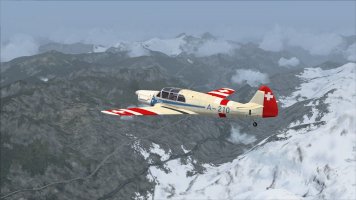
As you can see at the picture, this scenery works in FS2004 without any problems. And it is definitely not bad.

1780258412240.jpeg

However I think I will stick to the Alps mesh by Jonathan de Ferranti and Holger Sandmann, which I already had installed. (Available at SImviation)

Don't get me wrong, the mesh by Alain Ragot is really very nice, but its matter of personal taste. Perhaps Alain's mesh just contains too much detail for me.

Cheers,
Huub
 
somewhat misleading possibly, because per the readme included in the file, one can conclude that this mesh is for FSX exclusively
The file is named "MeshAlpesLOD11 FS9-FSX" , Alain Ragot developed it around 2003 for FS9, and later patched it to match FSX. It works perfectly in both sims FS9 and FSX - this is not mentioned clearly in that website u mentioned. "one" would have been mislead. The original websites are dead anyway.. plus if u would follow the original instructions on the web u mentioned u might cause non wanted mesh overlays/issues in your FS9.
Therefore i configured it as a normal scenery and not as recommended in the original readme "put the bgls in to the main scenery" wondering why u say "somewhat" unclear" :unsure:
cheers :wavey:
 
As you can see at the picture, this scenery works in FS2004 wothout any problems. And it is definitely not bad.

View attachment 189468

However I think I will stick to the Alps mesh by Jonathan de Ferranti and Holger Sandmann, which I already had installed. (Available at SImviation)

Don't get me wrong, the mesh by Alain Ragot is really very nice, but its matter of personal taste. Perhaps Alain's mesh just contains too much detail for me.

Cheers,
Huub

The file is named "MeshAlpesLOD11 FS9-FSX" , Alain Ragot developed it around 2003 for FS9, and later patched it to match FSX. It works perfectly in both sims FS9 and FSX - this is not mentioned clearly in that website u mentioned. "one" would have been mislead. The original websites are dead anyway.. plus if u would follow the original instructions on the web u mentioned u might cause non wanted mesh overlays/issues in your FS9.
Therefore i configured it as a normal scenery and not as recommended in the original readme "put the bgls in to the main scenery" wondering why u say "somewhat" unclear" :unsure:
cheers :wavey:
many thanks gents! this is rather welcome news! Naturally, I stand corrected with respect to my earlier statements!

While I was a tad dismayed at the outset that the FS2004 iterations were no longer available, indeed, I am now gladdened by the above remarks and @huub vink 's screenies concerning the FS2004 compatibility of Alain Ragot's LOD 11 v2 Alpes mesh for FSX; I have yet to test it out, and will so in due course, but again, much thanks for the HU and the attendant clarifications! Highly appreciated! @huub vink , I am also using Ferranti/Sandmann LOD 10 Alpes mesh, but I suppose now, I will also give this a whirl :)

Weirdly, I thought FSX mesh files are incompatible with FS2004, as a result of slight differences in the underlying world projections between FS2004 and FSX/P3D-ESP Platform, and presumably there are also differences between FS2004 and FSX bgl files - accordingly, my [erroneous] remarks above - in any case, perhaps with respect to Ragot's LOD 11 Alpes mesh files, this is not the case, but potentially may also explain the overlay incompatibilities with other mesh sceneries in that region and why they have to be removed.

Anyhow, again, thanks @Jochen for making it available here!

cheers!
 
Last edited:
Hi @ll, in my FS9 scenery addons have different alps mesh too, ready to be activated:
alps valle_aosta_est_vfr by Ferranti
alps valle_aosta_west_vfr by Ferranti
Alps mesh LOD10 CH and Fr by Ferranti & Sandmannn,
Alps mesh LOD10 Austr Italy by Ferranti & Sandmann
ALPES_LOD11_V2 by Ragot
Tested them three all and found the Rago Mesh with entire coverage of whole European alps as my personal favorite. I love to circle through or over the Rocky Mountains of Europe lol
Either with choppers (especially LYNX), Baron 58T, B737 etc - aircraft of different class - for all of them no matter which altitude, the Ragot mesh is providing a seemless entire alps experience. In terms of quality there is no siginificant difference to the Ferranti lod 10 mesh. Anyhow, these 3 guys Ferranti, Sandman and Ragot were even friends to share the same resources for their projects like maps satelite images etc...

The 3 reasons to re-publishing it is to make clear are
1) to show LOD11alps mesh Ragot was developed for FS9 in the first place and later enabled to serve in FSX as well, it works in both
2) configured it a way to en- or disable any time,
3) the websites are dead , one of them provided even a popup sort of virus, which i had to deal with, no thank you.

Here in outerhouse I feel safe und the 3 guys get their deserved credits all the way through:

A toast to the three genius guys :guinness: Alain Ragot, Holger Sandman and Jonatan Ferranti

cheers Jochen
 
Last edited:
Hi @ll, in my FS9 scenery addons have different alps mesh too ready to be activated:
alps valle_aosta_est_vfr by Ferranti
alps valle_aosta_west_vfr by Ferranti
Alps mesh LOD10 CH and Fr by Ferranti & Sandmannn,
Alps mesh LOD10 Austr Italy by Ferranti & Sandmann
ALPES_LOD11_V2 by Ragot
Tested them three all and found the Rago Mesh with entire coverage of whole European alps as my personal favorite. I love to circle through or over the Rocky Mountains of Europe lol
Either with choppers (especially LYNX), Baron 58T, B737 etc - aircraft of different class - for all of them no matter which altitude, the Ragot mesh is providing a seemless entire alps experience. In terms of quality there is no siginificant difference to the Ferranti lod 10 mesh. Anyhow, these 3 guys Ferranti, Sandman and Ragot were even friends to share the same resources for their projects like maps satelite images etc...

The 3 reasons to re-publishing it is to make clear are
1) to show LOD11alps mesh Ragot was developed for FS9 in the first place and later enabled to serve in FSX as well, it works in both
2) configured it a way to en- or disable any time,
3) the websites are dead , one of them provided even a popup sort of virus, which i had to deal with, no thank you.

Here in outerhouse I feel safe und the 3 guys get their deserved credits all the way through:

Aa toast to the three genius guys :guinness: Alain Ragot, Holger Sandman and Jonatan Ferranti

cheers Jochen
Nice to know! Again, much thanks! :ernaehrung004:
 
When it comes to new mesh, what do the different lods mean? Is lod10 higher quality than lod11?

And how should one priortise it in the scenery library of fs. should the new mesh be at the very top or down at the bottom. Cheers
 
When it comes to new mesh, what do the different lods mean? Is lod10 higher quality than lod11?

And how should one priortise it in the scenery library of fs. should the new mesh be at the very top or down at the bottom. Cheers
Highest resolution 19m LOD11 > High resolution 38m LOD10 > Medium resolution 76m LOD9 > Default Resolution, typically 150+m LOD8

Moreover, in FS9 cfg, have to also ensure the appropriate value for TERRAIN_MAX_VERTEX_LEVEL: 21 (19m) > 20 (38m) > 19 (76m) > 18 (150+m)

for more on mesh priority, see here, courtesy of FSAviator/Tom Gibson-Calclassic: https://calclassic.proboards.com/post/3668
 
Moreover, in FS9 cfg, have to also ensure the appropriate value for TERRAIN_MAX_VERTEX_LEVEL: 21 (19m) > 20 (38m) > 19 (76m) > 18 (150+m)
Correct wolfe, this could be "optimal" Terrain tweaks:

"""
[TERRAIN]
TERRAIN_ERROR_FACTOR=100.000000
TERRAIN_MIN_DEM_AREA=10.000000
TERRAIN_MAX_VERTEX_LEVEL=21
TERRAIN_TEXTURE_SIZE_SUPPORTED=1024
TERRAIN_TEXTURE_SIZE_EXP=8
TERRAIN_AUTOGEN_DENSITY=4
TERRAIN_MAX_AUTOGEN_TREES_PER_CELL=1000
TERRAIN_MAX_AUTOGEN_BUILDINGS_PER_CELL=900
TERRAIN_USE_VECTOR_MAP=1
TERRAIN_USE_VECTOR_OBJECTS=1
TERRAIN_MAX_EXTENDED_LEVEL=4
TERRAIN_DEFAULT_RADIUS=9.500000
TERRAIN_EXTENDED_RADIUS=9.500000
TERRAIN_EXTENDED_SOURCE_CHANNELS=256
"""
providing good grafikcard... If u wish to try BACKUP THE PREVIOUS CFG !
cheers Jochen
 
And how should one priortise it in the scenery library of fs. should the new mesh be at the very top or down at the bottom. Cheers
Hello anels, hello @all,
to be honest, I do not know exactly, some simmers say all of them and FS9 would load the higher LOD - myself doubt it.. others say the LOD10 of Sandmann/ferranti is better - yes some details are better formed but less resolution, i dont know why.
However, put them all in yor scenery addon, try and decide one after the other and find out your püersonal favorite.

By feeling i would state to put all meshes below your personal addons..
cheers Jochen
 
If you put the terrain at the bottom of the stack (high on the list) everything else will go on top of it - just like on the real planet Earth. I have mine above the stock scenery areas and above all add-on scenery. I suppose I could put it right at the very bottom (top of the list) but when I set up my sims lo those many years ago I did it this way and I've had no reason to change it.
 
Hello anels, hello @all,
to be honest, I do not know exactly, some simmers say all of them and FS9 would load the higher LOD - myself doubt it.. others say the LOD10 of Sandmann/ferranti is better - yes some details are better formed but less resolution, i dont know why.
However, put them all in yor scenery addon, try and decide one after the other and find out your püersonal favorite.

By feeling i would state to put all meshes below your personal addons..
cheers Jochen

If you put the terrain at the bottom of the stack (high on the list) everything else will go on top of it - just like on the real planet Earth. I have mine above the stock scenery areas and above all add-on scenery. I suppose I could put it right at the very bottom (top of the list) but when I set up my sims lo those many years ago I did it this way and I've had no reason to change it.
With regards to mesh priority in the scenery library for FS2004, the subject is a tad more nuanced, and thus the inherent confusion, per Holger Sandmann's remarks, below - quoted verbatim and sourced from https://www.avsim.com/forums/topic/399575-scenery-library-order/ :

"...there is the issue of priority of terrain mesh files. FS will automatically display the local mesh file with the highest level of detail (LOD), regardless of where its entry is in the scenery library. The only time scenery library priority comes into play is if there are overlapping mesh files of the same LOD. In FS2002 and FSX, the rule for this case is handled logically: the mesh of the same LOD but with higher display priority in the scenery library menu (i.e., above the other mesh entry) will be used. For some strange reason, in FS9 this rule is reversed; it's the mesh file lower down in the menu that will be displayed.

Since FSGenesis, FSGlobal, etc. are considered base mesh files, and other scenery add-ons may include their own mesh file of the same LOD, the suggestion for FS9 users is to place the library entries of FSGenesis etc. at the top of the scenery library menu. That way the local mesh files will be used in their own coverage area. Again, it's the opposite if you're using FS2002 or FSX!

For example, our FS9 Vancouver+ product includes custom 38-m terrain mesh files. The Canadian parts of FSGenesis' 38-m Cordillera files are similar but not identical (different processing). The difference isn't major but you'd notice it at bridge ramps, helipads, etc. If the Vancouver+ scenery library entries were placed above the FSGenesis entries it's the FSGenesis mesh that would be displayed, which is undesirable.

In short, if you have installed add-ons with terrain mesh of the same LOD then you need to consider scenery library position. If you don't then it doesn't matter where your mesh file entries are relative to one another or other entries..."


Per the above, it appears that FSAviator and Holger Sandmann's remarks are generally in agreement. Hope the above helps if not better clarifies any concerns!

cheers!
 
The only time scenery library priority comes into play is if there are overlapping mesh files of the same LOD.
I don't completely agree wth this statement of Holger Sandmann. Often scenery static objects are only shown if they are set in very high priority.

Bernard
 
I don't completely agree wth this statement of Holger Sandmann. Often scenery static objects are only shown if they are set in very high priority.

Bernard
I believe Holger's remarks concern exclusively with the 'FS9-bug' of reverse mesh priorities in the scenery library, and in particular, contrasting the need to reverse-prioritize 'overlapping' mesh DEM of identical LOD vs the little to no need for prioritization of mesh DEM of different LOD, for the same area
In short, if you have installed add-ons with terrain mesh of the same LOD then you need to consider scenery library position. If you don't then it doesn't matter where your mesh file entries are relative to one another or other entries..."
i.e. typically 'scenery-specific' custom local or regional mesh of the same LOD as the global mesh, for an area, may have added detail not found in the global mesh, and notwithstanding this, per Holger's remarks, relevant scenery object positioning, tailored to the details of the custom mesh, would be out-of-place if the global mesh was allowed precedence [, i.e. lower scenery priority] over the custom local / regional mesh, and why Holger and FSAviator, both suggest the global mesh scenery to have a generally higher scenery priority relative to other 'regional/local' mesh sceneries - to ensure said global mesh has the least display precedence within the sim!

Holger's remarks, do not, as I see it, pertain to [overlapping] vectors, landclass, photo or static object sceneries - which ought to be prioritized normally, i.e. wherein, a higher scenery priority takes precedence over a lower scenery priority - and for which, together with the reverse mesh priorities discussed above, FSAviator suggests the complete correct scenery layering best practices https://calclassic.proboards.com/post/3668 :

"... I believe best layering practice in *FS9* is considered to be;
3P = third party = not supplied by MS
1) 3P Global mesh
2) 3P Object Libraries
3) 3P AI Traffic
4) 3P Regional mesh
5) 3P Local mesh
6) 3P scenery (which has its own internal priorities)
7) ALL Photo scenery
8) 3P Local Landclass
9) 3P Regional Landclass
10) Other MS default layers
The above assumes that we now use only freeware or payware mesh better than the default FS9 LOD for a given region. However payware and freeware scenery developers sometimes include a local mesh whose LOD is identical to the MS default Mesh. They do this to control elevation of the mesh around the featured airport(s) to avoid having the airport in a crater or on a plateau. If we still use FS8 scenery in FS9 we may even need to impose mesh whose LOD is lower than FS9 local default LOD. If we have 3P mesh whose LOD is the same or worse than default MS mesh LOD in the same location to force use of that 3P LOD mesh in FS9 we must create;
11) 3P LOD mesh (ONLY if 3P LOD <= local MS default LOD) …"


Per FSAviator's remarks, you are very much correct that static object libraries indeed have to be set to a high scenery priority to be shown correctly! and per explanations above, there is nothing to disagree with, in Holger's remarks!

cheers!
 
Last edited:
One thing I would suggest, and this is why I do my scenery edits manually, is that we all agree to a format based on the numbers in our scenery.cfg files. :cheerful: Let me show you an example:

[Area.071]
Title=Carriers 2006
Local=Addon Scenery\Carriers 2006
Remote=
Active=TRUE
Required=FALSE
Layer=71

[Area.072]
Title=Carrier Ocean Flatten Files
Local=Addon Scenery\Carrier Ocean Flatten Files
Remote=
Active=TRUE
Required=FALSE
Layer=72

[Area.073]
Title=Guam5a
Local=Addon Scenery\Guam5a
Remote=
Active=TRUE
Required=FALSE
Layer=73

Note that my Area and Layer numbers match. :wiggle:
With the scenery layering tools, this usually isn't the case. So, saying to move a layer UP or DOWN can become confusing.
Way back when, the common knowledge for carrier scenery was that the flatten files HAD to load before the MDL and AFCAD BGLs.
Clearly, this isn't the case as FS "sees" it. This is why the layering tools tend to change the LAYER number but not the AREA number.

Anyway, its just a suggestion. :ernaehrung004:
 
With the scenery layering tools, this usually isn't the case. So, saying to move a layer UP or DOWN can become confusing:ernaehrung004:
I am afraid not @Sbob as that is not necessarily the case - take Hans Hartmann's SCM2004 Scenery Manager for example - moving a scenery layer up and down, and the area and layer numbers are automatically synced/matched; in fact when you first load the application, it checks your entire scenery library for any scenery area and layering number anomalies, and corrects any found.

Likewise, FSScenery Config Editor also checks for a number of errors as mentioned here: https://fs-sceditor.sourceforge.net/listview.html https://fs-sceditor.sourceforge.net/texteditor.html and allows for both hand correction and auto-correction: https://fs-sceditor.sourceforge.net/actions.html

cheers!
 
Last edited:
Hello everyone, I've been reading posts for a few days now, but I can't find anything related to what I'm experiencing. First things first: I'm new to posting, so I'm not sure if this is the right way or the right place to post my question, so if I'm wrong, I apologize in advance. The problem is this: after downloading the zip file, I open it on my computer, but I can't find any files in the texture folder. Is this the case, or am I doing something wrong? Thanks for your help.
 
Yes, asking questions in the forum is the way to do it.

Terrain mesh tells FS how to form the ground. It turns stock FS molehills into realistic mountains, that sort of thing. It doesn't have textures.

I've read that FS doesn't like empty texture folders - it gets confused - so delete that empty texture folder.
 
Back
Top