
• Please see the most recent updates in the "Where did the .com name go?" thread. Posts number 16 and 17.

    Post 16 Update

    Post 17 Warning old domain name stealing credentials

  • Special Server Maintenance

    Just when you think you have everything running some what better...

    You get a message from the Hosting company. Short story they need to move us to a new server. I have been working with them to plan a good date for all concerned. Here is what we have come up with as a schedule.

    1. November 4th 17:00 -5UTC shut off the forums and start backup proceedures. During this time there will be no access to the forums or the Resource Section.
    2. November 5th Continue with Backups and download same until complete.
    3. November 6th 7:00 turn over server to hosting company to move system to new server
    4. November 7th - 8th restore backups and upgrade forum software.

    If all goes well we should be back online on November 8th.

    To keep you updated we will post updates on AVSIM forums.

    Thank you for your support.

mapbox_styleset_4_plan-g_v1.0.zip

spokes2112

Charter Member
718514749755243993.png

A new entry has been added to Add-Ons Library, category FSX Utilities

Description: An aviation themed, highly modified Mapbox tileset for use in Plan-G. Some highlights include -


  • Hi vis airports, taxiways & aprons
  • Rail lines
  • Elevation ISOlines & elevations (metric only)
  • Highlighted points of interest for "low & slow" VFR flight

To check it out, rate it or add comments, visit mapbox_styleset_4_plan-g_v1.0.zip
The comments you make there will appear in the posts below.
 
Query on Plan-G Settings

I tried setting this up using the read me but only get a red message "Exception: The Remote Server Returned an Error (400) Bad Request" on a blue tile background.

I'm assuming the two keys go in the fields labelled Mapbox 1 and Mapbox 2 and that Mapbox 2 option should be checked (it's only possibleto check one onf the two..

I'm running Plan G 3.1.2.101

Any help welcomed.


Update... ah: updated to 3.1.3 Beta (which now a least seems to have the right fields). Plan-G auto-update doesn't give you this version yet. However still get the blue tiles with a red message, though now I get error 401 Unauthorized.
 
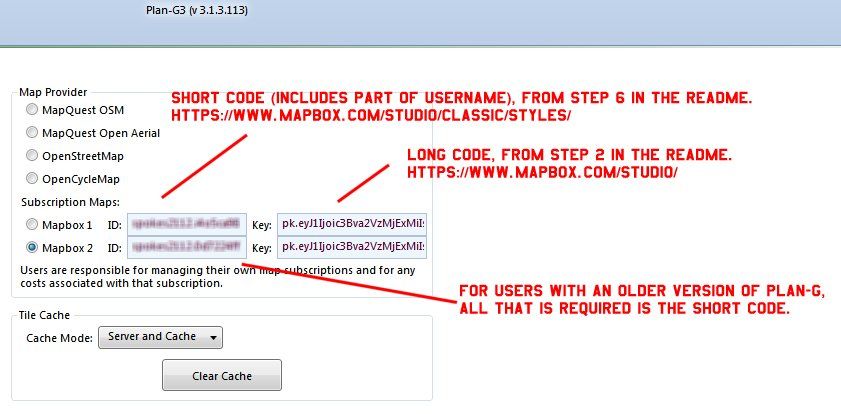
Not sure why it doesn't work for you. I have tested the mapbox custom tileset on both the newest (v3.1.3.113) and a much older version (v3.1.1.91) of Plan-G with no problems whatsoever. While making this tileset over the past month I even changed my "access token" (long code) multiple times and on each new version of the tileset created generated a new map ID (short code). All of which worked in Plan-G.

example_1.jpg


You could also check the "user.config" file located - C:\Users\<me>\AppData\Local\TA_Software\Plan-G3<Magic Number>\<version number>\user.config
to see if the entries match. (Plan-G shut down) The config file is nothing more than XML and can be opened by notepad or other plain text based editor. I did, at one time, have a problem entering the long code into the "Key:" textbox. The code is so long and the textbox is so small that some stray characters were left over.

From version 3.1.1.91 (uses only the short code, step 6, as shown in manual - Refer to 8.9.9, page 29 ) -


<setting name="MapboxKey1" serializeAs="String">
<value>username.XXXXXXXX</value>
</setting>
<setting name="MapboxKey2" serializeAs="String">
<value>username.XXXXXXXX</value>
</setting>


From version 3.1.3.113 (uses both codes, steps 2 & 6) -


<setting name="MapboxKey1" serializeAs="String">
<value>pk.eyJXXXXXXXXXXXXXXXXXXXXXXXiJjaXRsZzQ5bHEwM3p5XXXXXXXXXXXXXXXXX.IM23hBp2u7DXXXXXXXXXX</value>
</setting>
<setting name="MapboxKey2" serializeAs="String">
<value>pk.eyJXXXXXXXXXXXXXXXXXXXXXXXiJjaXRsZzQ5bHEwM3p5XXXXXXXXXXXXXXXXX.IM23hBp2u7DXXXXXXXXXX</value>
</setting>


<setting name="MapboxID1" serializeAs="String">
<value>username.XXXXXXXX</value>
</setting>
<setting name="MapboxID2" serializeAs="String">
<value>username.XXXXXXXX</value>

Hope this helps.
 
Just a heads up. A user e-mailed me saying that at first it didn't work. After waiting an hour he tried again and it worked.
So,, after uploading it may take a while for the new code to propagate through the servers.
 
Just a heads up. A user e-mailed me saying that at first it didn't work. After waiting an hour he tried again and it worked.
So,, after uploading it may take a while for the new code to propagate through the servers.
Yes I found that too. Took about 1 hour.
Good upload, thanks for your contribution.
 
Sorry gents,

I didn't test the tileset on a networked Plan-G. No worries.
My networked laptop runs WinXP & Plan-G v3.1.2.101 (XP) which uses the single Mapbox "short" key.
After many tries it just didn't work. One of those ideas popped up :pop4:.
All I did was log into Mapbox on the networked laptop and voila! It works.
I then logged out of Mapbox on the laptop, restarted Plan-G & went to a different map location avoiding the cache, it still works.
Maybe, no clue, a cookie has to be present.. ???

(Wiping sweat off the brow)

Thanks for the kind words.
 
Back
Top