-
Please see the most recent updates in the "Where did the .com name go?" thread. Posts number 16 and 17.
-
Special Server Maintenance
Just when you think you have everything running some what better...
You get a message from the Hosting company. Short story they need to move us to a new server. I have been working with them to plan a good date for all concerned. Here is what we have come up with as a schedule.
- November 4th 17:00 -5UTC shut off the forums and start backup proceedures. During this time there will be no access to the forums or the Resource Section.
- November 5th Continue with Backups and download same until complete.
- November 6th 7:00 turn over server to hosting company to move system to new server
- November 7th - 8th restore backups and upgrade forum software.
If all goes well we should be back online on November 8th.
To keep you updated we will post updates on AVSIM forums.
Thank you for your support.
You are using an out of date browser. It may not display this or other websites correctly.
You should upgrade or use an alternative browser.
You should upgrade or use an alternative browser.
Maryadi's MV22B Osprey Rel2.0 released
- Thread starter rcbarend
- Start date


gray eagle
SOH-CM-2026
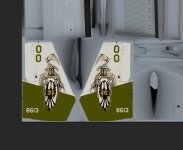
I must apologize , I found some faults in the VMM365 Blue Knights repaint. I got the Marines color wrong and the 00 numbers on the fuselage wrong. The colors are supposed to Blue not Black. Im making the changes now and will up load the new files this week .
Bill
Did this one ever get fixed?
Correct ....Hi Rob,
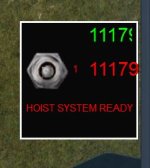
A minor point that I discovered flying over mountains. The Hoist Control window is not quite wide enough to show the full altitude AGL when above 9999 ft.
There is some slight cut-off of the last digit. Could this window be widened a little?

I dimensioned the gauge to display max. 9999 ft RA, but I forgot to blank the field when above.
Allthough flying at 9999+ Ft RADIO ALTITUDE with the hoist doors open, doesn't sound like proper flying you me .... LoL
Rob
Correct ....
I dimensioned the gauge to display max. 9999 ft RA, but I forgot to blank the field when above.
Allthough flying at 9999+ Ft RADIO ALTITUDE with the hoist doors open, doesn't sound like proper flying you me .... LoL
Rob
I had been flying over mountains using Flight Planner, which suggested an altitude of 15,000 ft, and I had a load on board, so I left the hoist doors open in case closing them had an effect on the load. (I am not sure whether closing the doors would immediately shed the load...). But your point about flying in that condition is well taken!
I live in British Columbia, Canada, where there are a lot of mountains, and this is where I like flying best, and I am still practising lifting, carrying and delivering loads. So I decided to try flying the MV-22B across the Coastal Range with a load on board. At the point in the flight that I took the screen-shot, the mountains had been left behind, but I was still at 15,000 ft, so the Radio Altitude had increased to more than 9999 ft.
Would simply increasing the lateral value of 'size_mm=190,190' and 'gauge00=rcb-gauges!HoistControl, 0,0,190,190' in [Window11] from '190' to, say, 195 make the window a little bit wider to make room for the extra digit? (This would be unnecessary if I could close the hoist doors.)
No. The positioning and scaling is done within the gauge itself.Would simply increasing the lateral value of 'size_mm=190,190' and 'gauge00=rcb-gauges!HoistControl, 0,0,190,190' in [Window11] from '190' to, say, 195 make the window a little bit wider to make room for the extra digit? (This would be unnecessary if I could close the hoist doors.)
But if you like (and learn a bit about XML), you can change it yourself ....
- Open the file Hoistcontrol.xml in folder \panel\rcb-gauges\, with Windows Notepad
- Find the two strings
FontSize="30"
and replace 30 with 24 or so.
- And save the file.
This reduces the fontsize of characters in both RA displays, so they will properly display 5 digits.
Cheers, Rob
No. The positioning and scaling is done within the gauge itself.
But if you like (and learn a bit about XML), you can change it yourself ....
- Open the file Hoistcontrol.xml in folder \panel\rcb-gauges\, with Windows Notepad
- Find the two strings
FontSize="30"
and replace 30 with 24 or so.
- And save the file.
This reduces the fontsize of characters in both RA displays, so they will properly display 5 digits.
Cheers, Rob
Thanks, Rob.
I'm pretty sure I can cope with XML. I've done it a few times before...
OK, I've done that. I'll see how it works and tell you.
I have another question, while I'm talking to you: I know it is not possible to save a 'Scenario' while a load is hanging - it drops the load. But if the load is loaded internally, can you save it and return to it later?

PhantomTweak
Members +
I have another question, while I'm talking to you: I know it is not possible to save a 'Scenario' while a load is hanging - it drops the load. But if the load is loaded internally, can you save it and return to it later?
No, because it was "created" by AICarriers. It therefor won't exist in a saved plane. You'd have the re-create it as the saved flight loaded in, and place it manually into the plane. I believe, though, that I seem to recall something about saving flights, then editing them to add in sling loads. But I've never worked with them that way. I've always used AIC to create the loads. You might want to look around the forum a bit for sling loads and saved flights.
Hope this helps a little.
Pat☺
No, because it was "created" by AICarriers. It therefor won't exist in a saved plane. You'd have the re-create it as the saved flight loaded in, and place it manually into the plane. I believe, though, that I seem to recall something about saving flights, then editing them to add in sling loads. But I've never worked with them that way. I've always used AIC to create the loads. You might want to look around the forum a bit for sling loads and saved flights.
Hope this helps a little.
Pat☺
Pat,
Well. I've just used Pete Dowson's Autosave and reverted to a previous bit of my present Flight and successfully unloaded the load i had picked up at the beginning of the flight...
How does that grab you?


MrZippy
SOH-CM-2026
No rotor animation for me, can someone help?Everything else works, great aircraft, thanks Maryadi.
FSX, FSX-SE, or P3D? Need to get that straight first! You are able to fly, but not rotor animation?
MrZippy
SOH-CM-2026
FSX Acceleration, Boxed edition
Able to fly no problem, just no prop-rotor spinning animation, only blade pitch
Are you using the proper panel for your Sim? 32bit vs 64bit? Can you move your nacelles up and down? Advanced Animations checked in your settings?
there 4 screen on virtual cockpit is it on? make sure battery is ON,
if screen are displayed, please check in Flight Manual prior installation (redistributable and installation)
if it OK:
make sure engine lever (on overhead) at fly position, prior to make blade turn/ start engine.
if screen are displayed, please check in Flight Manual prior installation (redistributable and installation)
if it OK:
make sure engine lever (on overhead) at fly position, prior to make blade turn/ start engine.