
-
Please see the most recent updates in the "Where did the .com name go?" thread. Posts number 16 and 17.
-
Special Server Maintenance
Just when you think you have everything running some what better...
You get a message from the Hosting company. Short story they need to move us to a new server. I have been working with them to plan a good date for all concerned. Here is what we have come up with as a schedule.
- November 4th 17:00 -5UTC shut off the forums and start backup proceedures. During this time there will be no access to the forums or the Resource Section.
- November 5th Continue with Backups and download same until complete.
- November 6th 7:00 turn over server to hosting company to move system to new server
- November 7th - 8th restore backups and upgrade forum software.
If all goes well we should be back online on November 8th.
To keep you updated we will post updates on AVSIM forums.
Thank you for your support.
You are using an out of date browser. It may not display this or other websites correctly.
You should upgrade or use an alternative browser.
You should upgrade or use an alternative browser.
Maybe someone here can help me.
- Thread starter AussieMan
- Start date


How do you mean Activate? If you're talking about on the world map, they're hidden by default. Click the More button at the bottom, then pull up the map filters. Navaids are down at the bottom of the list.
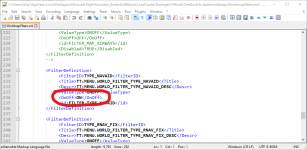
When the sim first came out, it would save your filter preferences in the map. It doesn't do that now. But you can change the defaults if you're comfortable with some minor edits in xml. Look in the Official folder and find the fs-base\worldmap folder. There's a file there called WorldmapFilters.xml that holds the defaults. I always have to edit this after every update, but only once. I turn off the POI's, Fauna, and Cities, then turn on the navaids. The entries are mostly in order as they appear in-sim, so scroll down a bit. Here's a screenshot of where to edit:
Attachments

hubbabubba
Charter Member
It will certainly help me! Thanks for the tip.
Just did it; Yeah!
Thanks for the tip.Just did it; Yeah!
Just remember that sim and world updates will usually reset that file to default.

tiger1962
SOH-CM-2026
Just remember that sim and world updates will usually reset that file to default.
They certainly do, and in my case they seem to do it by downloading an addition 20Gb of system files every time to replace this one!
To avoid this, I've created a Community folder mod for it which is working perfectly on my system, once I've written the instructions for editing the WorldmapFilters.xml I'll upload it to the library here.
Thanks for sharing this idea in the first place Tom, I'll mention you in the credits.
EDIT: It's in the library now under FS2020 - Other.
Last edited:
You should throw it up to the .to site too. There are a lot of users on the main forum that wish the WM filter had the same persistence it had when the sim was first released.
tiger1962
SOH-CM-2026
Thanks Tom, I've only just uploaded it due to the website problems at flightsim.to yesterday - I think they were hacked, at one point a very rude picture appeared in place of an a330 repaint.
One other thought on the sim updates replacing files: it seems to happen to me even when I change the file back to the default settings, so maybe the updater checks the "last modified date" of each file and replaces anything more recent than the last update?
One other thought on the sim updates replacing files: it seems to happen to me even when I change the file back to the default settings, so maybe the updater checks the "last modified date" of each file and replaces anything more recent than the last update?

FlameOut
SOH-CM-2026
....
I remember a guy made a repaint of an aircraft "P@&n Hub" ... I reported him to the sites admin.
.... anyways we are getting off topic .... we are here to help one another.
....very rude picture appeared
I remember a guy made a repaint of an aircraft "P@&n Hub" ... I reported him to the sites admin.
.... anyways we are getting off topic .... we are here to help one another.

There have been several threads closed and merged on the official board about giving users a "persistent" filter for the world map. As I said before, it was persistent on the initial release, then it was broken one or two updates into the run. It has been a Wishlist item for several months.

YoYo
SOH-CM-2023
There have been several threads closed and merged on the official board about giving users a "persistent" filter for the world map. As I said before, it was persistent on the initial release, then it was broken one or two updates into the run. It has been a Wishlist item for several months.
Probably, the next update will do something with this, will see but from now it works for me again! Thx!
