Hi you all, I remember 20 years ago having read that flying cfs1 missions in cfs2 was possible, in fact the single mission menu offers that possibility. I remember as well having read that fs2000 was able to be merged with this software (cfs2) so you can fly where ever you want with a stunning vought corsair. Now, im here trying to master 400 pages of forum with no luck. Please, can you help me? Thanks a lot.

-
Please see the most recent updates in the "Where did the .com name go?" thread. Posts number 16 and 17.
-
IMPORTANT DOWNLOADING INFORMATION - ALL MEMBERS PLEASE READ
Please see this thread for updates. Update Thread
SOH ADMINISTRATION
You are using an out of date browser. It may not display this or other websites correctly.
You should upgrade or use an alternative browser.
You should upgrade or use an alternative browser.
merge cfs1, fs2000 and cfs2
- Thread starter D'Ace
- Start date

You can flying CFS1 missions in CFS2 but they don't work well. CFS1 and FS2000 scenery can be loaded into CFS2. Not sure if someone has current-ish guide around I mess around with CFS1 scenery and it didn't look to well IMO.
Here is an old guide on getting CFS1 scenery in CFS2 I found after a quick google.
https://www.flightsim.com/vbfs/content.php?2008-How-To-Add-CFS-Scenery-to-CFS2
Here is an old guide on getting CFS1 scenery in CFS2 I found after a quick google.
https://www.flightsim.com/vbfs/content.php?2008-How-To-Add-CFS-Scenery-to-CFS2

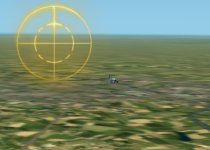
FS2000 scenery is totally and nicely visible in CFS2, HOWEVER...It floats above the cfs2 land about 30 feet in the air. I added North American scenery to CFS2 and ended up with several plateaus with cities and airports sticking up above the surrounding farm fields. You would think you are flying around the naturally occurring plateaus in NM, CO, AZ, UT. (The Four Corners).
Individual scenery objects, such as buildings in Europe float above the ground with no plateau supporting it. I can literally fly under them.
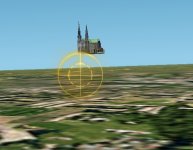
As an example, I placed FS2000 Chartres_Cathedral in my CFS2 Battle of France scenery and it floats above the terrain as described.
Give me a few minutes and I will fire it up and take a screen shot of it and post....
I have attempted to correct that, but it is a difficult task which requires one to go into the individual BGLs and correct the altitude to the CFS2 matching location.
It is not a one size fits all fix.
"Daunting" would be my description.
That said, ALL of my CFS2 installs use Richard's and SDC's mesh/landclass/excludes, so I have not tried FS2000 scenery in a default CFS2 install.
In fact, I don't have a default CFS2 install......
Individual scenery objects, such as buildings in Europe float above the ground with no plateau supporting it. I can literally fly under them.
As an example, I placed FS2000 Chartres_Cathedral in my CFS2 Battle of France scenery and it floats above the terrain as described.
Give me a few minutes and I will fire it up and take a screen shot of it and post....
I have attempted to correct that, but it is a difficult task which requires one to go into the individual BGLs and correct the altitude to the CFS2 matching location.
It is not a one size fits all fix.
"Daunting" would be my description.
That said, ALL of my CFS2 installs use Richard's and SDC's mesh/landclass/excludes, so I have not tried FS2000 scenery in a default CFS2 install.
In fact, I don't have a default CFS2 install......
Thanks a lot for your answers. In a review, from a spanish gaming site, i read that the Flight Model isn't accurate. After 20 years flying i'm still i love with this sim and how it flies, but I'd like to try changing some FM just to add some realism, mainly concerning to the torque effect, a bit to "soft" by default in he sim in my opinion. Do you know where to find them? Again, thanks.

bearcat241
SOH-CM-2023
Using your text editor, you can edit the flight tuning in the aircraft.cfg with a few tweaks. The text below is taken from my fav Corsair *cfg. Add/modify the lines in red to see if you get anything noticeable. The Corsair was historically notorious for monstrous torque on roll and required a lot of rudder trim and input on powered rollouts, so modding the rudder effectiveness will be required if you increase the torque_on_roll.
[flight_tuning]
cruise_lift_scalar = 0.500
parasite_drag_scalar = 1.180
induced_drag_scalar = 0.3400
elevator_effectiveness = 3.4880
aileron_effectiveness = 3.4885
rudder_effectiveness = 15.250
pitch_stability = 1.601
roll_stability = 1.500
yaw_stability = 1.520
elevator_trim_effectiveness = 1.016
aileron_trim_effectiveness = 1.016
rudder_trim_effectiveness = 1.016
p_factor_on_yaw = 0.2
torque_on_roll = 2.0
gyro_precession_on_yaw = 0.3
gyro_precession_on_pitch = 0.3
[flight_tuning]
cruise_lift_scalar = 0.500
parasite_drag_scalar = 1.180
induced_drag_scalar = 0.3400
elevator_effectiveness = 3.4880
aileron_effectiveness = 3.4885
rudder_effectiveness = 15.250
pitch_stability = 1.601
roll_stability = 1.500
yaw_stability = 1.520
elevator_trim_effectiveness = 1.016
aileron_trim_effectiveness = 1.016
rudder_trim_effectiveness = 1.016
p_factor_on_yaw = 0.2
torque_on_roll = 2.0
gyro_precession_on_yaw = 0.3
gyro_precession_on_pitch = 0.3
kdriver,
NICE!!
Lee
NICE!!
Lee