
-
Please see the most recent updates in the "Where did the .com name go?" thread. Posts number 16 and 17.
-
IMPORTANT DOWNLOADING INFORMATION - ALL MEMBERS PLEASE READ
Please see this thread for updates. Update Thread
SOH ADMINISTRATION
You are using an out of date browser. It may not display this or other websites correctly.
You should upgrade or use an alternative browser.
You should upgrade or use an alternative browser.
Moving a Gauge in VC
- Thread starter e.a.wicklund
- Start date


Yep, concur with that. Most of the CFS2 models are older though, so you have a good chance of it working on your Mustang.

You maybe able to open the VC with cfg edit (a panel gauge editor) http://www.sim-outhouse.com/sohforums/local_links.php?catid=49&linkid=6212
Hi Allen,
Cfg.edit will open the VC gauge coordinates but it won't let you change the VC model itself.
Cfg.edit will open the VC gauge coordinates but it won't let you change the VC model itself.

bearcat241
SOH-CM-2023
EAW, I see that you're working with the AW P-51D.
This should do it: gauge05=P51d!Turn_Indicator, 349,6,112,113
Be advised that you must take care to use the gaugeXX number currently listed in your cfg. Mine happens to be gauge05, but yours may be different.
If you were doing this in a gauge editor program like FS Panel Studio or CFGedit, you could simply do as below...

This should do it: gauge05=P51d!Turn_Indicator, 349,6,112,113
Be advised that you must take care to use the gaugeXX number currently listed in your cfg. Mine happens to be gauge05, but yours may be different.
If you were doing this in a gauge editor program like FS Panel Studio or CFGedit, you could simply do as below...
e.a.wicklund
Members +
Honestly, you guys just rock.
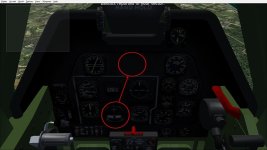
I hoped Bearcat's solution would work, but unfortunately no. I hoped it would. Still, CFGedit got the job done. Not exactly right. Seems I copied the gauge. I can figure that out later.
For now, Turn and Slip is right where I can see it easily. This Mustang .air file likes to be treated like a lady. You can't just yank & bank without keeping the ball in the center. She'll punish you for such indiscretions. So with this new gauge position I just got a bunch of kills with ease.
Thanks for the help, everyone.

I hoped Bearcat's solution would work, but unfortunately no. I hoped it would. Still, CFGedit got the job done. Not exactly right. Seems I copied the gauge. I can figure that out later.
For now, Turn and Slip is right where I can see it easily. This Mustang .air file likes to be treated like a lady. You can't just yank & bank without keeping the ball in the center. She'll punish you for such indiscretions. So with this new gauge position I just got a bunch of kills with ease.
Thanks for the help, everyone.
Attachments
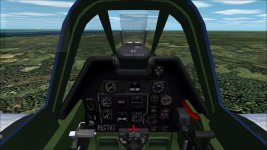
EAW, I see that you're working with the AW P-51D.
This should do it: gauge05=P51d!Turn_Indicator, 349,6,112,113
Be advised that you must take care to use the gaugeXX number currently listed in your cfg. Mine happens to be gauge05, but yours may be different.
If you were doing this in a gauge editor program like FS Panel Studio or CFGedit, you could simply do as below...
This aircraft will be updated soon. I am planning to finish the AW Ki-84 first.
The best tool to move the gauges is CFGEDIT (based on Allen's suggestion).
bearcat241
SOH-CM-2023
...I hoped Bearcat's solution would work, but unfortunately no.
Sorry, wrong model. I thought this was AC's model but its not, making my tip useless since VC paneling is very exclusive.
Hi Allen,
Cfg.edit will open the VC gauge coordinates but it won't let you change the VC model itself.
True but depending on how the VC was laid out the whole front may be usable as it could be square or rectangle that is big as the whole panel or even larger.