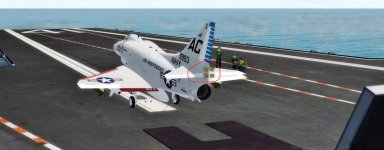
Need help, eliminating this lighting effect

Navy Chief

Senior Member
Recently I noticed this happening with external lights. Can anyone tell me what graphics setting might cause this? I am using a Power Color AMD RX480 card. Thanks, NC

attachment.php
 

Attachments

  • 2018-1-17_18-59-57-345 (2).jpg
    2018-1-17_18-59-57-345 (2).jpg
    46.7 KB · Views: 0
Hi NC,

doesn't seem to be a graphics setting issue but a not compatible texture. What aircraft are you using (FSX/native P3D/native)? Texture issues occur when not v4 compatible aircraft are used in this sim.
This seems to be a wrong added afterburner effect. So please give us some more informations about the used Skyhawk :wavey:
 
Hi Manschy,

Well, I suspect you are correct, in that the aircraft in the screenshot is the Virtavia Skyhawk. Have the same issue with the Razbam A-7. So am wondering if there is a fix? Thanks, NC

Hi NC,

doesn't seem to be a graphics setting issue but a not compatible texture. What aircraft are you using (FSX/native P3D/native)? Texture issues occur when not v4 compatible aircraft are used in this sim.
This seems to be a wrong added afterburner effect. So please give us some more informations about the used Skyhawk :wavey:
 
To me, it looks like one of your light textures (like, these fx_1.bmp or fx_2.bmp etc...) got overwritten by an incompatible file.
It's like your light works, but doesn't display the correct texture.

Also, the plane would look better on the deck if you would activate the shadows properly ;)
I think you simply need to enable the "receive" option for the simobjects category, in the lighting options of P3D :)
 
I will try that and report back later. Thanks! NC

To me, it looks like one of your light textures (like, these fx_1.bmp or fx_2.bmp etc...) got overwritten by an incompatible file.
It's like your light works, but doesn't display the correct texture.

Also, the plane would look better on the deck if you would activate the shadows properly ;)
I think you simply need to enable the "receive" option for the simobjects category, in the lighting options of P3D :)
 
Back
Top