
-
Please see the most recent updates in the "Where did the .com name go?" thread. Posts number 16 and 17.
-
IMPORTANT DOWNLOADING INFORMATION - ALL MEMBERS PLEASE READ
Please see this thread for updates. Update Thread
SOH ADMINISTRATION
You are using an out of date browser. It may not display this or other websites correctly.
You should upgrade or use an alternative browser.
You should upgrade or use an alternative browser.
New aircraft model series from Captmercy/Dvslats released!
- Thread starter captmercy
- Start date

captmercy
Members +
DHC_4_Captmercy.zip

A new entry has been added to Add-Ons Library, category CFS 2 Aircraft - American
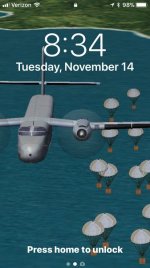
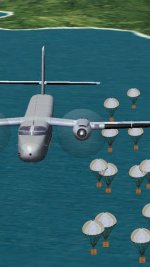
Description: Mike Stone’s simple but fun Caribou converted to CFS2 by me with DvSlats flying pigs or cargo effect.
To check it out, rate it or add comments, visit DHC_4_Captmercy.zip
The comments you make there will appear in the posts below.
A new entry has been added to Add-Ons Library, category CFS 2 Aircraft - American
Description: Mike Stone’s simple but fun Caribou converted to CFS2 by me with DvSlats flying pigs or cargo effect.
To check it out, rate it or add comments, visit DHC_4_Captmercy.zip
The comments you make there will appear in the posts below.

captmercy
Members +
captmercy
Members +
T-29 Captmercy Dvslats.zip

A new entry has been added to Add-Ons Library, category CFS 2 Aircraft - American
Description: VIRTUAL BIRDS FACTORY T-29.
Converted to CFS2 by Dvslats with VC and Pop Ups by Captmercy.
To check it out, rate it or add comments, visit T-29 Captmercy Dvslats.zip
The comments you make there will appear in the posts below.
A new entry has been added to Add-Ons Library, category CFS 2 Aircraft - American
Description: VIRTUAL BIRDS FACTORY T-29.
Converted to CFS2 by Dvslats with VC and Pop Ups by Captmercy.
To check it out, rate it or add comments, visit T-29 Captmercy Dvslats.zip
The comments you make there will appear in the posts below.


MaskRider
Tiller of Soil
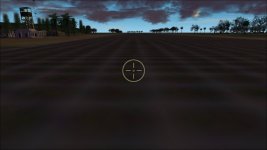
In hopes of not making myself appear to be a choosy beggar, I post this last shot. It is out the front window while sitting on the ground. I was wondering if there is anyway to move the cross hairs up to the horizon line?

It isn't a game killer in anyway. Its just a bit disorienting, particularly when landing. Thanks again, guys! Well done.
MR
It isn't a game killer in anyway. Its just a bit disorienting, particularly when landing. Thanks again, guys! Well done.
MR
Attachments
captmercy
Members +
Gun Site
Tnx for the feedback M-R
Dvslats has an actuall fix to move the gunsite around I’m sure he’ll check in in a bit with that. I also included a noguns.zip in the package that will remove the gunsite all together but then it won’t be avialable for other combat type planes
PD
Tnx for the feedback M-R
Dvslats has an actuall fix to move the gunsite around I’m sure he’ll check in in a bit with that. I also included a noguns.zip in the package that will remove the gunsite all together but then it won’t be avialable for other combat type planes
PD
MaskRider
Tiller of Soil
Thanks PD,
I guess what I was really trying to say is that the horizon needs to be brought down. The cross hairs are fine- 5 by 5 right where they are supposed to be.
When I said it is disorienting its because one gets the impression of trying to land the plane with it standing on its nose- like it is getting ready to flip.
For comparison sake, the right side of the image below is taken out the front window of the stock B-24.
Hope I'm sounding ungrateful.
Cheers,
Chris

I guess what I was really trying to say is that the horizon needs to be brought down. The cross hairs are fine- 5 by 5 right where they are supposed to be.
When I said it is disorienting its because one gets the impression of trying to land the plane with it standing on its nose- like it is getting ready to flip.
For comparison sake, the right side of the image below is taken out the front window of the stock B-24.
Hope I'm sounding ungrateful.
Cheers,
Chris
Last edited:
MaskRider
Tiller of Soil
Okay,
Thanks PD. That suggestion put me on the right track. Here is what that "Panel view info" deal looked like:

Didn't look much like what was in the actual CV-240 panel.cfg file.
On the left side, the following image shows what those entries in the CV-240 panel.cfg file actually look like. The value in question is hi-lighted in yellow. On the right the image shows the value I eventually settled on. The last image show the final result in the sim.
I took it for a spin and everything is jake. No more feeling that it wants to land standing on its nose. It feels and looks normal.


Cheers,
Chris
Thanks PD. That suggestion put me on the right track. Here is what that "Panel view info" deal looked like:
Didn't look much like what was in the actual CV-240 panel.cfg file.
On the left side, the following image shows what those entries in the CV-240 panel.cfg file actually look like. The value in question is hi-lighted in yellow. On the right the image shows the value I eventually settled on. The last image show the final result in the sim.
I took it for a spin and everything is jake. No more feeling that it wants to land standing on its nose. It feels and looks normal.
Cheers,
Chris


captmercy
Members +
Got it
Understood right away as I’m am a HUGE Maskrider fan from way back. I just started adding the 2D panels to our models just recently I perfer to use only the VC myself it looks to me as you only use the 2D view without the 2D panel for landing which seems like a good idea would you miss not having the 2D instrument Panel? it seems just to mess the view up to me?
PD
Understood right away as I’m am a HUGE Maskrider fan from way back. I just started adding the 2D panels to our models just recently I perfer to use only the VC myself it looks to me as you only use the 2D view without the 2D panel for landing which seems like a good idea would you miss not having the 2D instrument Panel? it seems just to mess the view up to me?
PD
MaskRider
Tiller of Soil
To tell you the truth one of the first things I do every time I download a new AC is to open up the panel in Panel Studio and add new window which I call aircraft-name_NavAP-window.
It;s based upon Alain Capt's ACS/GPS utility.
I usually leave the main 2D window in place and dump all the rest of the non-VC windows. Then I add this window.
Here is what it looks like. I just find this configuration much more versatile and easy to work with/modify than those standard pre-loaded GPS modules.
But yes, whenever I start the game I always maximize the 2D cockpit window and then call up this window and lay in a flight path.
I am much more of a sight-seer than a mission or campaign simmer.
That is one of the reason I enjoy a nice VC to a 2D window any day.
I have no issues with your leaving out the 2D window. However, if what one wants is an open vista to look at minus cock-pit clutter, maximizing the regular 2D windows is only a simple click away.
Cheers,
Chris


It;s based upon Alain Capt's ACS/GPS utility.
I usually leave the main 2D window in place and dump all the rest of the non-VC windows. Then I add this window.
Here is what it looks like. I just find this configuration much more versatile and easy to work with/modify than those standard pre-loaded GPS modules.
But yes, whenever I start the game I always maximize the 2D cockpit window and then call up this window and lay in a flight path.
I am much more of a sight-seer than a mission or campaign simmer.
That is one of the reason I enjoy a nice VC to a 2D window any day.
I have no issues with your leaving out the 2D window. However, if what one wants is an open vista to look at minus cock-pit clutter, maximizing the regular 2D windows is only a simple click away.
Cheers,
Chris