New NVidia drivers with GPU Hardware Scheduler.

YoYo

SOH-CM-2023
NVIDIA 451.48 - GPU Hardware Scheduler.
https://www.theverge.com/2020/6/24/...scheduling-driver-support-directx-12-ultimate

“This new feature can potentially improve performance and reduce latency by allowing the video card to directly manage its own memory,” says Nvidia.
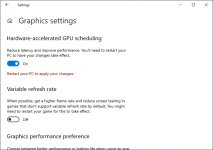
If you install this latest update, you’ll get a new option in Windows 10’s graphics settings, allowing you to enable the hardware-accelerated GPU scheduling. A reboot is required to enable it fully.

Open Settings (in Windows 10).
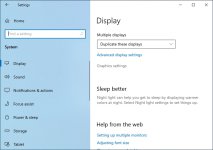
Navigate to System > Display.
Scroll to and click on the ‘Graphics settings’ link.
Enable the hardware-accelerated GPU scheduling option.
Restart your system.

Looks interesting for owners of W10 v.2004. I'll install it Today.
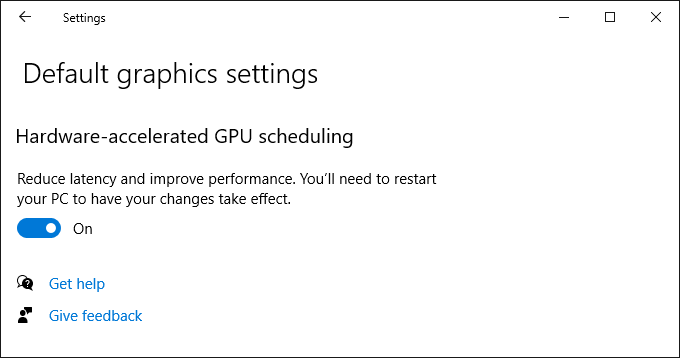
 
windows-10-hardware-scheduling-setting.png


Perhaps its a good option for VRAM.
 
Lost all sound after this update

Hi all
Thought I would post here and see if anyone else has experienced this problem. After updating the this latest driver I have lost all sound. Everything appears normal and I have changed nothing. Unfortunately I know more about airplanes than computers so I'm hesitant to post over at the Nvidia forum.
I uses a reasonably fast Alienware computer with Oculus Rift S and a GTX-1080.
Any suggestions much appreciated.
 
Hi all
Thought I would post here and see if anyone else has experienced this problem. After updating the this latest driver I have lost all sound. Everything appears normal and I have changed nothing. Unfortunately I know more about airplanes than computers so I'm hesitant to post over at the Nvidia forum.
I uses a reasonably fast Alienware computer with Oculus Rift S and a GTX-1080.
Any suggestions much appreciated.

Did You install HD drivers? Check also settings of sound and use Default option for speakers, like here:

 
I use exclusively headset and none of my settings has changed - nothing is muted. I installed Nvdia update 451.48 and everything in my sim was normal and did not change until the update.
I'm considering uninstalling this driver but would like to try and have it working.
Thanks
Warren
 
Hi Aspen
Got the same graphics 1080, installed new nvidia drivers and all is ok. Perhaps you did a direct install with nvidia sound drivers (HD audio) and if that´s the case they override the ones you´re using. Got same problem some time ago and had to restore drivers for my on board (motherboard) sound. Best of luck
 
No Sound Blaster. I believe it is a Realtek audio card. I did do a direct install and suspect that something may have been overwritten.
I'll play some more as soon as possible. The simulator part P3D V4.5 is working very well - it's these other things that come along that plague me.
Thanks for the advice so far.
Warren
 
Would be interesting to see if this new hardware-accelerated GPU scheduling has any effect on performance.
 
I'm not sure which element gets the credit, but the combination of the new driver under Win 10 20H1, the new mode set on, and HF2 has done wonders for my VR performance in P3D V5.
 
No Sound Blaster. I believe it is a Realtek audio card. I did do a direct install and suspect that something may have been overwritten.
I'll play some more as soon as possible. The simulator part P3D V4.5 is working very well - it's these other things that come along that plague me.
Thanks for the advice so far.
Warren

Realtek audio drivers here on board ASUS mother board. Check that speaker icon lower right corner and see what you got either (Realtek(R)Audio)or hd audio You may try to reinstall nvidia drivers personalize and uncheck HD audio drivers. This will remove nvidia audio drivers
Regards
 
Thanks to all
I uninstalled the audio component of the Nvidia update and reinstalled the latest Realtek audio driver and I'm back in the sound business - at least for the next few minutes.
Warren
 
Ian,

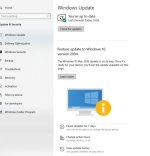
Do you have the latest W 10 update to 2004, as that is the only way to get the option.

I have tried to update mine as i am on version 1909, but not ready for my device yet?

attachment.php
 

Attachments

  • W10.jpg
    W10.jpg
    34.2 KB · Views: 6
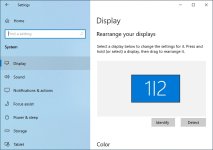
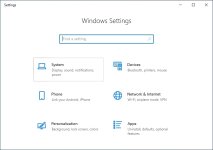
Where do you find this option, I've installed the new driver, looked on the Nvidia graphics options and also in W10 settings but I can't find it anywhere!

Thanks,
Ian

Same boat,,,updated to latest driver and latest Windows but cannot find this option anywhere?
 
attachment.php
attachment.php
attachment.php
attachment.php
 

Attachments

  • Display.jpg
    Display.jpg
    64.2 KB · Views: 3
  • WindowsSettings.jpg
    WindowsSettings.jpg
    45.2 KB · Views: 3
  • GraphicsSettings.jpg
    GraphicsSettings.jpg
    68.2 KB · Views: 3
  • GPUSheduling.jpg
    GPUSheduling.jpg
    67.3 KB · Views: 3
Thanks everyone, I've just checked updates and it's given me the option of downloading 2004:biggrin-new:


Regards,
Ian
 
So is that it, you need update 2004 for this to work? If so how do you get it when windows does not want you to have it yet?
 
Back
Top