
-
Please see the most recent updates in the "Where did the .com name go?" thread. Posts number 16 and 17.
-
Special Server Maintenance
Just when you think you have everything running some what better...
You get a message from the Hosting company. Short story they need to move us to a new server. I have been working with them to plan a good date for all concerned. Here is what we have come up with as a schedule.
- November 4th 17:00 -5UTC shut off the forums and start backup proceedures. During this time there will be no access to the forums or the Resource Section.
- November 5th Continue with Backups and download same until complete.
- November 6th 7:00 turn over server to hosting company to move system to new server
- November 7th - 8th restore backups and upgrade forum software.
If all goes well we should be back online on November 8th.
To keep you updated we will post updates on AVSIM forums.
Thank you for your support.
You are using an out of date browser. It may not display this or other websites correctly.
You should upgrade or use an alternative browser.
You should upgrade or use an alternative browser.
New SS HDD Question
- Thread starter falcon409
- Start date

There is a registry utility for FSX. I think that wil do the trick.
Cees
Cees

falcon409
SOH-CM-2026
Ah yes, I think Flight1 has it. Forgot about that. Thanks CeesThere is a registry utility for FSX. I think that wil do the trick. Cees

CurlSnout
Charter Member
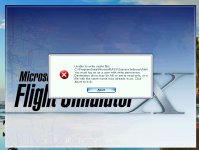
I have moved (not reinstalled) my FSX from one hard drive to another multiple times. I see this message pop up from time to time, usually after I have added or removed scenery objects. For me, the fix is simple - I just run FSX 'as administrator' the first time after making such a scenery change. After the first time it's not necessary to run 'as administrator' and I forget about it - until the next time I make a change.
Worth a try?
Worth a try?
falcon409
SOH-CM-2026
Yep, it didn't recognize me as the Admin. Runs fine now!I have moved (not reinstalled) my FSX from one hard drive to another multiple times. I see this message pop up from time to time, usually after I have added or removed scenery objects. For me, the fix is simple - I just run FSX 'as administrator' the first time after making such a scenery change. After the first time it's not necessary to run 'as administrator' and I forget about it - until the next time I make a change.
Worth a try?


falcon409
SOH-CM-2026
Boy Huub that's the truth. . .I'm thinking positive thoughts for now, lolGood luck Ed! So far so good, but the ways of Microsoft are mysterious, I have done complex jobs in the past which worked without any issue and tried to do simple things which required a complete re-install in the end....
Cheers,
Huub

blanston12
SOH-CM-2025
Are you adding an additional drive and then once everything is copied going to remove the old? If so once the old drive is out you can change the drive letter once the copy is done. Here is something I found that might help.
https://learn.microsoft.com/en-us/windows-server/storage/disk-management/change-a-drive-letter
https://learn.microsoft.com/en-us/windows-server/storage/disk-management/change-a-drive-letter
falcon409
SOH-CM-2026
Currently I have 2 SATA standard HDD's and 1 SATA SS drive to replace the "D" drive that finally went belly up yesterday. Luckily it didn't contain anything that was of any great importance. So the SS drive is now the new "D" drive and I've moved my FSX contents along with the SDK to that drive.Are you adding an additional drive and then once everything is copied going to remove the old? If so once the old drive is out you can change the drive letter once the copy is done.
The remainder of what's on the current "E" drive (FSX and the SDK were on there) will be moved over to one of the new SS drives and then finally the "C" (has the OS) drive will go on the other. All three of the SS drives are 1Tb drives.
Thanks for the link, sometimes the drives will automatically come out correct, but as Huub stated, this is Microsoft after all, lol
falcon409
SOH-CM-2026
Ok, I'm a little confused. I did a clone of the "C" drive with one of the new SS drives as the recipient. Took 5 hrs to complete but it appears that it was successful. However I now also have an extra "Drive" showing with about 80meg free of 514meg. . . .only thing is it's not a physical drive and there's actually nothing in it. Is that something left over from the cloning function? I want to delete it but I'm hesitant to do that until I'm sure.
UPDATE: All good. I shut the puter down, removed the last of the old HHD's and started her up again. Boot up went fine and once back in, the drives were as they should be and that "ghost drive" was gone. Only other thing I needed to do was change one drive letter. Back in business running 3-1Tb SS drives.
UPDATE: All good. I shut the puter down, removed the last of the old HHD's and started her up again. Boot up went fine and once back in, the drives were as they should be and that "ghost drive" was gone. Only other thing I needed to do was change one drive letter. Back in business running 3-1Tb SS drives.
Last edited: