Newbie

collensr

SOH-CM-2025
Hi All

I am about to embark on converting a friend of mine from 2020 to 2024. I'm still 2020 exclusively myself so I am unashamedly using this as practice for my own "big day". Plan is to wait for SU 5 to drop then do the deed.

For background we will be completely uninstalling 2020 from his system and will purchase 2024 through the MS Store.
He has a very decent internet connection (100mbps).

I'd be extremely grateful for any tips on how to best to do this i.e.

1) best way to ensure there are no remnants of 2020 on his system
2) how to ensure 2024 goes on his SSD drive
3) best way to deal with the 2024 UI (which i understand is better but still hard to navigate)
4) Any other pitfalls/things to avoid / best practices

Many thanks in advance
 
I'll be watching the input you get on this thread with great interest. Thinking about a "summer" test (and, perhaps, transition), but still enjoying 2020!
 
Same, months later and yet to upgrade my cpu in order to try 2024 (update my pre-built or buy new). Almost everything in my 2020 install is working just fine.
 
I think this covers all your questions. :) I hope more folks update; it's frustrating to see people sad that there are 2024-only releases and liveries when in fact about 98% of stuff works fine under 2024 nowadays, and the sim is better in many ways.

* Back up your Community folder, if you're not using Addons Linker and especially if you have it in the default MSFS location.

* You can keep 2020 on your system, if you want to keep it going when transitioning. It doesn't hurt anything. You can get full "delete everything" instructions by going to chatgpt.com and asking how to delete it, and specify Steam or MS Store version to make sure you get all the right folders. I just checked it and the instructions were accurate, and you can ask it questions based on your own config. I'm hesitant to use AI for many things, but this is the kind of area where it shines.

* To get it on the SSD drive:
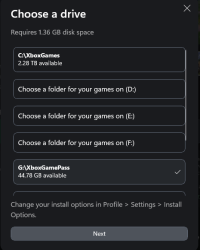
* Install from the Xbox app. You can choose the drive during install.
1776970792483.png
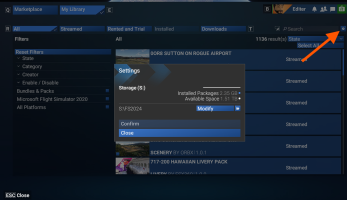
* Once installed, go to Marketplace/My Library and click the gear icon next to the Search box (NOT the one at the top). This will let you select a custom folder on the SSD for your Community and other folders. Also makes finding those much easier versus the terrible default file path naming.
1776971000208.png

* 2024 UI complaints are the complaints you get with any redesign, that goes back to my magazine days when a font change would get letters of anger and joy alike. :) It's better in some respects, annoying in some others. There are some bigger changes coming in SU5 (in the next week or so) which will simplify some of the settings and stuff. At any rate, there are no big blockers or confusing elements, just like any UI change you just need a little time to explore. The dumb second gear to set your custom directory I mentioned above is probably the only major UI flag I would note.

Other notes/best practices:
* If you're not already using Addons Linker, it's a great time to start. Makes managing big addons libraries much more manageable, makes loading faster (2024 can load incredibly fast if you point it to just airports and airplanes you're using, versus a 1.7TB Community folder :) ), and simplifies troubleshooting. If you're already using Addons Linker, make sure to download the latest update which has an FS2024 version. You can literally just point that to your old MSFS 2020 add-ons structure.

* Most add-ons now work fine in 2024. The only ones I had that are still broken are the Parallel 42 SimFX and the PMDG 737-700. (The 737 now has a paid update, but I haven't grabbed it yet.) Occasionally FS2020 freeware airports have visual issues or building duplication, but the vast majority work fine.

* Make sure you check all your payware and fs.to downloads for updates and get the latest versions. Someone on this forum was complaining about issues with the FS2020 JustFlight Arrow under 2024, for instance, but there's a free update available that includes a native FS2024 verson of the plane. Many other FS2020 planes that don't have fully 2024 SDK rebuilds still have updates available that fix config file issues, etc that caused problems under FS2024. Very few 2020 planes nowadays have problems under 2024.

* Once you have 2024 set up, go to the My Library tab under Marketplace, click "State", and check your Disabled add-ons. Many of your existing add-ons will be disabled by default, but will activate and stream fine if you just activate them. The small percentage that are incompatible (almost all of which have native 2024 alternatives) will be flagged. If you try to activate a 2020 add-on that you have the 2024 version of, the sim will warn you and you can cancel.

 
Last edited:
I think this covers all your questions. :) I hope more folks update; it's frustrating to see people sad that there are 2024-only releases and liveries when in fact about 98% of stuff works fine under 2024 nowadays, and the sim is better in many ways.

* Back up your Community folder, if you're not using Addons Linker and especially if you have it in the default MSFS location.

* You can keep 2020 on your system, if you want to keep it going when transitioning. It doesn't hurt anything. You can get full "delete everything" instructions by going to chatgpt.com and asking how to delete it, and specify Steam or MS Store version to make sure you get all the right folders. I just checked it and the instructions were accurate, and you can ask it questions based on your own config. I'm hesitant to use AI for many things, but this is the kind of area where it shines.

* To get it on the SSD drive:
* Install from the Xbox app. You can choose the drive during install.
View attachment 186673
* Once installed, go to Marketplace/My Library and click the gear icon next to the Search box (NOT the one at the top). This will let you select a custom folder on the SSD for your Community and other folders. Also makes finding those much easier versus the terrible default file path naming.
View attachment 186674

* 2024 UI complaints are the complaints you get with any redesign, that goes back to my magazine days when a font change would get letters of anger and joy alike. :) It's better in some respects, annoying in some others. There are some bigger changes coming in SU5 (in the next week or so) which will simplify some of the settings and stuff. At any rate, there are no big blockers or confusing elements, just like any UI change you just need a little time to explore. The dumb second gear to set your custom directory I mentioned above is probably the only major UI flag I would note.

Other notes/best practices:
* If you're not already using Addons Linker, it's a great time to start. Makes managing big addons libraries much more manageable, makes loading faster (2024 can load incredibly fast if you point it to just airports and airplanes you're using, versus a 1.7TB Community folder :) ), and simplifies troubleshooting. If you're already using Addons Linker, make sure to download the latest update which has an FS2024 version. You can literally just point that to your old MSFS 2020 add-ons structure.

* Most add-ons now work fine in 2024. The only ones I had that are still broken are the Parallel 42 SimFX and the PMDG 737-700. (The 737 now has a paid update, but I haven't grabbed it yet.) Occasionally FS2020 freeware airports have visual issues or building duplication, but the vast majority work fine.

* Make sure you check all your payware and fs.to downloads for updates and get the latest versions. Someone on this forum was complaining about issues with the FS2020 JustFlight Arrow under 2024, for instance, but there's a free update available that includes a native FS2024 verson of the plane. Many other FS2020 planes that don't have fully 2024 SDK rebuilds still have updates available that fix config file issues, etc that caused problems under FS2024. Very few 2020 planes nowadays have problems under 2024.

* Once you have 2024 set up, go to the My Library tab under Marketplace, click "State", and check your Disabled add-ons. Many of your existing add-ons will be disabled by default, but will activate and stream fine if you just activate them. The small percentage that are incompatible (almost all of which have native 2024 alternatives) will be flagged. If you try to activate a 2020 add-on that you have the 2024 version of, the sim will warn you and you can cancel.
Thanks ! this exactly what we need to see us on our way !
 
Back
Top