
-
Please see the most recent updates in the "Where did the .com name go?" thread. Posts number 16 and 17.
-
IMPORTANT DOWNLOADING INFORMATION - ALL MEMBERS PLEASE READ
Please see this thread for updates. Update Thread
SOH ADMINISTRATION
You are using an out of date browser. It may not display this or other websites correctly.
You should upgrade or use an alternative browser.
You should upgrade or use an alternative browser.
No 32 bit available
- Thread starter kwb737
- Start date
KWB,
Below is a copy are my display settings. I found that I had to hand edit them in to the CFS2 config as well when I upgraded to Windows 7, and not all of the settings, such as HWTnL and AntiAlias were available.
[DISPLAY]
Device=NVIDIA GeForce GTX 970 (\\.\DISPLAY1)
Mode=1920x1080x32
AntiAlias=1
HWTnL=1
Below is a copy are my display settings. I found that I had to hand edit them in to the CFS2 config as well when I upgraded to Windows 7, and not all of the settings, such as HWTnL and AntiAlias were available.
[DISPLAY]
Device=NVIDIA GeForce GTX 970 (\\.\DISPLAY1)
Mode=1920x1080x32
AntiAlias=1
HWTnL=1

Dirtman
SOH-CM-2022
Driver issue?
Yo kbw;
I was going to inquire about your Nvidia driver status (newest installed?) and origin (directly from Nvidia - preferred or from Microsoft?)
However ... I just noticed that Nvidia has released updated driver packages for the "main-stream" video cards today.
[url]https://www.geforce.com/drivers
[/URL]
Yo kbw;
I was going to inquire about your Nvidia driver status (newest installed?) and origin (directly from Nvidia - preferred or from Microsoft?)
However ... I just noticed that Nvidia has released updated driver packages for the "main-stream" video cards today.
[url]https://www.geforce.com/drivers
[/URL]
Yo kbw;
I was going to inquire about your Nvidia driver status (newest installed?) and origin (directly from Nvidia - preferred or from Microsoft?)
However ... I just noticed that Nvidia has released updated driver packages for the "main-stream" video cards today.
https://www.geforce.com/drivershttps://www.geforce.com/drivers
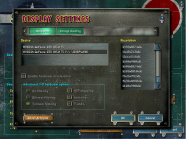
Thank you to all. I hand edited the CFG File and also updated my video card driver. Still no joy. as you can see in the picture besides losing my 32 bit choice (only 16 bit available now) I've also lost my ability on "Hardware Acceleration" and "Advanced 3D Hardware Options". I'm really stumped.

Attachments

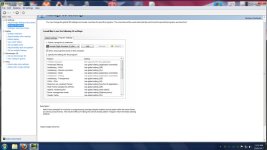
Your settings in Nvidia Control panel?
I'm glad you asked that. What are your settings?? I have a window that shows CFS2, but I don't know what setting to choose.
Attachments

Try the below. The Disable=0 should force Hardware Acceleration on and when you start in game things should be fine. Trying to edit these settings in game is likely to not work so stay out of the Display Settings of CFS2.
[DISPLAY]
Device=NVIDIA GeForce GTX 1050 TI (\\.\DISPLAY1)
Mode=1024x768x32
AntiAlias=1
HWTnL=1
Disable=0
[DISPLAY]
Device=NVIDIA GeForce GTX 1050 TI (\\.\DISPLAY1)
Mode=1024x768x32
AntiAlias=1
HWTnL=1
Disable=0

adiazcay
Members +
I'm glad you asked that. What are your settings?? I have a window that shows CFS2, but I don't know what setting to choose.
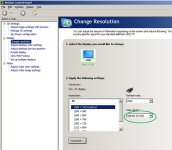
Well, I don't have CFS2, but I'd try Nvidia Inspector for these settings (is what I use for FS9). Basically, I want to know the settings of 'Change resolution', to confirm that you have 32 bit color enabled.
Try the below. The Disable=0 should force Hardware Acceleration on and when you start in game things should be fine. Trying to edit these settings in game is likely to not work so stay out of the Display Settings of CFS2.
[DISPLAY]
Device=NVIDIA GeForce GTX 1050 TI (\\.\DISPLAY1)
Mode=1024x768x32
AntiAlias=1
HWTnL=1
Disable=0
That fixed it Allen!! Kinda sort of lol!! Everything works except missions won't load for some reason. Any ideas?
That fixed it Allen!! Kinda sort of lol!! Everything works except missions won't load for some reason. Any ideas?
Nevermind. I think I see the problem and I need to play around with it a bit. Need to play around with the display settings in the config file. Thank you to all!!
Last edited:
Nevermind. I think I see the problem and I need to play around with it a bit. Need to play around with the display settings in the config file. Thank you to all!!
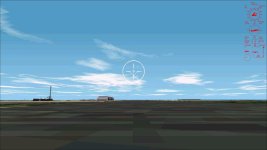
Well some mission will load just fine and others after I press the tab "Fly" all I get is this.
Attachments
Try using any Compat setting?
Yeah I tried that Allen but no joy. I did discover that it might have to do with the aircraft. One mission that wouldn't load for example had me flying a P-38F. When I replaced that P-38F with the stock one the problem went away and all was good. I'm still tinkering with it when I have time. Thanks Allen.
Check the panel for the aircraft. IF it ONLY have a 1024 x 786 panel that maybe the prob.
I think I know what your talking about but could you go into a little more detail so i'm sure. My config file is as follows.
Device=NVIDIA GeForce GTX 1050 Ti
Mode=1920x1080x32
AntiAlias=1
HWTnL=1
Disable=0
Something really weird is going on but for the time being it may be fixed. I put my original plane back in that was causing the mission not to load, and when it came time to load the mission instead of clicking the "Fly" tab fairly quickly like I used to, I tried clicking it slow and deliberate holding down my left click on my mouse a little longer and bam! The mission loaded no problem. I'll keep an eye on things though. Love my new card. The Japanese attack on Pearl Harbor always put a strain on my old card where the FPS would drop so low that the stuttering would cause me to just give up. Not with this card. Maintains around 60 FPS no matter what. 
I think I know what your talking about but could you go into a little more detail so i'm sure. My config file is as follows.
Device=NVIDIA GeForce GTX 1050 Ti
Mode=1920x1080x32
AntiAlias=1
HWTnL=1
Disable=0
The 2D panel bitmap it self. If the panel is only using bitmap that 1024 x 786 they seem to freeze up CFS2 on Win7+. You can see if the panel is the prob by swapping the panel with a stock aircraft panel.