• There seems to be an uptick in Political comments in recent months. Those of us who are long time members of the site know that Political and Religious content has been banned for years. Nothing has changed. Please leave all political and religious comments out of the forums.

    If you recently joined the forums you were not presented with this restriction in the terms of service. This was due to a conversion error when we went from vBulletin to Xenforo. We have updated our terms of service to reflect these corrections.

    Please note any post refering to a politician will be considered political even if it is intended to be humor. Our experience is these topics have a way of dividing the forums and causing deep resentment among members. It is a poison to the community. We appreciate compliance with the rules.

    The Staff of SOH

  • Please see the most recent updates in the "Where did the .com name go?" thread. Posts number 16 and 17.

    Post 16 Update

    Post 17 Warning

NVidia settings.

olderndirt

Charter Member
My card is a GTX460 and I downloaded and installed new driver 280.26. Had been using NVidia Inspector but reset that to default and did my settings in NVidia Control Panel, pretty much in line with what I had. My first screenshot had jaggies, even on straight lines - very disappointing. Ingame is Anisotropic and AA checked while the CP are 16x and 8x, to override. Have I just shot myself in the foot?
 
I've got a nvidia 460 oc, AA set to overide and 32x and i also have jaggies, AA set to 32 helps but there are still jaggies here and there.
 
I installed the 280.26 drivers yesterday for my GTX 480. After installation I went into Nvidia Inspector and entered all my original settings back in for FSX then hit apply. My sim looks great.

I would suggest that you go back and try Nvidia Inspector rather than trying to use the Nvidia Control Panel, with FSX that has never worked well for most people, that is why people made nHancer and later Nvidia Inspector.
 
Back using Inspector with Nick's settings. One area of confusion. Below the two 'shots, he states to be sure in-game filtering is Trilinear and AA is unchecked - wan't to be sure here as it contradicts a lot I've read.
Nick is correct.
 
Excellent. . .Nick's information goes against a lot I've read too, but a whole lot of folks swear by what he says and I have no reason to think otherwise. His settings have always worked when nothing else has. It's a good choice to stick with that.:salute:
 
I also use the Nvidia Inspector and have no problems - maybe we could share the NI configuration files here? As far as I can remember they are seperate files that can be assigned in the Inspector. I used Nicks config as a baseline, but made several individual adjustments for my GFX card (GTX460).
I'm not at home right now, but when I return this evening I'll attach it and post it here.

Cheers,
Mark
 
Mainly for clarification. What's the latest version of Nvidia Inspector? I downloaded it from the link above, and it's v1.932
 
I have version 1.995 ,downloaded in April.

I'd be willing to use that new version. I'll toss in my older version, along with two empty beer cans if you'd share the link the version you have!! :icon_lol:

I managed to find v1.9.5.5, unless your reply was a typo.
 
On a related note, does anyone know if the nVidia Inspector settings (and in game) are different for DX10 Preview? If so, how?

Thanks

Andy
 
I'd be willing to use that new version. I'll toss in my older version, along with two empty beer cans if you'd share the link the version you have!! :icon_lol:

I managed to find v1.9.5.5, unless your reply was a typo.
Sorry ,had an old fart moment,it is 1.955,so not a lot newer but I,m sure there are some updates.
 
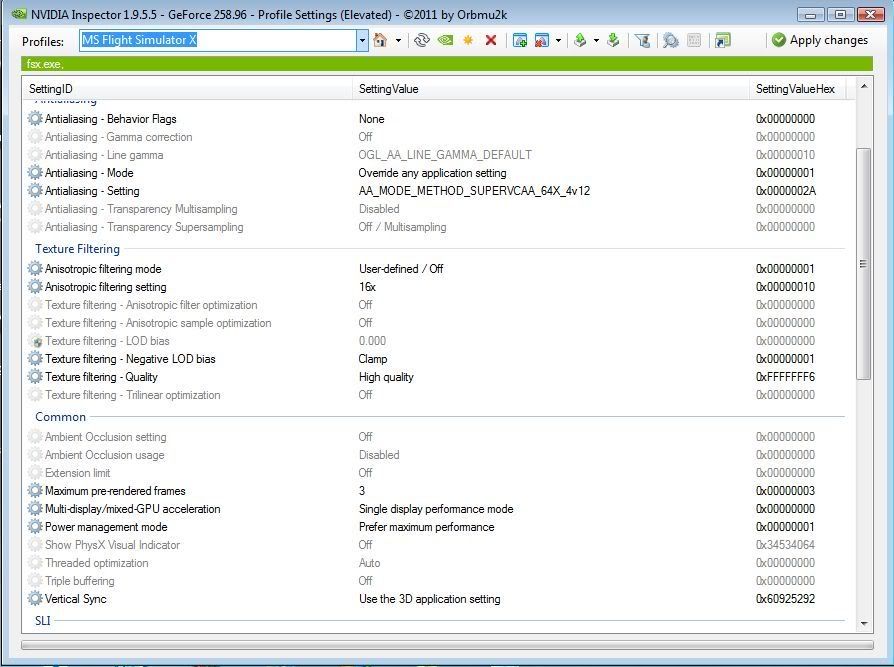
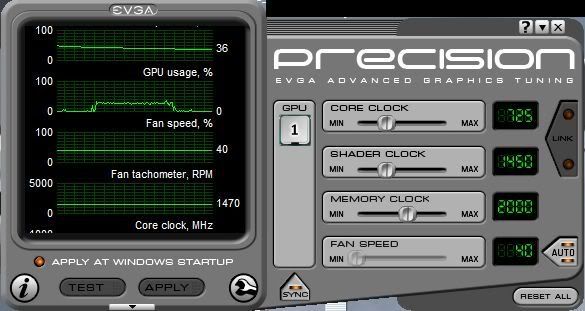
I have the 2 gig ram version and have AA and Anisotropic off in the game and on to high settings in the video card to divert some of the work from the cpu to the gpu. Also I use the EVGA utility to monitor temps etc and it also has a great auto fan utility. Also please note that vertical sync is set to Use the 3D app.... This is because I have it set in my FsX.cfg as per Jesus Altuve's suggestion.


NvIns.jpg
 
Sorry to hijack the thread here.

I have a small problem that maybe someone can help with. I have a EVGA 470 1280mb superclocked (OC).The problem I have is when I use pretty much any driver other than 270.61 I get a stutter.I have tried the new beta driver 285.38 .Tried several drivers and get this anoying stutter.It only happens in FSX.
 
I'm using version 280.26 with my GTX570. They seem to work well, all except an appearance of what seems like the screen is under water (if that makes sense) occasionally there is an appearance of water flowing as if like a wave in a pool
 
Sorry to hijack the thread here.

I have a small problem that maybe someone can help with. I have a EVGA 470 1280mb superclocked (OC).The problem I have is when I use pretty much any driver other than 270.61 I get a stutter.I have tried the new beta driver 285.38 .Tried several drivers and get this anoying stutter.It only happens in FSX.

Stick with the drivers that work. That's what I've done.
 
With the way I bounce between windows, applications, aero and standard the 280 version of the drivers was corrupting itself about every three days causing my system to not boot visually, and being no small pain..
I've gone back to 270..
 
Back
Top