ThinkingManNeil
Charter Member
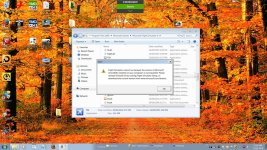
...after a fresh install of Flight Simulator X Gold Edition, I'm being told that the version of Direct X I have is incompatible, and I'm being told to reload Direct X 9.0 but I see Direct X is at a higher iteration (11.3?) now. Advice?
I'm also going to need some hints as to how to shift FSX over to my SSD from the current common hard drive. Eventually I'll be sending my add on scenery files over to a 4TB hard drive, but that's off in the future.
Here, again, are the specs on my new system:
Intel Core i7-6700K Quad-Core Processor | Socket LGA1151, 4.0Ghz, 8MB L3 Cache, 14nm
ASUS ROG MAXIMUS VIII HERO motherboard
G.SKILL Trident Z Series 16GB (2x8GB) DDR4 3200MHz
Samsung 850 Pro Series 1TB 2.5" SATA 6Gb/s Solid State Drive
Western Digital Black 4TB Performance Desktop Hard Disk Drive - 7200 RPM SATA 6 Gb/s 64MB Cache
Seagate Desktop HDD 2TB 3.5" SATA3 64MB Cache
ASUS ROG Strix GeForce GTX 1080 8GB GDDR5X (STRIX-GTX1080-8G-GAMING) | 1607Mhz Core Clock, 10010Mhz video card
ASUS (DRW-24F1ST/BLK/B) Internal 24x DVD Writer
Corsair HX1000i 1000W 80 PLUS Platinum Certified, High Performance Power Supply
Deepcool Maelstrom 240 Liquid CPU Cooler | 120mm PWM Fan
Corsair Graphite Series 760T Black Steel / Plastic ATX Full Tower Windowed Gaming Case with two 140mm Red LED fans
Microsoft Windows 7 Professional 64-Bit
And here's a screenshot of the message I got while trying to launch FSX...
N.

I'm also going to need some hints as to how to shift FSX over to my SSD from the current common hard drive. Eventually I'll be sending my add on scenery files over to a 4TB hard drive, but that's off in the future.
Here, again, are the specs on my new system:
Intel Core i7-6700K Quad-Core Processor | Socket LGA1151, 4.0Ghz, 8MB L3 Cache, 14nm
ASUS ROG MAXIMUS VIII HERO motherboard
G.SKILL Trident Z Series 16GB (2x8GB) DDR4 3200MHz
Samsung 850 Pro Series 1TB 2.5" SATA 6Gb/s Solid State Drive
Western Digital Black 4TB Performance Desktop Hard Disk Drive - 7200 RPM SATA 6 Gb/s 64MB Cache
Seagate Desktop HDD 2TB 3.5" SATA3 64MB Cache
ASUS ROG Strix GeForce GTX 1080 8GB GDDR5X (STRIX-GTX1080-8G-GAMING) | 1607Mhz Core Clock, 10010Mhz video card
ASUS (DRW-24F1ST/BLK/B) Internal 24x DVD Writer
Corsair HX1000i 1000W 80 PLUS Platinum Certified, High Performance Power Supply
Deepcool Maelstrom 240 Liquid CPU Cooler | 120mm PWM Fan
Corsair Graphite Series 760T Black Steel / Plastic ATX Full Tower Windowed Gaming Case with two 140mm Red LED fans
Microsoft Windows 7 Professional 64-Bit
And here's a screenshot of the message I got while trying to launch FSX...
N.