
• There seems to be an uptick in Political comments in recent months. Those of us who are long time members of the site know that Political and Religious content has been banned for years. Nothing has changed. Please leave all political and religious comments out of the forums.

    If you recently joined the forums you were not presented with this restriction in the terms of service. This was due to a conversion error when we went from vBulletin to Xenforo. We have updated our terms of service to reflect these corrections.

    Please note any post refering to a politician will be considered political even if it is intended to be humor. Our experience is these topics have a way of dividing the forums and causing deep resentment among members. It is a poison to the community. We appreciate compliance with the rules.

    The Staff of SOH

  • Please see the most recent updates in the "Where did the .com name go?" thread. Posts number 16 and 17.

    Post 16 Update

    Post 17 Warning

ORBX England is released

That's quite a good error, sketchy... Much better than my attempts to install to Prepar3D resulting in it telling me that FSX's path isn't available... When it is. So is Prepar3D's. That still doesn't work and remains unanswered as well. I think they just want me to wait and do two seperate installs to FSX and P3D, when I'd really like a side-by-side installation.

Anyway, thanks for the comments, guys. I will make them work with Orbx ENG, somehow, but it may take some time. Any preferences for airfields to move to priority seats at the top of the list?

Ian P.
 
Hi Sketchy,
I'm no expert, but did you download and install the latest Orbx librery?
Regards,
Ian.

Hi Ian,
They said the same on their Forum, but for something I downloaded yesterday from them I was rather assuming this was up to date? Also what is and where can I find the latest "Orbx Library"?


Can you replicate it and click on the "Details" button to get the details of the issue.

Object reference not set to an instance of an object, might mean it's trying to read something that's not there. Could be Orbx library, could be VC++ runtime, could be anything without knowing the details.

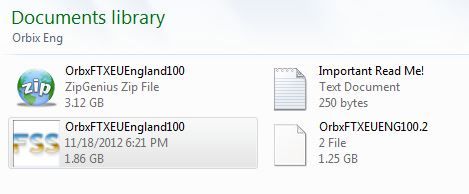
How big was the installer/wrapper does it match to what you thought you were downloading from the Orbx site?

Darren thanks for the reply mate, (hope Bedfordshire treats you well?) I expanded the details on their site too, but here it is:


See the end of this message for details on invoking
just-in-time (JIT) debugging instead of this dialog box.

************** Exception Text **************
System.NullReferenceException: Object reference not set to an instance of an object.
at FTXCentral.PublicDefs.SaveActiveConfig()
at FTXCentral.FTXC.ExitToolStripMenuItem_Click(Object sender, EventArgs e)
at System.Windows.Forms.ToolStripItem.RaiseEvent(Object key, EventArgs e)
at System.Windows.Forms.ToolStripMenuItem.OnClick(EventArgs e)
at System.Windows.Forms.ToolStripItem.HandleClick(EventArgs e)
at System.Windows.Forms.ToolStripItem.HandleMouseUp(MouseEventArgs e)
at System.Windows.Forms.ToolStrip.OnMouseUp(MouseEventArgs mea)
at System.Windows.Forms.ToolStripDropDown.OnMouseUp(MouseEventArgs mea)
at System.Windows.Forms.Control.WmMouseUp(Message& m, MouseButtons button, Int32 clicks)
at System.Windows.Forms.Control.WndProc(Message& m)
at System.Windows.Forms.ToolStrip.WndProc(Message& m)
at System.Windows.Forms.ToolStripDropDown.WndProc(Message& m)
at System.Windows.Forms.Control.ControlNativeWindow.WndProc(Message& m)
at System.Windows.Forms.NativeWindow.Callback(IntPtr hWnd, Int32 msg, IntPtr wparam, IntPtr lparam)


************** Loaded Assemblies **************
mscorlib
Assembly Version: 2.0.0.0
Win32 Version: 2.0.50727.5466 (Win7SP1GDR.050727-5400)
CodeBase: file:///C:/Windows/Microsoft.NET/Framework64/v2.0.50727/mscorlib.dll
----------------------------------------
FTXCentral
Assembly Version: 1.0.2.9
Win32 Version: 1.0.2.9
CodeBase: file:///C:/Users/Fraser%20Main%20PC/Desktop/Flight%20Sim%20Files/ADD%20Ons/Aircraft/EXTRACT/ORBX/Scripts/FTXCentral/FTXCentral.exe
----------------------------------------
Microsoft.VisualBasic
Assembly Version: 8.0.0.0
Win32 Version: 8.0.50727.5420 (Win7SP1.050727-5400)
CodeBase: file:///C:/Windows/assembly/GAC_MSIL/Microsoft.VisualBasic/8.0.0.0__b03f5f7f11d50a3a/Microsoft.VisualBasic.dll
----------------------------------------
System
Assembly Version: 2.0.0.0
Win32 Version: 2.0.50727.5466 (Win7SP1GDR.050727-5400)
CodeBase: file:///C:/Windows/assembly/GAC_MSIL/System/2.0.0.0__b77a5c561934e089/System.dll
----------------------------------------
System.Windows.Forms
Assembly Version: 2.0.0.0
Win32 Version: 2.0.50727.5460 (Win7SP1GDR.050727-5400)
CodeBase: file:///C:/Windows/assembly/GAC_MSIL/System.Windows.Forms/2.0.0.0__b77a5c561934e089/System.Windows.Forms.dll
----------------------------------------
System.Drawing
Assembly Version: 2.0.0.0
Win32 Version: 2.0.50727.5462 (Win7SP1GDR.050727-5400)
CodeBase: file:///C:/Windows/assembly/GAC_MSIL/System.Drawing/2.0.0.0__b03f5f7f11d50a3a/System.Drawing.dll
----------------------------------------
System.Runtime.Remoting
Assembly Version: 2.0.0.0
Win32 Version: 2.0.50727.5420 (Win7SP1.050727-5400)
CodeBase: file:///C:/Windows/assembly/GAC_MSIL/System.Runtime.Remoting/2.0.0.0__b77a5c561934e089/System.Runtime.Remoting.dll
----------------------------------------
System.Configuration
Assembly Version: 2.0.0.0
Win32 Version: 2.0.50727.5420 (Win7SP1.050727-5400)
CodeBase: file:///C:/Windows/assembly/GAC_MSIL/System.Configuration/2.0.0.0__b03f5f7f11d50a3a/System.Configuration.dll
----------------------------------------
System.Xml
Assembly Version: 2.0.0.0
Win32 Version: 2.0.50727.5420 (Win7SP1.050727-5400)
CodeBase: file:///C:/Windows/assembly/GAC_MSIL/System.Xml/2.0.0.0__b77a5c561934e089/System.Xml.dll
----------------------------------------
nisb72gp
Assembly Version: 1.0.2.9
Win32 Version: 2.0.50727.5466 (Win7SP1GDR.050727-5400)
CodeBase: file:///C:/Windows/assembly/GAC_MSIL/System/2.0.0.0__b77a5c561934e089/System.dll
----------------------------------------
System.Core
Assembly Version: 3.5.0.0
Win32 Version: 3.5.30729.5420 built by: Win7SP1
CodeBase: file:///C:/Windows/assembly/GAC_MSIL/System.Core/3.5.0.0__b77a5c561934e089/System.Core.dll
----------------------------------------
beqqpwxw
Assembly Version: 1.0.2.9
Win32 Version: 2.0.50727.5466 (Win7SP1GDR.050727-5400)
CodeBase: file:///C:/Windows/assembly/GAC_MSIL/System/2.0.0.0__b77a5c561934e089/System.dll
----------------------------------------

************** JIT Debugging **************
To enable just-in-time (JIT) debugging, the .config file for this
application or computer (machine.config) must have the
jitDebugging value set in the system.windows.forms section.
The application must also be compiled with debugging
enabled.

For example:

<configuration>
<system.windows.forms jitdebugging="true">
</system.windows.forms></configuration>

When JIT debugging is enabled, any unhandled exception
will be sent to the JIT debugger registered on the computer
rather than be handled by this dialog box.

Also reference the size of the download, it was quoted as 3.12Gb and that is what I managed to download:

FTXproblem02.jpg


The last reply to my query on the Forum was have you tried uninstalling it and installing it again...... Reminds me of the IT Crowd.... lol

Thanks for the replies all...

Fraser.
 
Hi Ian,
They said the same on their Forum, but for something I downloaded yesterday from them I was rather assuming this was up to date? Also what is and where can I find the latest "Orbx Library"?

Fraser.

The ORBX library is a collection of common objects used through the ORBX sceneries and are updated periodically, especially after something has been released (region or airport).

It can be found near the bottom of the support page http://www.fullterrain.com/support.html

it should be installed after any other type of ORBX installation as it will contain the most up to date variants of library models.
 
Thanks already Ian for all you efforts. I really hope you will succeed. Although I love the look of ORBX England, I can't imagine I will enjoy it without your airfields.

Cheers,
Huub
 
I don't have anything to read kmz files so could somebody tell me what coverage this has as I notice one comment saying it was further than they expected.

Cheers Ron
 
Hi Ron, it covers England.. .i.e not the whole of the UK but the 'England' part, I believe it also goes a little outside of the English borders due to the way FSX is designed (grids)

Wales, Scotland and Ireland are coming next (in that order)
 
Thanks for the updates, more than likely I'll wait until Wales and Scotland become available.

By the way I was aware that kmz files are read by google earth but I belong to the "don't install unless you really need it gang". ;) Less to go wrong or clog up your system. And don't ask me about "auto updaters" that software installs without asking you first. I hate them as I feel you lose control of your system, after all its yours not the blankty blank software firms.

Cheers Ron
 
Basically, what I need to do is to go to every airfield I've done, find all the problems, put linear object excludes through any modern road that is added (this happens with UTX as well, not just Orbx), create a grass landclass poly under every airfield to avoid trees showing through where Orbx have broken the default AB_xxx polygon, put one or more legacy "exclude everything" boxes over the top, upversion, edit the text file, rezip, re-upload, lather, rinse, repeat for every airfield.

...or just put up a post that says "Not compatible with Orbx scenery."

It looks from their forum like some of the England team want to do WW2 airfields anyway. I'd rather they fix the (not insignificant) issues with England first, but hey. If they want to create better airfields than me, it's not hard and they're very much more than welcome to do so. I only do what I do because no-one else did!

Ian P.

Ian. I guarantee that any of my sceneries works with only one other manfacturer's scenery. MS Flight Simulator. End of. If other manufacturers want to break the rules that's their problem not mine.
 
Sorry if I have missed it but how big (physically in GBs) is it? I currently have Horizon GenX installed and that was 12 dvds + 3 more dvds for the v3 update totally 95.6gb on hdd.

Bigger or smaller? (Smaller would be nice, to get some hdd space back) :)
 
Just a question based on the posts...I just want to understand clearly

So All addon scenery for England must be remove for this ORBX England scenery to work correctly

all Freeware ACG RAF and Duford? Popham, Oldwarden and such plus Payware like earthsimulations will not work with the ORBX england

and only ORBX addons will work with ORBX england

Nice screen shot Roger, the scenery and Plane/paint :applause:
 
Back
Top