
OT-Perplexing Computer Issue

Milton Shupe

Staff Contributor
Staff member
I have this svchost.exe running constantly using 50% cpu steady; must be looping as it slows down everything.


If I End Task, I lose Sounds; no output or mic input support; says they are disabled or not available.


I have checked drivers, hardware, settings, everything I can think of.

Any ideas how I might isolate this issue?

EDIT: Forgot to mention that this is for my development computer running W/XP SP3
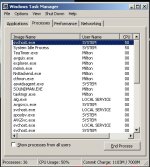
 

Attachments

  • svchost.exe issue.jpg
    svchost.exe issue.jpg
    76.2 KB · Views: 0
Yes, you can download a number of freeware apps that will actually open the svhost( s ) that that are running and tell you what programs are part of that service host. You can then stop them or isolate them or delete them individually.
 
Forgot to mention this for my development computer running Win/XP SP3

Thanks for your responses ...
 
Forgot to mention this for my development computer running Win/XP SP3

Dunno how far it gets you but in Win7 you can just right-click on the svchost instance and select 'go to services', then it highlights all the services this is running. It might get you a bit further on.
 
Thanks for your help.

Found the issue using the SysInternals Process Explorer.

The issue was Windows update process trying to run (I guess).

wuauclt was the process highlighted under that svchost.exe.

I turned off Windows Updates (why was that on for XP?), and that corrected the issue.

Thanks again :)
 
Unidentified automatic updates can be a real pain. I once had a Google app update hogging the processor until it was turned off. Wasn't even a program I used much.
 
Back
Top