
• Please see the most recent updates in the "Where did the .com name go?" thread. Posts number 16 and 17.

    Post 16 Update

    Post 17 Warning old domain name stealing credentials

  • Special Server Maintenance

    Just when you think you have everything running some what better...

    You get a message from the Hosting company. Short story they need to move us to a new server. I have been working with them to plan a good date for all concerned. Here is what we have come up with as a schedule.

    1. November 4th 17:00 -5UTC shut off the forums and start backup proceedures. During this time there will be no access to the forums or the Resource Section.
    2. November 5th Continue with Backups and download same until complete.
    3. November 6th 7:00 turn over server to hosting company to move system to new server
    4. November 7th - 8th restore backups and upgrade forum software.

    If all goes well we should be back online on November 8th.

    To keep you updated we will post updates on AVSIM forums.

    Thank you for your support.

P-3 now listed on Flightsim.to, but.....

Navy Chief

Senior Member
I was thrilled to see the P-3 listed by KBT on Flight sim.to, but (contrary to what seems to be indicated on the description included by KBT), there aren't any additional liveries, such as USN, included. Hopefully they will be releasing them as well. The one included in the release is the Royal Norwegian Air Force. Nice paint, but we need some USN! :encouragement: NC

UPDATE: they just posted this!
https://flightsim.to/file/17398/lockheed-p-3c-orion-us-navy

navy vp.jpg

Oh, and unfortunately they have not included the cockpit of the P-3, and instead had to use the 747. Hey, it is what it is, and I am happy to see it!!! And a big THANK YOU to SOH member for his outstanding RNoAF livery!
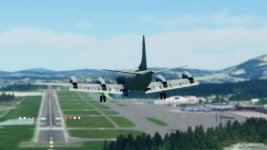
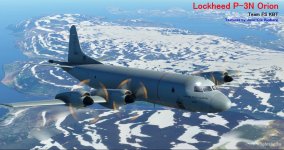
P-3N.jpg
fwd view.jpg

https://flightsim.to/file/17346/lockheed-p-3n-orion-rnoaf
 
Last edited:
Ok, so KBT posted a file with new light effects for the P-3. But the JSON file for the aircraft model has to be changed to reflect the new lights. I still cannot figure out how to do this crap. Yes, before you reply, saying that FSDevelopers has a cool little utility that automatically modifies the JSON file for you, yes, I already downloaded it, but I cannot figure out how to use the darn thing. It says to "Drag any file named "layout.json" onto the exe", but when I try to do this, the EXE file will not highlight, so I am unable to do this. I have tried to edit the JSON, but can't figure out how to get the spacing correct, etc.....

I would really appreciate some help here. This is driving me nuts. NC

:dizzy:

https://flightsim.to/file/17394/p-3-series-new-light-effects
 
It's still useable. First, drag the addon folder to your desktop (makes it easy to find in a minute). Then open the folder and drag the layout.json file to the desktop and out of the folder.

Double-click the auto-json program to open the GUI window.

Click the Directory button at the top-right and navigate to the addon folder - select the folder itself, but don't go any further.

Click OK and the program will generate the text of the json in the main window.

Click anywhere in that window and press Ctrl+A and Ctrl+C to copy the entire volume.

Open the layout.json on your desktop with either Notepad or Notepad++, then press Ctrl+A > Delete > Ctrl+V to replace the previous text with the new data.

Place the json back into the addon folder and then put the addon back in the Community folder. You should be good to go now.
 
Iit would have been nice if the author had just included a new json along with the effects...
 
It's still useable. First, drag the addon folder to your desktop (makes it easy to find in a minute). Then open the folder and drag the layout.json file to the desktop and out of the folder.

Double-click the auto-json program to open the GUI window.

Click the Directory button at the top-right and navigate to the addon folder - select the folder itself, but don't go any further.

Click OK and the program will generate the text of the json in the main window.

Click anywhere in that window and press Ctrl+A and Ctrl+C to copy the entire volume.

Open the layout.json on your desktop with either Notepad or Notepad++, then press Ctrl+A > Delete > Ctrl+V to replace the previous text with the new data.

Place the json back into the addon folder and then put the addon back in the Community folder. You should be good to go now.

Thanks.for.that! I will give it a go tomorrow! NC
 
If you have Legacy Importer, that can be used to update the layout.json file too. Just open Legacy Importer, click the right-hand P-51 "Select MSFS Aircraft Legacy or Native", browse to the addon's folder, select it, then click the "Rescan aircraft files" bar, wait for it to tell you how many files it added in JSON, then close. I find this easier than using stand-alone tools for this purpose since I'm already comfortable with Legacy Importer from converting airplanes.

August
 
It's still useable. First, drag the addon folder to your desktop (makes it easy to find in a minute). Then open the folder and drag the layout.json file to the desktop and out of the folder.

Double-click the auto-json program to open the GUI window.

Click the Directory button at the top-right and navigate to the addon folder - select the folder itself, but don't go any further.

Click OK and the program will generate the text of the json in the main window.

Click anywhere in that window and press Ctrl+A and Ctrl+C to copy the entire volume.

Open the layout.json on your desktop with either Notepad or Notepad++, then press Ctrl+A > Delete > Ctrl+V to replace the previous text with the new data.

Place the json back into the addon folder and then put the addon back in the Community folder. You should be good to go now.

Well, as usual I got confused and frustrated. Couldn't figure it out. NC
 
Back
Top