• Please see the most recent updates in the "Where did the .com name go?" thread. Posts number 16 and 17.

    Post 16 Update

    Post 17 Warning

  • Bandwidth Drive 2026 is over

    Thanks to everyone who donated.

Panel Editing Software?

ScottishMike1

Members +
After spending years tinkering with panels, and seeing JGF’s panels in the All Sims Air Tour I was wondering what panel editing software for FS9 others would recommend? Payware or free.

 
The learning curve is steep - you'll learn quickly

Lol, if there's a mistake to be made, I've made it. The program teaches you what not to do. Though you're not likely to encounter any true problems unless you start editing gauges ....which you will when you want a set of matching gauges for some aircraft.
 
Last edited:
:unsure:
I gave up on FSPS because it doesn't play well with Win10 and I do most of my panel edits manually.
If anyone's interested, there's an old (FS98) "GPS" gauge I use in the Alphasim B-52 that needs some updating.
I think it only needs an update to the BMP format (8 bit to something more modern) if anyone wants to take a crack at it. :wiggle:
Just hit me with a PM/Convo and I'll send it. :cool:
 
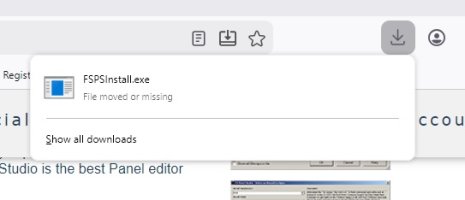
Thanks people, I tried to download FSPS from the Flight1 site but as Sbob said Win10 will not allow the download.exe file to be moved or run (even as administrator). Back to working manually.
 
It seems odd that people are having issues with FSPS because it's always worked well for me and I currently use it for FSX and P3D running Windows 10.
 
Thanks people, I tried to download FSPS from the Flight1 site but as Sbob said Win10 will not allow the download.exe file to be moved or run (even as administrator). Back to working manually.

That is interesting.
I have Windows 10 installed and just downloaded and installed FSPS (of course, using the command: Run as administrator)
It works perfectly for me.
 
I think it only needs an update to the BMP format (8 bit to something more modern)

As far as I know anything above 8bit (256 color) will not be accepted. Gauges that do not look good are usually due to low res graphics, not low color. MS got lazy with FS2004, many of the default aircraft have gauges from FS2000; they were fine on a 19" monitor at 1024x768 but are horrid on new systems; average gauges back then, such as an asi, are 100p or less diameter, a newer equivalent is around 300p. It's even worse with military aircraft, where you often encounter old CFS1 gauges.

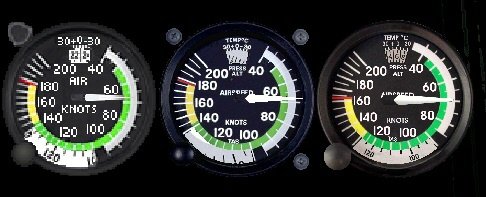
For example, a C172 ASI, on the left the default FS2004 gauge, 100p diameter; center is from some freeware aircraft, 300p; on the right is a 700p gauge from the Flight 1 C172. All 8 bit color.
gauges.jpg
 
Thanks people, I tried to download FSPS from the Flight1 site but as Sbob said Win10 will not allow the download.exe file to be moved or run (even as administrator). Back to working manually.
Probably Windoze considers it an unsigned exe, and as we all know, anything not blessed by MS is malware.
 
FS Panel Studio is one of my favorite FlightSim Utilities! Along with Glenn Copeland's gauges one can cobble together some good Panel stuff.
 
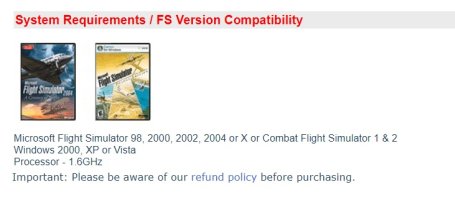
I decided to go back and try again. I went to the Flight1 site and Panel Studio is listed but I noticed under the requirements Win 10 or 11 are not listed:
1 Require.jpg
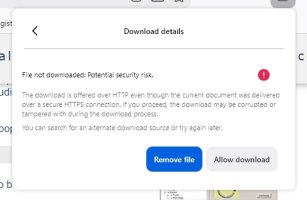
But I downloaded the FSPSinstall.exe again and got the following message:
2 Warning 1.jpg

Brave and undaunted I clicked on Allow download and it appeared to have worked:
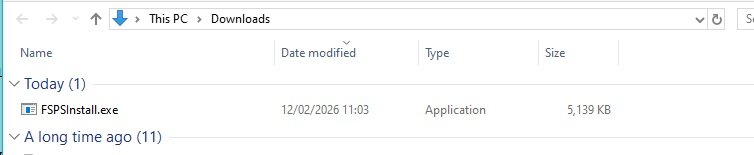
3 downloaded.jpg

But when I tried to run it I got the following:
4 try to run.jpg

Does win10 move suspect files to a special “quarantine” folder. If it does, does anyone know where it is?

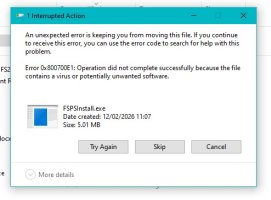
I downloaded the file again, this time I tried to move it out of the downloads folder before double clicking it but got the following:
5 Cant move.jpg

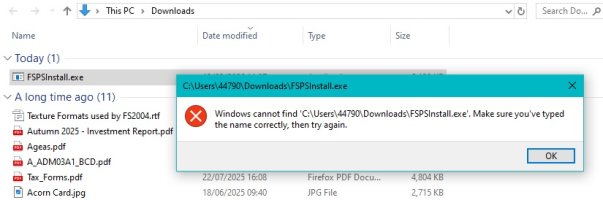
so tried to run it from the downloads folder but got the following:
6 file gone.jpg


All the above was downloading direct from the Fligh1 site. Flight1 do recommend down loading their Flight1 Agent and using that to buy products and, much as I dislike having to download “apps” to use a store, I did so, but annoyingly Panel Studio is not listed!:
7 Flight1 agent.jpg

:mad::devilish::banghead::banghead:
 
Don't give up just yet, try right-clicking the EXE file and "run as admin". If that doesn't work, try right-clicking the EXE again and "set compatibility mode" to something like "Win XP svc pack 3", then try an install. :encouragement:

I'm not sure how Win10 handles things lately, BUT in many cases it would be a matter of letting your machine "phone home" then waiting for a couple of days and try again.
 
Try downloading to a different location - desktop, an external drive, etc. Also try temporarily disabling DEP. I think the issue is that FSPS is old enough that it isn't "signed" by Microsoft so windows balks at installing it, but there is a workaround.

Things like this are one reason I've not "progressed" past Win7.


Just noticed the "potentially unwanted software" flag; if the installer shows ads for other company products while installing that will trigger the "PUP" alert in some security software, but there should be an option to ignore that.
 
Last edited:
:unsure:
I gave up on FSPS because it doesn't play well with Win10 and I do most of my panel edits manually.
If anyone's interested, there's an old (FS98) "GPS" gauge I use in the Alphasim B-52 that needs some updating.
I think it only needs an update to the BMP format (8 bit to something more modern) if anyone wants to take a crack at it. :wiggle:
Just hit me with a PM/Convo and I'll send it. :cool:
I've been running Win10 since the last two or three projects David and I did, and I worked on the panels in Panel Studio. I had no trouble.
 
Where are you trying to install it to? Do not put it in the default 'Progam Files' or 'Progam Files (x86)' folders, instead put it in the root of C: or in a folder off the root. Mine is in 'C:\FSX Tools\FS Panel Studio' along with all the other tools I use for FSX like Active Sky, Air Wrench, JoinFS, MCX, several SDKs for both FSX and P3D, etc., etc., etc.

Keep at it, you will find a way that works on your system.
 
Where are you trying to install it to? Do not put it in the default 'Progam Files' or 'Progam Files (x86)' folders, instead put it in the root of C: or in a folder off the root. Mine is in 'C:\FSX Tools\FS Panel Studio' along with all the other tools I use for FSX like Active Sky, Air Wrench, JoinFS, MCX, several SDKs for both FSX and P3D, etc., etc., etc.

Keep at it, you will find a way that works on your system.
On my W10 rig it lives in Program Files (86) and it works.
 
Look at the antivirus logs, the downloaded file was likely blocked and quarantined because F1's installer appears as a trojan to AV programs. Find the quarantined file in the logs, allow and unQ it, then run it as admin to a folder outside of the 'program files' tree and it should work.
 
Back
Top