• Please see the most recent updates in the "Where did the .com name go?" thread. Posts number 16 and 17.

    Post 16 Update

    Post 17 Warning old domain name stealing credentials

  • Special Server Maintenance

    Just when you think you have everything running some what better...

    You get a message from the Hosting company. Short story they need to move us to a new server. I have been working with them to plan a good date for all concerned. Here is what we have come up with as a schedule.

    1. November 4th 17:00 -5UTC shut off the forums and start backup proceedures. During this time there will be no access to the forums or the Resource Section.
    2. November 5th Continue with Backups and download same until complete.
    3. November 6th 7:00 turn over server to hosting company to move system to new server
    4. November 7th - 8th restore backups and upgrade forum software.

    If all goes well we should be back online on November 8th.

    To keep you updated we will post updates on AVSIM forums.

    Thank you for your support.

PC Revving Up for Takeoff

Wing_Z

Charter Member 2011
I know this is a topic much discussed over time.
But my PC seems to be getting ever hotter and noisier during the opening screens of MSFS 2020.

WTH? Is MS stealing a little Nvidia time in that interlude, to train its AI on 4.5 million user PC's ?
It runs quietly during a loaded flight.

Co-incidentally my PC froze yesterday, to the point that I had to turn it off at the wall.
Never happened before, and when restarted it announced it was stripping WIN 11 and trying to get it right.
 
Check your cooler's thermal paste. If it's drying out, it can cause all those symptoms. When the CPU starts getting warm, the system tries to ramp up the fans for more cooling. If that fails it might start throttling the CPU or even lock up if things get worse.
 
Yeah , sounds like heat problems to me.
I had a throttling CPU once. Turned out i forgot to remove the plastic cover from the cooler plate.
:dizzy:
 
All of the above and open the box see if there's a lot of dust in there. Blow it out.

One more thing: check the number of services and processes you have running and check the startup services. The ones you don't need to start up with the machine, disable startup.

Priller
 
Thanks for the advice, I will proceed stepwise.
Sad if it were just a bit 'o dust, one does love a good conspiracy theory...
 
Thanks for the advice, I will proceed stepwise.
Sad if it were just a bit 'o dust, one does love a good conspiracy theory...
Keep us posted if you will! Ya never know, maybe we'll be able to say something remotely intelligent! :D

Jan
 
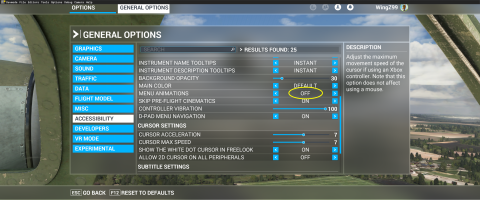
To stop the PC from revving to 20,000RPM on loading, you need to disable menu animations.

Microsoft Flight Simulator Screenshot 2026.04.20 - 16.50.54.25.png

Apparently there is no frames cap in there, and the PC runs away - temps spike and fans go beserk.
Worked for me.
 
Last edited:
Back
Top