
• Please see the most recent updates in the "Where did the .com name go?" thread. Posts number 16 and 17.

    Post 16 Update

    Post 17 Warning old domain name stealing credentials

  • Special Server Maintenance

    Just when you think you have everything running some what better...

    You get a message from the Hosting company. Short story they need to move us to a new server. I have been working with them to plan a good date for all concerned. Here is what we have come up with as a schedule.

    1. November 4th 17:00 -5UTC shut off the forums and start backup proceedures. During this time there will be no access to the forums or the Resource Section.
    2. November 5th Continue with Backups and download same until complete.
    3. November 6th 7:00 turn over server to hosting company to move system to new server
    4. November 7th - 8th restore backups and upgrade forum software.

    If all goes well we should be back online on November 8th.

    To keep you updated we will post updates on AVSIM forums.

    Thank you for your support.

Pesky triangle in ModelconverterX

Cees Donker

Administrator
Staff member
Hello converterexperts,

[FONT=Verdana,Arial,Tahoma,Calibri,Geneva,sans-serif][/FONT]
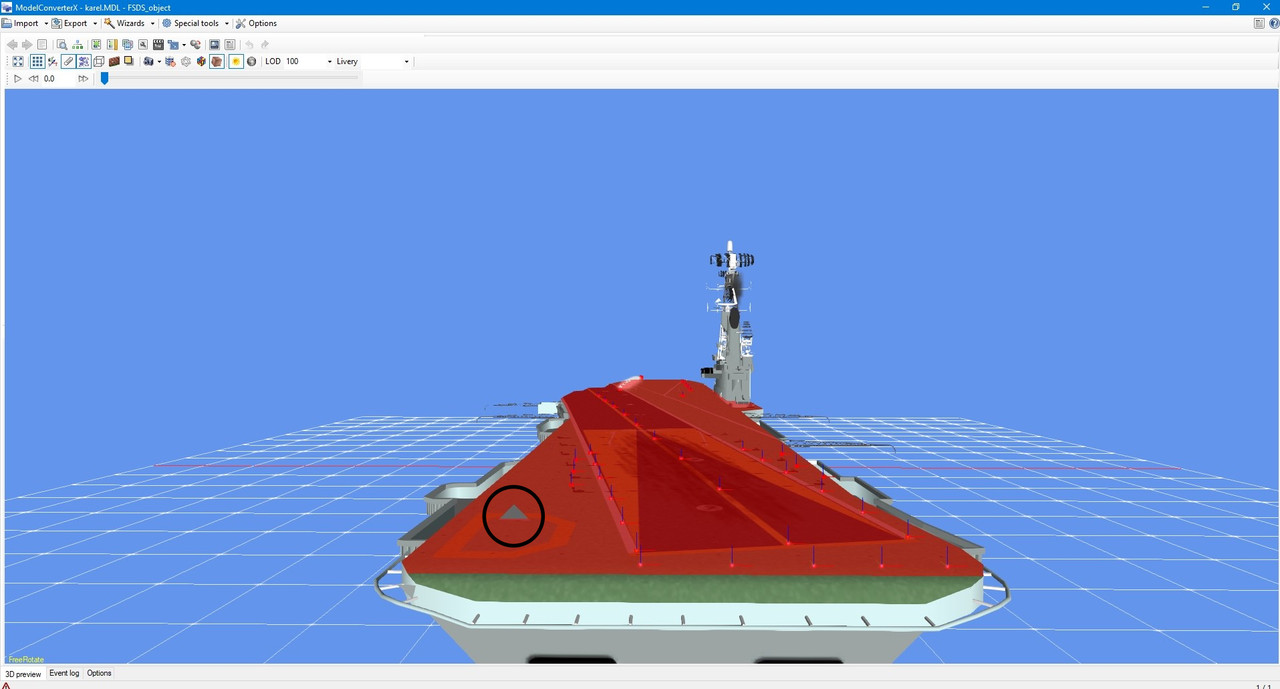
I was working on the Karel Doorman and noticed this triangle. There was an attachpoint on that spot that I removed. Has anyone here encountered this before and know how to get rid of it?

:dizzy:

Cees
 
Hello Cees,
Open the Hierarchy Editor and search for that part in scenegraph,
when the part is red highlighted then click Remove button, that delete the triangle file.

Ulrich
 
Thank you! Great to have experts in this forum! The
Hierarchy Editor is the same as Hierarchy Viewer?​

Cees
 
If this was an animated attached effect, alternative you can open the attached object editor
and search for the effect that you have deleted and delete it here too if present.
 
It was an attached library object. I removed that object and then there was this pesky triangle! :)


Cees
 
It was an attached library object. I removed that object and then there was this pesky triangle! :)


Cees

Attached objects have to have a polygon for them to display, which is usually called an "empty", as although it is drawn it has no visibility or geometry. Although MCX can see it, it's worth compiling and checking in the simulator, as it probably will be invisible.
 
It looks like the rest of an old effect file of the removed object.
That should actually be found in the Hierarchy Editor.
The Editor lists all the existing individual parts of the object.

Sadly I don't own this ship, so i can't have a look. Is it free avaible
anywhere?
 
Attached objects have to have a polygon for them to display, which is usually called an "empty", as although it is drawn it has no visibility or geometry. Although MCX can see it, it's worth compiling and checking in the simulator, as it probably will be invisible.
It is visible in the sim! Otherwise I'd let it rest.

Cees
 
Cees,
If you can't find the triangle in MCX try viewing it in wireframe mode and then search thru the Hierarchy Editor for it. It is easier to see small parts get highlighted this way.

Gavin
 
Thanks Ulrich (and Gavin and DC)! This was an important lesson to use 1.4 from now on. Version 1.3 can't solve this kind of problems.

:untroubled:

Cees
 
HaHa, and I was wondering what you meant by hierarchy viewer.
icon12.png
 
Back
Top