• There seems to be an uptick in Political comments in recent months. Those of us who are long time members of the site know that Political and Religious content has been banned for years. Nothing has changed. Please leave all political and religious comments out of the forums.

    If you recently joined the forums you were not presented with this restriction in the terms of service. This was due to a conversion error when we went from vBulletin to Xenforo. We have updated our terms of service to reflect these corrections.

    Please note any post refering to a politician will be considered political even if it is intended to be humor. Our experience is these topics have a way of dividing the forums and causing deep resentment among members. It is a poison to the community. We appreciate compliance with the rules.

    The Staff of SOH

  • Please see the most recent updates in the "Where did the .com name go?" thread. Posts number 16 and 17.

    Post 16 Update

    Post 17 Warning

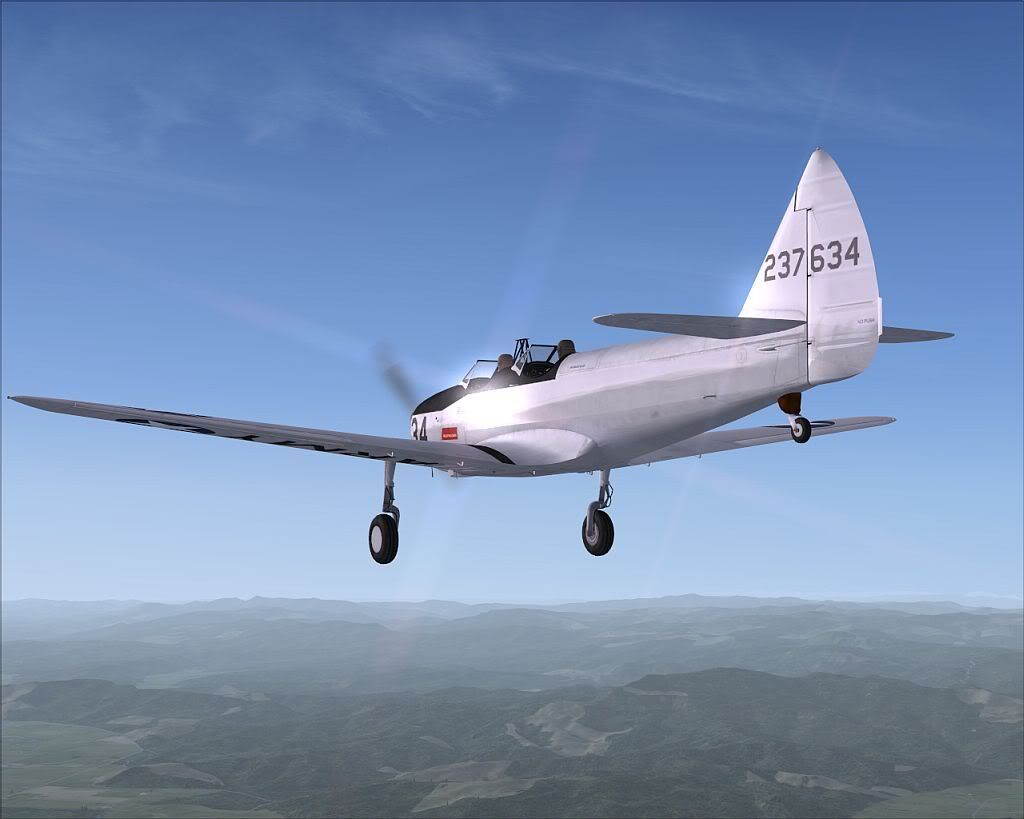
Piglet's PT-19 is out....

First, thank you, Tim, for another excellent bird! :medals:

However, during a distance flight today, I got totally lost. I'm a pretty good old-fashioned navigator, so I couldn't figure out how I ended up so far off course. When I finally broke down and cheated (checked the GPS), I noticed that my compass (in both cockpits) read 140 while the GPS read 180. Yep, the compass seems to be 40 degrees off to the left.
Am I the only one experiencing this? Have I just missed something stupid?

I believe the compass in the center of the console is controlled by the Gyro Compass function with precession turned on which means it has to be continually corrected to a magnetic compass to remain accurate. I didn't notice if there was also a Mag Compass in the cockpit to correct to. If not, you could always change the XML gauge to display Whiskey Compass instead of Gyro Compass for the long cross countrys.

Dave

Not the precession that is causing it. The "gyro_compass_strip.bmp" is offset by 45 degrees. The file in the DC3 seems to work to get rid of the 45 offset. Only thing that is still amiss is the DG is not adjustable. Not sure why.

Dave
 
I just posted the livery to the download section and discovered that Wodzu had already posted the same livery. My guess is that the two are not identical since I could only find one image to work from and much of the rest was guesswork. Ah well. . .No more for me anyway. That livery quenched my thirst for repainting the PT-19. Time to enjoy flying it now!!:salute:
 
gyro_compass.xml

Hello,

I have edited the gyro_compass.xml code. Don't forget to keep a safegard copy of the original code outside PT-19.cab.

The xml that is working on my computer is:

<Gauge Name="gyro_compass" Version="2.0">
<Image Name="gyro_compass_background.bmp"/>
<Element>
<Position X="27" Y="34"/>
<MaskImage Name="gyro_compass_window.bmp">
<Axis X="32.5" Y="0"/>
</MaskImage>
<Image Name="gyro_compass_strip.bmp">
<Nonlinearity>
<Item Value="0" X="236" Y="0"/>
<Item Value="360" X="57" Y="0"/>
</Nonlinearity>
</Image>
<Shift>
<Value>(A:Heading Indicator,degrees) dnor</Value>
</Shift>
</Element>
<Element>
<Position X="56" Y="34"/>
<Image Name="gyro_compass_line.bmp"/>
</Element>
<Element>
<Position X="58.5" Y="89.5"/>
<Image Name="gyro_compass_knob.bmp">
<Axis X="13.5" Y="13.5"/>
</Image>
<Rotate>
<Value>(G:Var1) dgrd</Value>
<Delay DegreesPerSecond="360"/>
</Rotate>
</Element>
<Mouse>
<Tooltip ID="TOOLTIPTEXT_HEADING_INDICATOR_HEADING"/>
<Area Left="45" Top="76" Right="58" Bottom="102">
<Cursor Type="DownArrow"/>
<Click Repeat="Yes">0 (>K:GYRO_DRIFT_DEC) (G:Var1) 5 - s0 0 < if{ 340 } els{ l0 } (>G:Var1) </Click>
</Area>
<Area Left="59" Top="76" Right="74" Bottom="102">
<Cursor Type="UpArrow"/>
<Click Repeat="Yes">0 (>K:GYRO_DRIFT_INC) (G:Var1) 5 + 360 % (>G:Var1) </Click>
</Area>
</Mouse>
</Gauge>


The basic problem was related to the gyro_compass_strip.bmp. This bitmap image is 254 pixels by 41 pixels. The left N is located at 57 pixel and the right N is located at 236 pixels.

Now in order to have a working knob in the MAIN PANEL we should edit the aircraft.cfg file (Once again make a safegard copy of the original file uunder another name) Edit the file and replace the [direction_indicators] section by

[direction_indicators]
//1 Type: 0=None, 1=Vacuum Gyro, 2=Electric Gyro, 3=Electro-Mag Slaved Compass,

4=Slaved to another
//2 Indicator number of slaving indicator if Type = 4
direction_indicator.0=1,0 ;*** 0,0

Have a good virtual trip

Benoit
 
Great find Benoit.

I tweaked it a bit more:

<item value="0" x="<strong">Item value="0" X="238" Y="0"
<item value="0" x="<strong">
I think this may be a bit closer, but your tweak is much better as well.

Thanks for the hint.</item></item>
 
This is why I love developers who use XML gauges. The community can fix anything that is faulty themselves without having to wait for an update of the model. Problem identified one day, fixed the next.

This is a great community.

Dave
 
Off in to the sunset :mixedsmi:

pt-19-3.jpg
 
I can see the original gyro_compass.xml in the cab file, and I have made a new xml as detailed above, but how do I get the new one into the cab, please? I can extract and edit the original, but I can't get it back in to replace the old one.

Also I modded the aircraft.cfg as above and that doesn't seem to make any difference either. Is it me?
 
The easiest way around it is to just create a folder with the name of the cab file in that directory, copy all the files from the cab to the folder and change the cab to *.Cab.Orig. then you can modify the files in the folder to your hearts content.

Dave
 
I can see the original gyro_compass.xml in the cab file, and I have made a new xml as detailed above, but how do I get the new one into the cab, please? I can extract and edit the original, but I can't get it back in to replace the old one.
Unpack the cab file using any unzip utility (Winzip, 7zip, WinRAR etc.) which will give you a folder containing the gauges. Replace the old gauge with the new one and rename the cab file as suggested. You don't actually need to repack the cab file as FSX will read the gauges from the folder quite happily. The only advantages to using a cab file are a slightly smaller footprint in terms of disc space used and less time/bandwidth used for the initial aircraft download.

Also I modded the aircraft.cfg as above and that doesn't seem to make any difference either. Is it me?
It won't make a difference until you rename (or remove) the cab file as FSX will read the cab file to find the gauges before it will read the folder and so it will use the original file rather than the modified one.
 
After several false starts and a certain mount of bad language I now have the compass working from a PT-19 folder in the gauges folder. if I wanted to convert it back to a cab would I just zip it and rename from .zip to .cab, or is that too simple?

The adjustment knob still doesn't do anything, though. Is it because of the *** in this line: direction_indicator.0=1,0 ;*** 0,0 ?
 
After several false starts and a certain mount of bad language I now have the compass working from a PT-19 folder in the gauges folder. if I wanted to convert it back to a cab would I just zip it and rename from .zip to .cab, or is that too simple?
I am afraid it is not that simple. While you can unpack a .cab file with almost any unzip utility you need the tool Microsoft provided in the FSX SDK to repackage the .cab file.
 
I think I know the answer but...

..is there anyway that this beautiful model can be made to work in FS9?

RD
 
Randy,
There is a good version by Daniel and Denis Da Silva of the PT-19 for FS2002/FS2004. A google should find it.
 
Randy, I went the other way. I went back to FS9 and GW3, because there were too many aircraft done for FS2004 too good not to fly them anymore. Since I reinstalled GW3 I only fly FSX for testing purposes.....

Cheers,
Huub
 
Back
Top