• Please see the most recent updates in the "Where did the .com name go?" thread. Posts number 16 and 17.

    Post 16 Update

    Post 17 Warning old domain name stealing credentials

  • Special Server Maintenance

    Just when you think you have everything running some what better...

    You get a message from the Hosting company. Short story they need to move us to a new server. I have been working with them to plan a good date for all concerned. Here is what we have come up with as a schedule.

    1. November 4th 17:00 -5UTC shut off the forums and start backup proceedures. During this time there will be no access to the forums or the Resource Section.
    2. November 5th Continue with Backups and download same until complete.
    3. November 6th 7:00 turn over server to hosting company to move system to new server
    4. November 7th - 8th restore backups and upgrade forum software.

    If all goes well we should be back online on November 8th.

    To keep you updated we will post updates on AVSIM forums.

    Thank you for your support.

Portover view issues

Willy

Administrator
Staff member
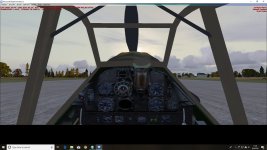
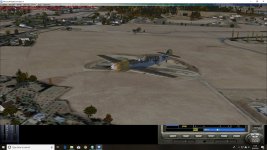
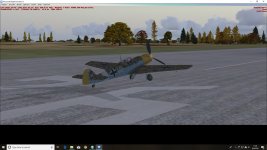
I like to take some old aircraft for FS9 and port it over just to see if I can get it to work in FSX like it does in FS9. It's usually a learning experience for me. Sometimes, I get a pleasant surprise, sometimes, something totally hosed up, and usually something somewhere in between. But it keeps me out of trouble. Lately I've had this teutonic thing going and decided to see what I could do with the old FS9 Aeroplane Heaven Bf 109E. It's actually been working well, but I've got an issue with the views that I've ran into before doing this but for some silly reason, I think I want to try and see what it would take to fix it. It's like FS won't cover the whole screen, leaving a black section at the bottom. A 2d panel and pop ups will work well, but not the vc or outside views. The question is if this is something that's built into the model and nothing can be done or can it be fixed by the user?

Thanks in advance

Willy

PS: Forgot to add the screenshots... oops (I know the vc textures need some updating, but if I can get the view to act right, it's on the to do list)
 

Attachments

  • wm_-2018-sep-8-001.jpg
    wm_-2018-sep-8-001.jpg
    54.4 KB · Views: 0
  • wm_-2018-sep-8-002.jpg
    wm_-2018-sep-8-002.jpg
    53.6 KB · Views: 0
  • wm_-2018-sep-8-003.jpg
    wm_-2018-sep-8-003.jpg
    65.3 KB · Views: 0
Easy fix.
Open the panel.cfg, and search for the line "render_3d_window=1" and delete it.
 
Thanks very much! Sometimes it's the simple stuff that jumps up and bites you in the rear. Now, I've got a few more that need that fix.
 
Hello-

Usually when I run into this situation, I go to the bottom of the panel.cfg to the SIZE Y= value, and make sure that it's 6143... Typically in these cases it's not...

-Mike Z.

P. S. You got me curious, so I checked out the panel.cfg in the AH 109E panel folder, and sure enough, SIZE_Y= was 5296... so I changed it to 6143 and copied the aircraft into FSX with no issues!

-M. Z.
 
Last edited:
Back
Top