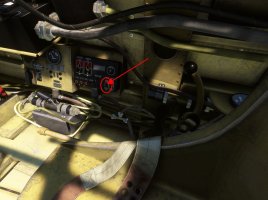
Problem with AeroplaneHeaven A6M-2 Zero and early Spitfire aircraft

Good morning

I recently bought a Mitsubishi A6M-2 Zero. It's a very nice aircraft, but I'm having a problem with it.
If I press the reset button (like in the videos), the entire MSFS2020 simulator freezes
and then shuts down after a few seconds.

A similar thing happens with the early Supermarine Spitfire. Clicking this button shuts down the simulator.
I tested it on a clean, updated simulator without any add-ons or third-party aircraft.
Here are photos of the areas that cause the simulator to freeze. Is this a known issue,
or is something wrong with my settings?

Best regards
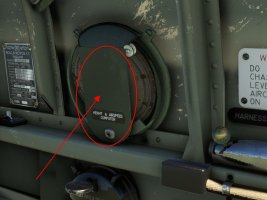
ScreenHunter_01 May. 07 23.21.jpg
ScreenHunter_02 May. 07 23.28.jpg
 
I contacted support, but I was wondering if anyone else had experienced this error, so I asked.

Best regards.
I have both aircraft. I will fire them up when I get home from work in a few hours and see if I can’t replicate the issue. I’ll let you know. Cheers!
 
I would be very grateful :)

I've sent a description of the problem and the Windows crash logs,
but these are more technical descriptions: Faulting process ID: 0x192c and causing the error: XboxPcTray.exe and Microsoft.Gaming.Telemetry.Win32.dll

I managed to work around this issue by enabling and disabling developer mode before flying with the loaded aircraft. Then, when I click on these areas, the aircraft loads normally without any errors or simulator crashes.

However, I'm curious if this is just happening on my computer, or if something broke after the MSFS2020 updates.

Regards
 
Momo81 - one more request
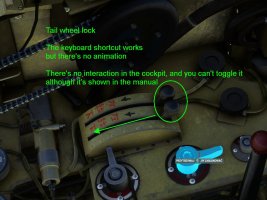
Could you check the tailwheel lock?
The keyboard shortcut works,
but there's no animation.
There's no interaction in the cockpit and it can't be toggled,
even though it's shown in the manual.
ScreenHunter_04 May. 08 22.24.jpg
 
Momo81 - one more request
Could you check the tailwheel lock?
The keyboard shortcut works,
but there's no animation.
There's no interaction in the cockpit and it can't be toggled,
even though it's shown in the manual.
View attachment 187607
Hey mate, I forgot to hop on here and let you know what the results of my experiment are: it crashes my sim in both aircraft. I just tried it again in the Spitfire with the same results. I’m about to try these other things out, too.
 
Thanks for the reply.

I contacted their tech support, and they initially responded about the wheel lock issue, saying I was the first person to report the bug, that the wheel lock wasn't working, and that they were investigating it... unfortunately, they didn't receive a response. I wrote again because "they've lost my email address."
They replied that they had intentionally removed the tail wheel lock (because the original Zero didn't have one). The online videos showing it in action are old, and the manual that came with the plane is outdated ;(
Good, good... the keyboard shortcut works, so you can lock both tail wheels.

Regarding the system freezing when "spawning" the plane, I suspect something is wrong with the simulator... good, good.

I found a solution to this problem. Before flying these planes, I turn developer mode on and off. Then, when spawning the plane, the system doesn't freeze (because developer mode requires a few things, like memory test limitations) and works.

Best regards.

PS. If others are also experiencing this issue, you can contact them and let them know what they'll do in the next update.
 
Back
Top