• Please see the most recent updates in the "Where did the .com name go?" thread. Posts number 16 and 17.

    Post 16 Update

    Post 17 Warning old domain name stealing credentials

  • Special Server Maintenance

    Just when you think you have everything running some what better...

    You get a message from the Hosting company. Short story they need to move us to a new server. I have been working with them to plan a good date for all concerned. Here is what we have come up with as a schedule.

    1. November 4th 17:00 -5UTC shut off the forums and start backup proceedures. During this time there will be no access to the forums or the Resource Section.
    2. November 5th Continue with Backups and download same until complete.
    3. November 6th 7:00 turn over server to hosting company to move system to new server
    4. November 7th - 8th restore backups and upgrade forum software.

    If all goes well we should be back online on November 8th.

    To keep you updated we will post updates on AVSIM forums.

    Thank you for your support.

Question about specular files,bump files

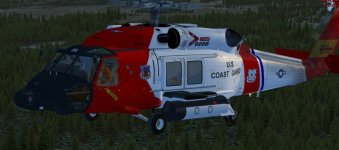
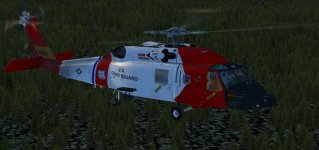
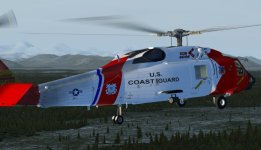
Ok that worked, used a grey scale, slightly darker on the spec file and a white spec alpha and loaded up the sim and BAM, no more shine when the light hits the areas I was previously talking about AND there is a lot more uniformity over the whole aircraft ( I changed all the spec maps to the above solution ), now you can see all the details that I want to show up and it looks pretty good . Thanks to all for you help, Jeansy,000rick000 . Very helpful indeed

Bill
 
Definitely the look I was hoping for , no shine when the lights hit the surface so the details don't get shined out so to speak

Bill
 

Attachments

  • 1.jpg
    1.jpg
    54.6 KB · Views: 1
  • 2.jpg
    2.jpg
    57.6 KB · Views: 0
  • 3.jpg
    3.jpg
    58.5 KB · Views: 1
Thanks again fellas , it’s coming together, seahawk72 is refining the mfd to operate much more realistically , Looks great , a few more things to do and hopefully I can get this repaint out soon

Bill
 
I will just add that even with the detailed explanations here, it still depends on how the materials were set up by the modeler.

Look closely at these options, especially those within the yellow band, and you can see how reflections and alphas can be used in different ways.

The SDK materials section (teapot) gives a reasonable explanation but still leaves a lot to experimentation.

http://www.sim-outhouse.net/downloads/SOHTeam/mtls.jpg
 
Bit rich from a developer who doesnt know how to use bump or spec mapping


Cheers rick for elaborating further

i didnt want to go too much into detail but you did a great job on expanding my very basic explanation which i wrote around 1;30 am

Bill theres a very detailed Microsoft sdk webpage on painting, it can be heavy reading but it explains all the different styles to map and paint fsx modeled aircraft

But i warn you its heavy reading as it more directed at the developer level for them to include those textures

But you have more than enough here to work with

Thank you, Matt.:wavey:
 
Back
Top