• Please see the most recent updates in the "Where did the .com name go?" thread. Posts number 16 and 17.

    Post 16 Update

    Post 17 Warning old domain name stealing credentials

  • Special Server Maintenance

    Just when you think you have everything running some what better...

    You get a message from the Hosting company. Short story they need to move us to a new server. I have been working with them to plan a good date for all concerned. Here is what we have come up with as a schedule.

    1. November 4th 17:00 -5UTC shut off the forums and start backup proceedures. During this time there will be no access to the forums or the Resource Section.
    2. November 5th Continue with Backups and download same until complete.
    3. November 6th 7:00 turn over server to hosting company to move system to new server
    4. November 7th - 8th restore backups and upgrade forum software.

    If all goes well we should be back online on November 8th.

    To keep you updated we will post updates on AVSIM forums.

    Thank you for your support.

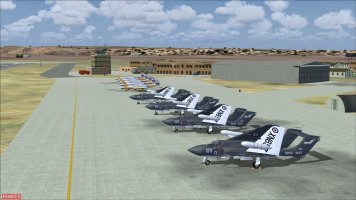
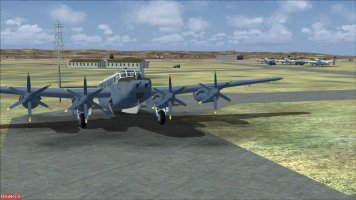
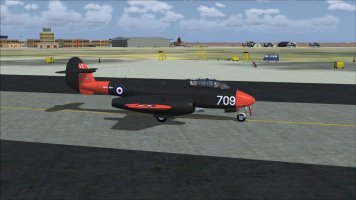
RAF Malta 1962 v3

Just uploaded the 6th part of our Middle east/near east scenery project. This is the last big add-on, but there may be more bits and pieces to come. Please read AVP's comprehensive read-me, as there's quite a lot of important info and a list of other scenery's that im guessing you've already installed. One important note, please uninstall any previous Malta scenery by me. Specifically Malta-65.zip which i uploaded a few years back.
as there will probably be conflict
Kalle has produced some extra RAF objects for these scenery's which ive included in this package. Mainly crew buses and staff car's, and cockpit cooling trollies. Just unzip the included zip and copy/paste into the KLB Static Library Objects folder already installed in your addon scenery folder, overwriting when prompted

1.jpg4.jpg6.jpg
 
Just uploaded the 6th part of our Middle east/near east scenery project.

Where did you upload it? As i can’t find it nowhere…

Please read AVP's comprehensive read-me, as there's quite a lot of important info and a list of other scenery's that im guessing you've already installed.

One important note, please uninstall any previous Malta scenery by me. Specifically Malta-65.zip which i uploaded a few years back.
as there will probably be conflict.

Does this Scenery also conflict with Daniel Chircop’s Malta Airport Scenery?

As I’m planing to keep Daniel Chircop’s Malta Scenery… as well as “Malta-65.zip”
and maybe (if the conflicting is the case) only use the included AI Traffic.

Btw.:
Does anybody remember, that I once made an FSET Photoreal for the whole Malta Island as well as Gozo Island?
I lost that during a Major HDD Crash… and as Flightsim.com is down (where i actually uploaded that), I hoped that somebody of you might still has it and could eventually share it with me again. That would be massively appreciated…

Thanks a lot.
 
Last edited:
Just check'd, its up in resources now.

This is a stand alone project based around an early 1960's time line. and wil conflict with any other add-ons, esp modern airfield scenery, the photoreal probably wouldn't work very well either. A good mesh is probably a good idea although there were a few problems to solve as AVP and myself use different mesh's
 
Hi guys, AVP here. Was away yesterday when this got released but did want to clear up one or two things.

First, Malta 1965, when I wrote the instructions it does say the Malta 1965 was required as I hadn't planned to include the original texture folder and other bits that were in it but I see Ian did add the texture folder to the release so you can do it either with, just replacing the scenery folder with this one or a complete removal of the old and install this one.

Second to Bazel's questions and to reinforce Ian's comments. This scenery will not be compatible with any other Malta sceneries, but you can have both in your scenery lib but only one active at a time. Photoreall, I have no idea how that would work and agree with Ian, probalby not well at all but I don't have it so....

Mesh is important for the cliffs, especially around the waters at Hal Far. Ian and I use different mesh (I use Global 2010 payware) and was able to acheive shear cliffs at the waters edge as in real life but with Ian's meash he had water climbing up the cliffs so we did our best to compromise in getting cliffs set back a bit to stop the water climbing up the sides of the cliff but again, users have different meshes or none at all so your results can be different. The ADE project files for the airports are included and if you have issues and are familiar with using ade you can modify the flatten flies within it to try to get better results for your particular setup.

I will be releasing additional traffic files with some airport modifications shortly to add additional interesting traffic or make previous releases work a little better (parking codes etc.. ) with the traffic that has been added since their release.

Enjoy!
Al
 
Love it..

In the LMML traffic file it refers to "ACG_Canberra_PR9_39sqn_WE137A_AI", I've hunted high and low with no joy..any idea where I can find the repaint?

Thanks again


Jim
 
Love it..

In the LMML traffic file it refers to "ACG_Canberra_PR9_39sqn_WE137A_AI", I've hunted high and low with no joy..any idea where I can find the repaint?

Thanks again


Jim
I cant help im afraid, ive looked through my aircraft folder's and i cant find it either. AVP handled the traffic side of things so maybe he'll chip in
 
Hi Jollyrodger, That entry is nothing more than a reuse of [Fltsim.8] which uses the texture PR3 which I believe was part of the original JY Canberra. I just created another entry [Fltsim.25] in my case, that uses that texture. It appears I inadvertently left out that entry to add to your aircraft.cfg. Find attached my complete Aircraft.cfg and you can just copy fltsim.25 entry into your Aircraft cfg. Apoligies for that oversight, it was one of the earller ones I had created and forgot about it.
 

Attachments

  • aircraft - cfg.txt
    27 KB · Views: 6
Hi Jollyrodger, That entry is nothing more than a reuse of [Fltsim.8] which uses the texture PR3 which I believe was part of the original JY Canberra. I just created another entry [Fltsim.25] in my case, that uses that texture. It appears I inadvertently left out that entry to add to your aircraft.cfg. Find attached my complete Aircraft.cfg and you can just copy fltsim.25 entry into your Aircraft cfg. Apoligies for that oversight, it was one of the earller ones I had created and forgot about it.
Many thanks for that, just my OCD kicking in....

Jim
 
As both members before me, i just got to test the scenery now... and wanted to say a huge thank you for that gem of a scenery!

Very nicely done. Will later on attach some screenshots, if allowed... maybe tomorrow or tuesday...
 
Back
Top