• Please see the most recent updates in the "Where did the .com name go?" thread. Posts number 16 and 17.

    Post 16 Update

    Post 17 Warning old domain name stealing credentials

  • Special Server Maintenance

    Just when you think you have everything running some what better...

    You get a message from the Hosting company. Short story they need to move us to a new server. I have been working with them to plan a good date for all concerned. Here is what we have come up with as a schedule.

    1. November 4th 17:00 -5UTC shut off the forums and start backup proceedures. During this time there will be no access to the forums or the Resource Section.
    2. November 5th Continue with Backups and download same until complete.
    3. November 6th 7:00 turn over server to hosting company to move system to new server
    4. November 7th - 8th restore backups and upgrade forum software.

    If all goes well we should be back online on November 8th.

    To keep you updated we will post updates on AVSIM forums.

    Thank you for your support.

Release Notes (1.16.2.0) Sim Update IV Now Available

When I disable autotuning, my download speed was cut drastically.

One of the Zendesk fixes is to limit your download speed with Netlimiter, so it's not necessarily a bad thing. When I first disabled autotuning, the download wouldn't resume at all. I reset it with the command "netsh int tcp set global autotuninglevel=disabled enable" and then tried disabling IPv6 which worked brilliantly until a large file (fs-base) began downloading. I then disabled autotuning again, with IPv6 also disabled, and it worked perfectly. I don't know what caused this looping and sticking issue to start with; MSFS updates worked perfectly before Christmas.
 
Still getting CTD's.... so.... 2 areas of community folder fail identified. 1. H135 and all associated 3rd party liveries removed. 2. 20m mesh, german and austrian alps and any associated scenery ads to this area. That alone freed up about 4 gigs of data.

I will just wait now for the next H135 update which won't be long and hope it will work.

- d
 
Still getting CTD's.... so.... 2 areas of community folder fail identified. 1. H135 and all associated 3rd party liveries removed. 2. 20m mesh, german and austrian alps and any associated scenery ads to this area. That alone freed up about 4 gigs of data.

I will just wait now for the next H135 update which won't be long and hope it will work.

- d

It should be on tomorrow with V. 1. A big fly-out is organized for the occasion around Rio De Janeiro.
 
Anyone else here having CTD after the update . After I pick a airport etc and press fly, it loads and gets about halfway through the load and crashes every time . Apparently plenty of people are having this issue . Funny thing is , I can pick a flight like a dangerous approach in the menu and it loads fine and I can fly it but when I pick a airport/plane of my own choosing the sim crashes every time ? Very frustrating, any ideas ? There are several threads on the adobo msfs site but no answers from the asobo people .

Bill
 
Anyone else here having CTD after the update . After I pick a airport etc and press fly, it loads and gets about halfway through the load and crashes every time . Apparently plenty of people are having this issue . Funny thing is , I can pick a flight like a dangerous approach in the menu and it loads fine and I can fly it but when I pick a airport/plane of my own choosing the sim crashes every time ? Very frustrating, any ideas ? There are several threads on the adobo msfs site but no answers from the asobo people .

Bill

This is usually caused by an offending addon in your community folder and is quite common. Try moving all contents out of the community folder and try again. If a flight loads then reinsert the addons one by one to verify which caused the problem.
 
Thanks for the reply’s, yowza , moving and replacing addons is gonna be a daunting task, got like I don’t know 50 plus gigs of addons . But it’s a long weekend so I’ll start tonight :banghead:

Thanks again

Bill
 
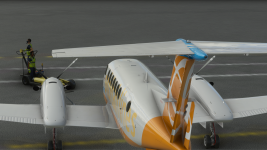
One issue found in the update is a broken model file for the King Air. The rudder trim tab isn't animated correctly.
 

Attachments

  • Microsoft Flight Simulator Screenshot 2021.05.26 - 23.18.37.67.png
    Microsoft Flight Simulator Screenshot 2021.05.26 - 23.18.37.67.png
    4.2 MB · Views: 72
well i updated my vid drivers and removed all the addons from community folder and of coarse it works . The only thing I see thats different is the splash screen is not the updated smaller one ? im still getting the original splash screen I had before the update ? I did have the smaller newer one when I first updated to the new version ? then after shutting the computer down for the night and restarting the next day is when it would CTD . It works good now so ill start putting addons back in and see what happens . Thanks for the help

Bill
 
zsoltquack
I can't start as an administrator It stops with an error!​


I had the same problem yesterday. I was able to "LEFT CLICK" the old fashioned way and could run the simulation ! :dizzy:

Oh brother ! Let me get the King Air out for a spin.
 
Back
Top