• Please see the most recent updates in the "Where did the .com name go?" thread. Posts number 16 and 17.

    Post 16 Update

    Post 17 Warning old domain name stealing credentials

  • Special Server Maintenance

    Just when you think you have everything running some what better...

    You get a message from the Hosting company. Short story they need to move us to a new server. I have been working with them to plan a good date for all concerned. Here is what we have come up with as a schedule.

    1. November 4th 17:00 -5UTC shut off the forums and start backup proceedures. During this time there will be no access to the forums or the Resource Section.
    2. November 5th Continue with Backups and download same until complete.
    3. November 6th 7:00 turn over server to hosting company to move system to new server
    4. November 7th - 8th restore backups and upgrade forum software.

    If all goes well we should be back online on November 8th.

    To keep you updated we will post updates on AVSIM forums.

    Thank you for your support.

[Released] SBuilderX V 3.15

Great news Mark! And very nice of him to share the code. This way at least there could be more developers involved in this great tool and keep it alive and updated.
 
Yes, I think making SBX a public Github project is a tremendous step forward. There is huge potential in this application.


Cheers,
Mark
 
Thanks Mark, got it and installed.

I'll spend some time with it today and post up any bits that may be of interest. I've got a bunch of work that needs to be done in SBX, I'm looking forward to the improvements. Very, very much appreciated!:encouragement:
 
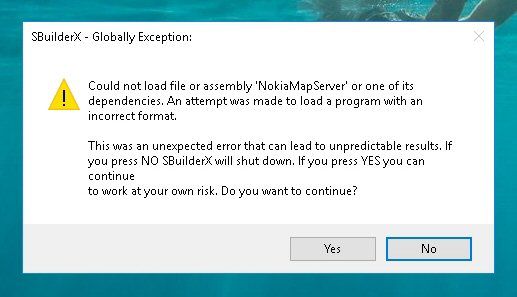
Installed, replaced the various pointers in the cfg file to show current folder name change and I get this:

SBX_error.jpg
 
Installed, replaced the various pointers in the cfg file to show current folder name change and I get this:

SBX_error.jpg

Hi!
You have to move all the server "dll" 's from the folder "Tiles" to the main folder where the main program is located.

Giorgio.
 
Hi!
You have to move all the server "dll" 's from the folder "Tiles" to the main folder where the main program is located.
Giorgio.
Why? Nothing about that in the readme and the "Tiles" folder was included in this download. . . .that's where they belong.
 
Did you copy the new version over the old one?
I did not have this effect on my system.
Cheers,
Mark
Yes I did. I also changed the folder name, which meant I had to make those changes in the various cfg files as well as the "SBX" and "SBP" files for the one scenery I'm trying to build.
 
The tile server dlls should stay in their designated directory. What makes me wonder is that the error references to the Nokia Map Service, which is not used in this SBX build.

Ahh, and you should delete the old sbuilderx.ini file prior to the start of the new sbuilderx.exe!


Cheers,
Mark
 
The tile server dlls should stay in their designated directory. What makes me wonder is that the error references to the Nokia Map Service, which is not used in this SBX build.
Ahh, and you should delete the old sbuilderx.ini file prior to the start of the new sbuilderx.exe!
Cheers,
Mark
If you're referring to the configuration file, I did that already.
 
Do you still have the old nokia dll in the tile server directory?

If so, can you delete it and start sbx again?


Best,
Mark
 
Yep, deleted the Nokia references, corrected one mistake "I" made in the "SBX" file information and imported the sbx file with no problems then saved it as a project in order to build a new/correct "SBP" file. All is well. Thanks!
 
Yep, deleted the Nokia references, corrected one mistake "I" made in the "SBX" file information and imported the sbx file with no problems then saved it as a project in order to build a new/correct "SBP" file. All is well. Thanks!

Glad it worked, Ed. We'll update the readme.txt with these instructions.


Cheers,
Mark
 
Back
Top