• Please see the most recent updates in the "Where did the .com name go?" thread. Posts number 16 and 17.

    Post 16 Update

    Post 17 Warning old domain name stealing credentials

  • Special Server Maintenance

    Just when you think you have everything running some what better...

    You get a message from the Hosting company. Short story they need to move us to a new server. I have been working with them to plan a good date for all concerned. Here is what we have come up with as a schedule.

    1. November 4th 17:00 -5UTC shut off the forums and start backup proceedures. During this time there will be no access to the forums or the Resource Section.
    2. November 5th Continue with Backups and download same until complete.
    3. November 6th 7:00 turn over server to hosting company to move system to new server
    4. November 7th - 8th restore backups and upgrade forum software.

    If all goes well we should be back online on November 8th.

    To keep you updated we will post updates on AVSIM forums.

    Thank you for your support.

Renaming files

Navy Chief

Senior Member
I download quite a few files from Flightsim.to, and have, since it came online. However, since the release of MSFS2024, and the eventual addition of "2024 Only" files, I have been renaming downloaded files, adding "2024" at the beginning of the filename. Sometimes it could be days, even weeks before I get around to actually installing them. If I don't rename the files, I end up having to go back to Flighsim.to,and search for the file to check. Just my way of trying to keep things organized. NC
 
Why not have an FS24 folder in the downloads folder?
But I just download files all over the place, Chrome seems to choose a new location each time...
 
Why not have an FS24 folder in the downloads folder?
But I just download files all over the place, Chrome seems to choose a new location each time...
That is what I do. I have folders for all sims that I have. Being ex-army, I love to keep things nice and tidy.

Priller
 
I use an FS24 main folder, then separate aircraft, liveries, and scenery in folders inside.
 
And if y'all used Windsailor, you could just have the downloads install as you download them. Cuts the time to maintain downloads dramatically, especially since updates automatically end up in the right place.

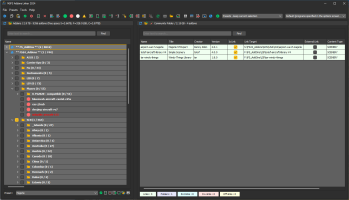
Then I use Addons Linker to keep my installed stuff organized so I can easily activate whatever combos I want to use. FS_Addons is my original 2020 folder; FS24_Addons is FS2024-specific stuff. The FS2020 - compatible folder is FS2020 SDK planes that have been officially updated for FS2024 compatibility. It seems like a lot, but once you get the basic folder setup in place, it makes daily flightsim.to updates -- and selecting only the addons you need -- super-simple!

1737674982789.png
 
Why not have an FS24 folder in the downloads folder?
But I just download files all over the place, Chrome seems to choose a new location each time...
I do have a FS24 folder om my PC, however I download a lot of files on my Samsung Tablet, away from my desktop. Creating a FS2024 directory on my Samsung Tablet and moving files to it and then later on downloading them to my PC is more time consuming. I will look into Windsailor again, but need to learn how to use it with Addon-Linker.
 
Last edited:
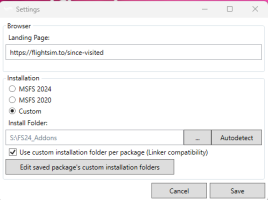
The trick to using it with Addons Linker is to go to Settings in Windsailor and select "Use custom installation folder per package."

1737706553607.png

This way, if I download a plane to s:\FS24_Addons\Aircraft then all future updates of that plane will be installed there automatically -- you just click "Download" on FS.to and you don't have to select a folder, install the addon, etc. Of thousands of add-ons, I've only had issues with a very few that had weird folder structures.
 
Back
Top