• Please see the most recent updates in the "Where did the .com name go?" thread. Posts number 16 and 17.

    Post 16 Update

    Post 17 Warning old domain name stealing credentials

  • Special Server Maintenance

    Just when you think you have everything running some what better...

    You get a message from the Hosting company. Short story they need to move us to a new server. I have been working with them to plan a good date for all concerned. Here is what we have come up with as a schedule.

    1. November 4th 17:00 -5UTC shut off the forums and start backup proceedures. During this time there will be no access to the forums or the Resource Section.
    2. November 5th Continue with Backups and download same until complete.
    3. November 6th 7:00 turn over server to hosting company to move system to new server
    4. November 7th - 8th restore backups and upgrade forum software.

    If all goes well we should be back online on November 8th.

    To keep you updated we will post updates on AVSIM forums.

    Thank you for your support.

Repaint/Livery Question

FlameOut

SOH-CM-2026
Could anyone tell me how to fix this problem?

I like everyone here has a multitude of repaints in their Community Folder. I have (2) liveries that appear to over-write the main model displaying in the aircraft selection UI of MSFS.

This one for the 40th. Anniversary DC-3 Screenshot (84).jpg and this one for the 40th. Anniversary A310-300 Screenshot (85).jpg
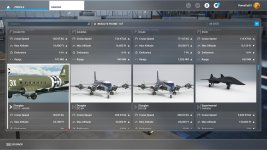
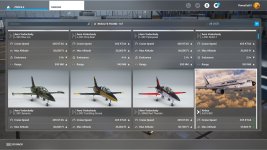
I've already fooled around with the aircraft.cfg for the DC-3 and the A310-300 appears to be locked.

Would it be in the mainfest.json or the layout.json? files that the repainter supplied with his/her texture set?

Thanks,

- Don
 
Could anyone tell me how to fix this problem?

I like everyone here has a multitude of repaints in their Community Folder. I have (2) liveries that appear to over-write the main model displaying in the aircraft selection UI of MSFS.

This one for the 40th. Anniversary DC-3 View attachment 89179 and this one for the 40th. Anniversary A310-300 View attachment 89180

I've already fooled around with the aircraft.cfg for the DC-3 and the A310-300 appears to be locked.

Would it be in the mainfest.json or the layout.json? files that the repainter supplied with his/her texture set?

Thanks,

- Don

I believe the first livery (alphabetical) is displayed.
 
The layout.json is just a listing of the files, and the manifest is market info. Both are actually xml format and can be opened in any text/code editor.
 
I Remember that in FS9, FSX, & P3D it was the Title= *** line that controlled how the UI displayed the aircraft in alphabetical order as you stated.

This is what the repainter supplied in his/her aircraft cfg.

I put that big ol' Z in there thinking that would put this DC-3 livery to the back of list, but it didn't work.
Do I have to put the "Z" in front of the DC-3 like this: ZDC-3 .............. of course, it is a regular size capital Z


[VERSION]
major = 1
minor = 0


[VARIATION]
base_container = "..\douglas-dc3"


[FLTSIM.0]
Title="DC-3 Zthatsallbrother Classic"
Model=""
Panel="class"
Sound=""
Texture="thatsallbrother"
KB_Checklists=""
KB_Reference=""
description="TT:AIRCRAFT.DESCRIPTION"
ui_manufacturer="TT:AIRCRAFT.UI_MANUFACTURER"
ui_type="TT:AIRCRAFT.UI_MODEL_MOD"
atc_id=""
ui_variation="Zthatsallbrother Classic"
ui_typerole="Twin Engine Prop"
ui_createdby="Microsoft"
ui_thumbnailfile=""
ui_certified_ceiling=24100
ui_max_range=2300
ui_autonomy=-1
ui_fuel_burn_rate=-1
icao_airline=""
atc_id_enable=1
atc_airline=""
atc_flight_number=""
atc_heavy=0
atc_id_color="f0f0f0"
atc_id_font=""
isAirTraffic=0
isUserSelectable=1
isFlyable=1
canBeUsedByAITraffic=0
Effects=""
atc_parking_types=""
atc_parking_codes=""
wip_indicator=0

Thanks,
-Don
 
Could anyone tell me how to fix this problem?

I like everyone here has a multitude of repaints in their Community Folder. I have (2) liveries that appear to over-write the main model displaying in the aircraft selection UI of MSFS.

This one for the 40th. Anniversary DC-3 View attachment 89179 and this one for the 40th. Anniversary A310-300 View attachment 89180

I've already fooled around with the aircraft.cfg for the DC-3 and the A310-300 appears to be locked.

Would it be in the mainfest.json or the layout.json? files that the repainter supplied with his/her texture set?

Thanks,

- Don

... some of the add-on Livery´s come with a Model and a Texture folder, try with delete the Model folder and see what happens ~


HB
 
@ Brytskiva,

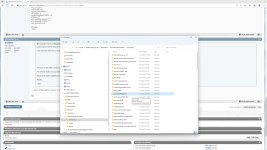
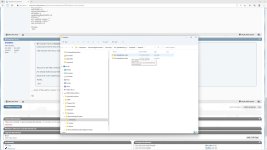
The repainter's supplied folder set for this repaint
Screenshot (89).jpg has (2) subfolders Screenshot (90).jpg the folder named "dc3-thatsallbrother-Retro" did indeed have a model folder within it, so I moved it out to my desktop. I did not amend anything to the aircraft.cfg. file in this folder that dealt with the: Model="cargostd" section, I left that unaltered.

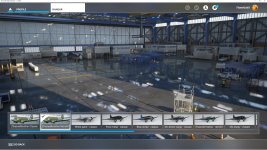
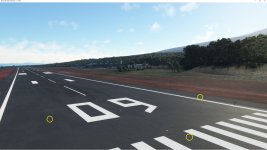
Removing that model folder only caused the aircraft not to show up in my aircraft Hanger Screenshot (87).jpg and only gave me the (3) external lights in the MSFS simulation Screenshot (88).jpg

Maybe I have to edit the aircraft.cfg file to read: Model=""

I'll revist this when I get off work this evening.

Thanks,

- Don
 
@ Brytskiva,

The repainter's supplied folder set for this repaint
View attachment 89195 has (2) subfolders View attachment 89196 the folder named "dc3-thatsallbrother-Retro" did indeed have a model folder within it, so I moved it out to my desktop. I did not amend anything to the aircraft.cfg. file in this folder that dealt with the: Model="cargostd" section, I left that unaltered.

Removing that model folder only caused the aircraft not to show up in my aircraft Hanger View attachment 89197 and only gave me the (3) external lights in the MSFS simulation View attachment 89198

Maybe I have to edit the aircraft.cfg file to read: Model=""

I'll revist this when I get off work this evening.

Thanks,

- Don


Yes Edit the Livery .cfg like there was no Panel. ------> Panel="" how to do with Model i´m not sure.

HB
 
Last edited:
Nope!

Editing the aircraft.cfg of the "dc3-thatsallbrother-Retro" to read: Model="" gave me a static view looking forward from the cockpit .... I could not look left, right, up, down, or go to external view mode. I could not click on anything in the VC ... the mouse would not move, and I had to "Ctrl+Alt+Del" and shut it down via task manger.

I restored everything back to the original state and I'll have to live with it for now.

Thanks,

- Don
 
Nope!

Editing the aircraft.cfg of the "dc3-thatsallbrother-Retro" to read: Model="" gave me a static view looking forward from the cockpit .... I could not look left, right, up, down, or go to external view mode. I could not click on anything in the VC ... the mouse would not move, and I had to "Ctrl+Alt+Del" and shut it down via task manger.

I restored everything back to the original state and I'll have to live with it for now.

Thanks,

- Don

Hi , i tried the livery , and i leave it as it was, and it works perfectly, no interference with the Original what i have seen ~

HB
 
Back
Top