
-
Please see the most recent updates in the "Where did the .com name go?" thread. Posts number 16 and 17.
-
Special Server Maintenance
Just when you think you have everything running some what better...
You get a message from the Hosting company. Short story they need to move us to a new server. I have been working with them to plan a good date for all concerned. Here is what we have come up with as a schedule.
- November 4th 17:00 -5UTC shut off the forums and start backup proceedures. During this time there will be no access to the forums or the Resource Section.
- November 5th Continue with Backups and download same until complete.
- November 6th 7:00 turn over server to hosting company to move system to new server
- November 7th - 8th restore backups and upgrade forum software.
If all goes well we should be back online on November 8th.
To keep you updated we will post updates on AVSIM forums.
Thank you for your support.
You are using an out of date browser. It may not display this or other websites correctly.
You should upgrade or use an alternative browser.
You should upgrade or use an alternative browser.
Reshade??
- Thread starter warchild
- Start date


Dangerous Beans
SOH-CM-2022
I want access to it to make a profile for Oculus Tray Tool but Windows won't allow it.
The only thing I've really tried so far is taking ownership of both the file and the folder but no luck
The only thing I've really tried so far is taking ownership of both the file and the folder but no luck

Bear in mind that I have the Store version, but I suspect that Steam will be the same, since this is "the" core folder.
C:\Program Files\WindowsApps\Microsoft.FlightSimulator_1.15.10.0_x64__8wekyb3d8bbwe
Also remember that you'll have to change your shortcut every time the sim updates to a new version.
C:\Program Files\WindowsApps\Microsoft.FlightSimulator_1.15.10.0_x64__8wekyb3d8bbwe
Also remember that you'll have to change your shortcut every time the sim updates to a new version.

Bear in mind that I have the Store version, but I suspect that Steam will be the same, since this is "the" core folder.
C:\Program Files\WindowsApps\Microsoft.FlightSimulator_1.15.10.0_x64__8wekyb3d8bbwe
Also remember that you'll have to change your shortcut every time the sim updates to a new version.
For Steam users it is: C:\Program Files (x86)\Steam\steamapps\common\MicrosoftFlightSimulator
Cheers,
Priller

ak416
Members +
There should be a way to take ownership of the Windows Store version folder but I have the Steam version so I'm not 100% sure. Maybe try Googling "take ownership cmd" and see what you can find if you are interested, I had to do something similar a while back when tinkering with Forza Horizon.
If you have an NVIDIA card, you can use NVIDIA freestyle to apply some effects similar to what Reshade offers but there is a performance hit. With the game open, hit LALT+F3 and start playing with the settings. I have a more in-depth tutorial over HERE but it's pretty straight forward.
You'll need the Geforce Experience installed to use NVIDIA Freestyle.
If you have an NVIDIA card, you can use NVIDIA freestyle to apply some effects similar to what Reshade offers but there is a performance hit. With the game open, hit LALT+F3 and start playing with the settings. I have a more in-depth tutorial over HERE but it's pretty straight forward.
You'll need the Geforce Experience installed to use NVIDIA Freestyle.
Dangerous Beans
SOH-CM-2022
There should be a way to take ownership of the Windows Store version folder but I have the Steam version so I'm not 100% sure. Maybe try Googling "take ownership cmd" and see what you can find if you are interested, I had to do something similar a while back when tinkering with Forza Horizon.
I already tried taking ownership of the folder but still no go
The apps folder is even more heavily guarded than the program files folder.
I already tried taking ownership of the folder but still no go
The apps folder is even more heavily guarded than the program files folder.
Proof once more that not installing in the default location is still valid!
Priller
Dangerous Beans
SOH-CM-2022
Proof once more that not installing in the default location is still valid!
Priller
Unfortunately you don't get a choice in this case.
You can install the bulk of the files where you want, mine or on my D drive. But the main support file will go in the Windows apps folder whether you like it or not.
It is possible to change where the Windows apps folder is on the system but its all or nothing, you can't do it on a per program basis and I suspect they will still be protected in the same way. (I haven't tested that assumption though).
For Store owners, paste the entire path into the Windows address bar and you'll get there. You just can't drill down to it.
Dangerous Beans
SOH-CM-2022
For Store owners, paste the entire path into the Windows address bar and you'll get there. You just can't drill down to it.
That's not the problem Tom.
I can drill down to the exe OK, but if I browse to it in as in my case Oculus Tray Tool an I assume Reshade works the same to make a profile I get a popup saying
"FlightSimulator.exe
You don't have permission to open this file
Contact the file owner or an administrator to obtain permission"
I don't want to open the exe, I just want to let Oculus Tray Tool know where it is so it can apply its profile when MSFS starts.
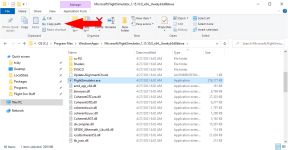
Once you're in the folder, click the exe once, then use the Copy Path button. You should be able to past that into the application.
If that doesn't work, the "official" forum has an entire sub-section on VR. I'm betting you can get a good answer there - the staff have a direct line with the dev's.
If that doesn't work, the "official" forum has an entire sub-section on VR. I'm betting you can get a good answer there - the staff have a direct line with the dev's.
Attachments
Dangerous Beans
SOH-CM-2022
Tried that, same result