Sim has Issues with cloud Layering...

Airbasil

Members +
Hey there,

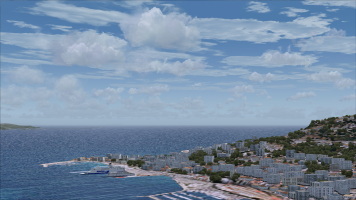
I lately detected that my sim has issues with the cloud layering...

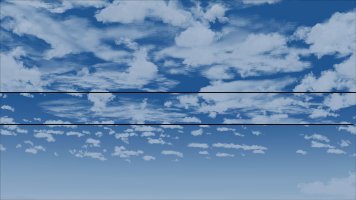
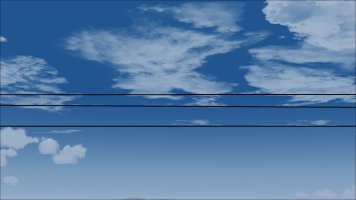
It does some weird Cloud cutting at destinctive lining... does anybody know what that could be?

I've allready tried all from weather changes, to FS9.cfg edits to standard weather cloud visibility changes... nothing helped...

For example: in my sim it looks like that

Neues Bild (10).jpg

this is what i mean: it sometimes does two lines of cutting, then it does three... and i don't know why...
Neues Bild (9).jpg

Neues Bild (11).jpg

also i did try to set my sim back to default and still had the same issues…

is this a graphical issue ? which means my graphics card is finally giving up, or something?

any suggestions and or help would be massively appreciated...

thanks a ton!
 
You might want to check if it also happens when playing video.

Also check the card for dust, check the connectors and if it still is decently seated in the motherboard.

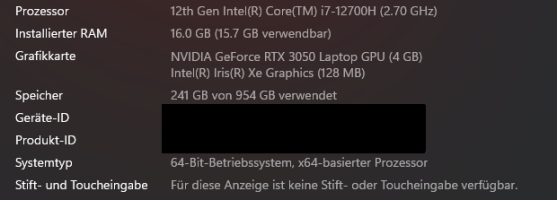
Could you tell us the specs of the rig please?

Priller
 
Could you tell us the specs of the rig please?
Sure that would be just a normal Laptop... nothing fancy... :

Neues Bild.png

And btw: interestingly it only happens with Default weather and FSRealWX V3.0.

It doesn't do it, when i activate the FSUnlimited WX (with the FSInternal Weather app).
 
Oh, ok, it's a laptop! Must have missed that.

Driver issue maybe? Did it start to happen after having installed the FSUnlimited WX (with the FSInternal Weather app)?
 
Oh, ok, it's a laptop! Must have missed that.

Driver issue maybe? Did it start to happen after having installed the FSUnlimited WX (with the FSInternal Weather app)?

Yep. I just discovered it after that. Allthough it also happens without FSUnlimited... just with the Default weather.
 
Then it's definitely not the hardware. try updating all drivers and and windows itself (reboot after every update) and see what gives.

Then it really is up to the FS9 guru's.

Sorry, I tried to help! ;)
 
Then it's definitely not the hardware. try updating all drivers and and windows itself (reboot after every update) and see what gives.

Then it really is up to the FS9 guru's.

Sorry, I tried to help! ;)

Thanks anyways for trying to help. Appreciate your thoughts.
 
Likely the laptop graphics card has been maxed. I doubt the graphics can be upgraded to anything better.
 
perhaps consider first backing up and then deleting that FS9 cfg config file, and thereafter, have the sim create a new default one. If the error no longer persists, then restore from the fs9 cfg back up, your individual cfg edits/modifications, line by line, as you best see fit

further also consider resetting the customizable FS2004 program/application profile within the Nvidia Control Panel and/or with the assistance of Nvidia Profile Inspector to default, base-line values - see if that helps!

edit: never mind the above - reading up online, it appears your visibility sight distance / cloud draw settings within the sim may have to be modified to match what is injected by the likes of FSRealWX V3.0. Moreover, the interval at which the external weather is updated within the sim, may have to be reduced. Perhaps also play around with the settings pertaining to changes in visibility smoothing in FSUIPC and/or any smoothing weather changes in FSRealWX; capping the Max Visibility in FSRealWX or FSUIPC may also also have to be considered

as an aside, I believe this issue @Airbasil has come up in your setup, of late since your recent mentioning of and trials with FSUnlimited WX - perhaps there is a conflict with the sim parameters pertaining to FSRealWX??
 
Last edited:
Seems like I've found the culprit...

It seems like the issue was on my side, not on any addons or the Sim itself... it was just my own selfishness... :D
As i tried to lock the sim in my FS9.cfg to use 4096x4096 solution textures (as high solution as possible in FS9) only, it then produced the issue with the clouds as they are not in 4096x4096 solution but in 1024x1024 only...

So i changed that back to 1024x1024 in my FS9.cfg and there we go... it does not produce those weird lines in the sky anylonger and does not cut any clouds anylonger...also it does not set it up to a certain visibility since i have it set to maximum visibility... it now seems to work fine again.

Anyways, thanks for all your efforts and trying to help me... - sometimes it is just up to the guy behind the computer to find out, that he's the idiot :D in that case its me :D

1786884245966.png
 
@Airbasil thanks for reporting back and glad you resolved the issue; albeit do note that within the cfg file, the maximum supported texture size - TEXTURE_MAX_LOAD value is 1024 x 1024 for FS2004, while for FSX is 4096 x 4096 - just as a heads-up!
 
@Airbasil thanks for reporting back and glad you resolved the issue; albeit do note that within the cfg file, the maximum supported texture size - TEXTURE_MAX_LOAD value is 1024 x 1024 for FS2004, while for FSX is 4096 x 4096 - just as a heads-up!
i know… i just was curiouse, because i’ve seen some pictures posted in the FS2004 Random shots Thread, where one mentioned, that his L-39 was 4096x4096 textured in FS2004… and so i wondered how that would be possible… since FS2004 actually doesn’t support that…

I then tried to lock the Texture_max_load to 4096x4096 in the FS9.cfg and tried to add a similar sized texture to an aircraft (which actually, surprisingly works)… but you then have other issues such as the one with the clouds… :D
 
Last edited:
I then tried to lock the Texture_max_load to 4096x4096 and tried to add a similar sized texture to an aircraft (which actually, surprisingly works)… but you then have other issues such as the one with the clouds… :D
neat thanks for the HU, but apparently that parameter is a one size fits-all, i.e. both for object textures and environment sky textures; and I have indeed read that the tex size capping limits are not hard limits, merely unsupported - so I suppose the possibility of success with 4096 x 4096 exists; anyhow what have you set your mipmaps to?
 
not using any… i use original Textures without Mipmaps… (only if i have some flickering somewhere, mipmapping the Textures, fixes the flickering mostly).
I mean in your fs9 cfg display settings what have you set your mipmaps to ---> can you try increasing it somewhat with the higher tex res, and see if that enables you to keep the 4096 x 4096 value in the texture_max_load

edit: sorry I meant mipbias
 
I mean in your fs9 cfg display settings what have you set your mip maps to ---> can you try increasing it somewhat with the higher tex res, and see if that enables you to keep the 4096 x 4096 value in the texture_max_load

edit: sorry I meant mip bias
MipBias is on 8. Don’t know if you can set that higher than 8 and if that would’ve any effect…
 
sounds about right and your Texture_Bandwidth_Mult and TextureMaxLoad setting values are likewise sufficient I presume?
They are… indeed… and i don’t think going bust with them, that that would have any effect to higher texture resolutions in FS2004… since the main core of the Game simply doesn’t support any higher… unless you go with FSX:SE or higher Plattforms…

Sometimes though i would’ve appreciated if that was possible in FS9… Specially when you fly in regions with pretty big Phototerrains… such as France or Corse or others… a higher resolution there would be massively appreciated… also if the textures loaded much faster without going blurry immediately…

Unfortunately though, we’ve got to live with what we have there… FS9 is now 23 Years old and we’ve got to accept some of the restrictions FS9 has…
 
Last edited:
Back
Top