• There seems to be an uptick in Political comments in recent months. Those of us who are long time members of the site know that Political and Religious content has been banned for years. Nothing has changed. Please leave all political and religious comments out of the forums.

    If you recently joined the forums you were not presented with this restriction in the terms of service. This was due to a conversion error when we went from vBulletin to Xenforo. We have updated our terms of service to reflect these corrections.

    Please note any post refering to a politician will be considered political even if it is intended to be humor. Our experience is these topics have a way of dividing the forums and causing deep resentment among members. It is a poison to the community. We appreciate compliance with the rules.

    The Staff of SOH

  • Please see the most recent updates in the "Where did the .com name go?" thread. Posts number 16 and 17.

    Post 16 Update

    Post 17 Warning

Solomons Carrier Traffic: Testers Needed

ok, so maybe its time for some of them "stupid newbie" questions..

I followed the instructions for installing the carrier track files and effects. i also started at 2000 hours from aggm and flew northwest over the gulf, several times.. thinking that i had obviously missed something somewhere, i installed the new landclass as well as ai carriers and then re-flew the route. As an aid to help with scaling and visualization, i used ai carrier to place one carrier in the gulf so i could judge size and distance.. There was stil no battle group, so, this left me wondering..

Does the carrier track and battle group depend on ai carriers?? and if so, do the entries for the individual ships need to be placed in an ai carriers config file somewhere?? Or is the entire carrier track self supporting and self actuating?? Is there anything besides install the scenry and adjust my traffic sliders ( they are now at 100% ) that i need to do ??

Thanks :)
Pam
 
Does the carrier track and battle group depend on ai carriers?? and if so, do the entries for the individual ships need to be placed in an ai carriers config file somewhere?? Or is the entire carrier track self supporting and self actuating?? Is there anything besides install the scenry and adjust my traffic sliders ( they are now at 100% ) that i need to do ??

You don't need AI carriers; the tracks here are all self-standing, so long as the files are copied in the right places, the proper folder is added to the scenery library, and boat traffic is >= 5%.

I really need to make at least one saved flight so that people can test whether the tracks are working. Any suggestions for a freeware plane?
 
You don't need AI carriers; the tracks here are all self-standing, so long as the files are copied in the right places, the proper folder is added to the scenery library, and boat traffic is >= 5%.

I really need to make at least one saved flight so that people can test whether the tracks are working. Any suggestions for a freeware plane?
hmmm.. intersting, cuz i took all the folders and simply dropped them into my main fsx folder,.. With that ai carriers carrier at one end of the gulf, i was able to see it from the opposite end, and since it was a bit after 2000 hours, all i can think is that the boats simply didnt show up.. I wonder whats different on my machine that they dont show up for me, and yet knowing they show up for other people.
 
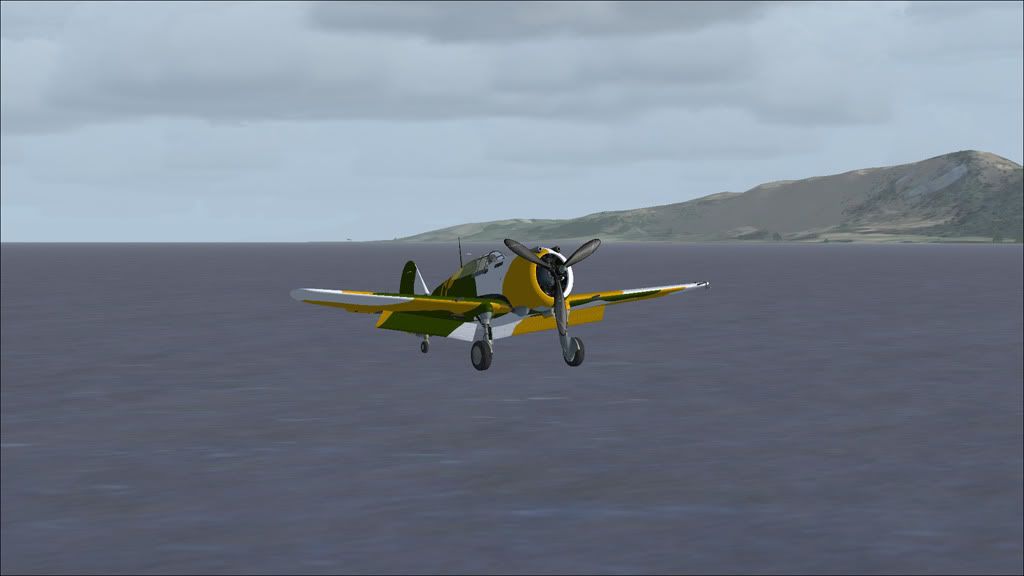
Ok, here's a quick and dirty sample flight using the freeware FM-2 mentioned above: http://www.box.net/shared/65qlk77ym8. Unzip it wherever you keep your saved flights (usually in the Flight Simulator X Files subfolder of My Documents). If everything's installed correctly, you should load on deck the Enterprise. I just landed, so if you want to take off again you'll need to clean up the flaps and tailhook first.
 
my plane dont have a tail hook.. apparently, something somewhere is not being copied corrctly, because i unzipped the folders to my fsx root directory, and well, a picture says a thousand words..

2010-3-13_14-57-44-338.jpg


No Big E.. I've gone through and checked file locations and made sure everything is where its supposed to be, I just dont understand why its not showing up..
 
Assuming all of the files and folders are in the right place, I can think of two explanations:

1. The new scenery folder hasn't been added yet to the scenery library. (I know you're an old hand, but I'm just running through the checklist.)

2. You have an FS9 traffic file installed somewhere. These will work in FSX, but they can block the boat traffic files (which this package is based on). It is possible to convert the old files to FSX traffic format, using the freeware AI Planner -- but I haven't done this myself.
 
It seems to work OK for me. I have seen and landed on the carriers going both directions around Vella Lavella so far. Have not looked for the boats in the slot yet.

Dave
<input id="gwProxy" type="hidden"><!--Session data--><input onclick="jsCall();" id="jsProxy" type="hidden"><input id="gwProxy" type="hidden"><!--Session data--><input onclick="jsCall();" id="jsProxy" type="hidden">
 
I am going to follow up on Pam's suggestion for the larger groups later on. Meanwhile...nice screenshot, Mark!
 
I'm not aware that i've installed any traffic files, but i wont rule out the possibility that one was installed with some of the fs9 software i've installed into fsx.. Theres also a remote possibility that it may be a kerfuggled scenery file, as i have modified rendova using both scenery shortcut, and instant scenery.. oddly, my little airport shows up, as does the yacht and trawler traffic that are default, but then, i would expect them too. i'll try turning off rendova to see if that changes things.. maybe move it to anther directory for a test..
Thanks david..
 
I have the same problem as warchild

I just get the aircraft hanging in the that I chose the f-18 just for testing purposes. I also have the same problem in the package for the Nimitz in that most are OK but some IE.Cuba have no carrier. I would appreciate any help in this as I think 1 solution will correct the other I am unaware of any fs9 AI files but if someone could indicate the folder concerned I will move it out and start again.
 
I just get the aircraft hanging in the that I chose the f-18 just for testing purposes. I also have the same problem in the package for the Nimitz in that most are OK but some IE.Cuba have no carrier. I would appreciate any help in this as I think 1 solution will correct the other I am unaware of any fs9 AI files but if someone could indicate the folder concerned I will move it out and start again.

The main place where you'll find traffic files is C:\Program Files\Microsoft Games\Microsoft Flight Simulator X\Scenery\World\Scenery. But they can be in any scenery folder (as this add-on demonstrates). Other than that, I'm out of ideas.

I do have a new version of the traffic file itself: http://www.box.net/shared/2noa90yvn6. Nothing radically different: after consulting Pam's website, I decided it was reasonable to add a light carrier and at least one more destroyer to the Enterprise groups. To my surprise, the saved flight still works.
 
yeahhh, i disabled all scenery except default, and theres a possibility that rex2 weather had something in memory even though i turned it off when it popped up.. I know other people arent having any problems at all, but for some unkown reason, it just wont show up on my system..
gonna keep investigating it though, see what i can figure out..
 
Version 1.3 is now available for testing: http://www.box.net/shared/tbk6p2ybdr. It adds a bunch of US supply ships (the S.S. Adventure steamer courtesy of Phil Crowther) and IJN destroyers (courtesy of Ron Jeffers). Maps and more details in the readme. I'm basically following the outline provided earlier by Mark Schimmer.

Still looking for some FSX boat models: IJN anything (we now have a destroyer), US Liberty ship, US LST.

NOTE:

If you've installed a previous version, you should delete the earlier trafficSolomonsCarriers.bgl file. Because the package has now broadened, I have divided the traffic into two files, trafficSolomonsIJN.bgl and trafficSolomonsUSN.bgl. If you leave the original .bgl in place you are going to see weird duplicates.

If you've already installed a previous version, you do NOT need to delete any of the boat models. My advice, unless you have a customized setup, is just to copy the new set of models and overwrite the old ones. But if you want to be on the safe side, the new boats are "Japanese Destroyer" and "SS Adventure Steamer AI."

There are also some new effects, so be sure you copy those over too.

The saved test flight still works: see http://www.sim-outhouse.com/sohforu...Testers-Needed?p=374054&viewfull=1#post374054.

HOW YOU CAN HELP: If you see a ship that has run aground, save the flight and send it to me. This is most likely to be a problem with the US supply route, which travels through some narrow passages (where the FSX shorelines don't always match up with the Google Earth images that were used in plotting the route).
 
Back
Top
