Spartan Executive Six Years Later

Wonderful- If you would share a Zip about the pictures you have , would be very great too-it may benefit a interior texture rework too- based on reality

 
Hello,

In the Spartan PBR 2.zip archive, there is a very nice decoration, the PM_N17617-PBR texture!
But it is not FSX compatible!
Does it exist for FSX?
Thank you for your help!

Alain-
-
 
I am working on updating the Spartan Exexutive that I produced back in 2023 of the one owned by Jim Savage here. I am working on a pre-flight popup for it which is requiring some xml gauge coding. A description and illustrations will be in the manual under construction. I will keep ya'all updated here.
 
I have been working on this non-stop for the past 18 days xml coding with a lot of help. The preflight popup is complete as is the P2 Audio Alert System programmed in xml by the dedicated work of EduHir from Austria at FSDevelopers. I want to give him a BIG Attaboy! here, those military know what that is, because with an 8 hour time difference between Austria and the U.S. East Coast he burned a lot of midnight oil with me testing, retesting, recoding etc. It operates exactly like the original because there were no limitations in the SDK. I have been programming this in Prepar3D V4.5 but will move everything into FSX with those models as well. There is NOW an almost vc because Milton Shupe's model will not allow me to remove the small portion of the panel in the interior model without losing ALL of it so it is what it is. I even was able to export an obj for GMax and work on it there but I don't know enough to export it properly so I just left it. I will be adding it to the Resources in both FSX and P3Dv4 after I complete the almost done 40 page illustrated manual which includes the real checklist which Mr Jim Savage furnished to me. I can see the "light at the end of the tunnel".
 
Last edited:
Hello tgycgijoes,

-On the latest version, I notice that we can no longer hide the column, the small control surface is no longer active, and also the tail wheel is no longer adjustable!
Can you restore these two functions on your next model?
Thank you so much!

Alain
 
Hello tgycgijoes,

-On the latest version, I notice that we can no longer hide the column, the small control surface is no longer active, and also the tail wheel is no longer adjustable!
Can you restore these two functions on your next model?
Thank you so much!

Alain
Yes. I have removed the column and added the vc.
 
I just finished installing and testing in FSX and Prepar3D V4.5 and will write up installation instructions for it. The 40 page manual is detailed and describes how to operate all the special gauges in both sims since they are all xml code. Sound files are all .wav so dual compatible as well. Watch for the final post here later in the week. Ya all have a good night.
 
I talked with Milton Shupe today. He said that there was a clickspot for the yoke but I redid the model and left the yoke there but there is no clickspot anymore and it's just in the way so I removed it again along with all the old levers that no longer are applicable to Jim Savage's Spartan. I also spent a few hours in gmax trying to get rid of those pesky plates that distort the vc but had no luck. I have put out a request for help at FSDevelopers because I got a reply but don't know enough about gmax to follow the instructions. My exported mdl from gmax was "garbage" so I am still not ready to put this in resources. Otherwise I did check it out and fixed some more stuff on the vc.
 
After working for a week with comments from FSDevelopers on how to try and remove that plate with the reflection on it in the vc, I was told that it is not possible because of factors to do it in Gmax and Windows 10 without redisigning the aircraft in Gmax which is WAAAAY beyond my skills. I asked for help at FSD from different folks but sadly Gmax design is a thing of the long ago past I have been told. I still tried but the exported mdl from Gmax just doesn't work. If you take the path of many payware and freeware designers, everything is going to MSFS2020 and MSFS2024 and us FSX (even a couple FS9) and P3D flyers are becoming left in the past.

I am going to release the FSX and P3D V4.5 versions into the Resources as they are. I am flying mine with no problems as long as you have a yoke with throttle/propeller/mixture controls internal or external. A bit disappointing but I'm not going to "beat a dead horse (or program)". If anyone reading this HAS Gmax installed and more skills than I, you can export the Spartan7w_internal.mdl into 3ds with Model Converter X and import it into Gmax and try to remove that plate. We have Milton Shupe, the original creator's permission to modify it and distribute it. I just confirmed that with him personally last week in a PM at FSDevelopers. He was kind enough to say he would have done it but has no programs or computer to do it on any more.

The problem why it can't be removed in Model Converter X, like I was able to do with other parts, is that the panel and those pieces are one part. You can't remove them without removing the panel and then the vc has nothing to be affixed to. I've tried all the suggestions from Tom Gibson he generously took the time to detail out for me. Everytime I though it when it seemed like it worked, it didn't. So, as Cody says: "It is what it is".
 
Last edited:
Not sure what you are using to export but the custom xml file is needed for most of my aircraft. This code is required to hide/unhide the yoke. I cannot remember if all that code is embedded in the .mdl file.

<!-- Insert Yoke Code Here -->
<part>
<name>yoke_vis</name>
<visible_in_range>
<parameter>
<code>
(L:Yoke_Vis, bool) 0 ==
</code>
</parameter>
<minvalue>1</minvalue>
</visible_in_range>
</part>

<part>
<name>Yoke_Hiding_Control</name>
<mouserect>
<cursor>Hand</cursor>
<tooltip_text>Hide Yokes</tooltip_text>
<mouse_flags>LeftSingle</mouse_flags>
<callback_code>
(L:Yoke_Vis, bool) ! (L:Yoke_Vis, bool)
</callback_code>
</mouserect>
</part>
 
That code would have been in the modeldef.xml file Milton and yes it would be compiled into the .mdl file at the time of export from GMAX, 3DSMax or FSDS.
 
Thank you Tako_Kichi for that reply. I just don't know enough about this to get it to do what I want (if that's possible). Maybe it's Windows 10 I don't know. That is why I said that I don't know how to do any more with it. I was so excited to be able to create a vc for it and then so disappointed that those parts in the model that are part of the panel in the model distort the bottom. I thought I knew how to remove them after Tom Gibson was so good to take the time to give me a 12 step outline on how to do it AND it looked like it worked. I use the FStools in GMAX but don't get the end result. That is why above I said that anyone who can fix the model is welcome and get my eternal thanks. We could have an undistorted vc in Jim Savage's Spartan for FSX and P3D.
 
I downloaded it and it is beautifully done. I have downloaded it into my hanger. It just bugs me that I cannot get a "perfect" vc into Jim Savage's Spartan that I did. Will you take a look at it and see if YOU can fix that persistent plate distorting the bottom of the vc if you think you can fix it? I have asked for help here and at FSDevelopers and have gotten responses but either I don't know enough of what...like I said above, the panel and that "box" are one part so they can't be "removed" in Model Converter X without losing the panel the vc is attached to. That would have been an easy fix like getting rid of the levers.
 
I was a 3D modeller not a 2D gauge programmer and I either use FS Panel Studio or I manually edit the panel.cfg file by hand to place already existing gauges but I wouldn't have a clue on how to make a 2D gauge from scratch.

Are you talking about the truncated graphic around the throttle and prop pitch levers in post #33? I'm not sure what is going on there to be honest but if you zip up the entire panel folder and attach it to a PM (aka a 'Conversation' with this forum software) to me at @Tako_Kichi I'll take a look at it to see if I can spot anything amiss.
 
I was a 3D modeller not a 2D gauge programmer and I either use FS Panel Studio or I manually edit the panel.cfg file by hand to place already existing gauges but I wouldn't have a clue on how to make a 2D gauge from scratch.

Are you talking about the truncated graphic around the throttle and prop pitch levers in post #33? I'm not sure what is going on there to be honest but if you zip up the entire panel folder and attach it to a PM (aka a 'Conversation' with this forum software) to me at @Tako_Kichi I'll take a look at it to see if I can spot anything amiss.
There is no problem with the placement of the gauges. I successfully did that in both Notepad++ to manually edit and check and I placed all of the gauges in FSPanel Studio. I have done that with many other panels to change gauges for an update etc. I also designed many of the gauges in xml and created the bmp's. After 10 years of doing this and getting help at FSDevelopers from many guys who are all mentioned in my manual for the Spartan. A number of them were created with atual information from the real manufacturers. Got a lot of help from Jim Savage too. The panel I don't believe is the problem because the 2D panel is perfect IMHO. The problem is in the interior model which obviously Milton did perfectly for the WWII version and I believe that is what you are using in your PBR update from what I can see. I'll send you the whole aircraft Jim Savage updated Spartan to look at. Maybe you WILL see something that I missed or overlooked. If you upload it to test I hope that you can fix something I missed. Here is a mediafire link to download it since it's too large to attach here.

https://www.mediafire.com/file/l3ajwmsm4lq2jzt/Spartan+Executive+N17634+Jim+Savage.zip/file
 
I have the file and will check it out. I don't currently have any modeling programs installed on this box so fixing a model issue may be problematic.
 
I think I have found where the problem may lie but without access to the original .max files (or back exporting it from MCX) there is not much chance of fixing the issue as I don't think it's possible to fix it directly in MCX. It may be possible but I am not skilled enough in using MCX to do it.

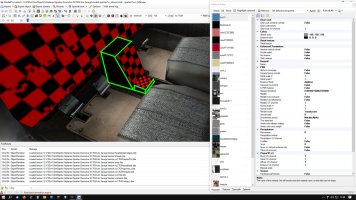
What I think is happening is shown in the screenshot from MCX below:

Spartan_issue.jpg
The entire areas bounded by the green lines are not 'mapped' to a material and therefore do not have a specific texture assigned to them.

In the 'material editor' tool on the right of that shot I have the 'highlight selected' box checked which makes everything on the specified texture sheet turn red and in the left column I have the $vc01 'dummy' texture that holds the gauges selected and the gauge planar has turned red to show that it is selected and highlighted. I then used the 'down arrow' key on the keyboard to select the next lower material (arranged in alphabetical order) and every part on the 'blacktexture' material/texture sheet was highlighted in red. I repeated that process for every other material/texture in that list and not once did the areas inside the green boundary lines above turn red to show I had the correct material/texture sheet selected.

I am not skilled enough with MCX to know if you can map/remap a surface to a texture sheet but those surfaces are definitely not mapped and you can never apply a texture to them. The only way to do it as far as I know would be to open the source .max file in GMAX, 3DS Max or FSDS and then map those areas correctly. I used to use GMAX and 3DS Max but as I said I have nothing installed on this box anymore so I can't do any more to help you. Sorry! :(
 
Back
Top