
-
Please see the most recent updates in the "Where did the .com name go?" thread. Posts number 16 and 17.
-
IMPORTANT DOWNLOADING INFORMATION - ALL MEMBERS PLEASE READ
Please see this thread for updates. Update Thread
SOH ADMINISTRATION
You are using an out of date browser. It may not display this or other websites correctly.
You should upgrade or use an alternative browser.
You should upgrade or use an alternative browser.
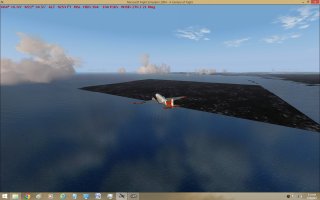
Square island off Keflavik, (BIKF).
- Thread starter stoney
- Start date


ian elliot
SOH-CM-2026
i guess the first question is, is that the stock BIKF area or have you any add-on scenery installed
Usually that indicates you are missing a base scenery (which designates contours) so you're seeing the main texture files mapped to the square cells.
I once had the entire coast of Australia look like this because somehow the base entry for Australia in the scenery.cfg had disappeared. If you backed up the default scenery.cfg, compare its base settings with the current scenery.cfg, you'll probably see something missing in the latter.
Occasionally add-on scenery will have this issue, either from a missing file or improper layering.
I once had the entire coast of Australia look like this because somehow the base entry for Australia in the scenery.cfg had disappeared. If you backed up the default scenery.cfg, compare its base settings with the current scenery.cfg, you'll probably see something missing in the latter.
Occasionally add-on scenery will have this issue, either from a missing file or improper layering.

Golden Rocket
Members +
Could also be a problem with Ocean folder in Scenery folder. Had once issues with Cape Verde Islands. I should search in Flightsim forum, what exactly was the bad thing.
Bernard
Bernard

wolfebee89
SOH-CM-2024
Potentially, an issue with an exclude bgl in a scenery within the identical LOD cell (and not necessarily Iceland specific), excluding the vectors shorelines/coastal regions near BIKF.
Possibly said errant exclude only accounted for the default Iceland scenery with default landclass and accordingly, any additional custom addon scenery for that region with altered shorelines and/or landclass would lead to said problem. Best then to additionally check that you have any custom Iceland landclass, likewise, also deactivated.
If you'd be wishing to keep both the scenery causing the issue and the Iceland specific custom sceneries/landclass, then a waterclass patch for that area will be essential to mitigating the issue.
Possibly said errant exclude only accounted for the default Iceland scenery with default landclass and accordingly, any additional custom addon scenery for that region with altered shorelines and/or landclass would lead to said problem. Best then to additionally check that you have any custom Iceland landclass, likewise, also deactivated.
If you'd be wishing to keep both the scenery causing the issue and the Iceland specific custom sceneries/landclass, then a waterclass patch for that area will be essential to mitigating the issue.
A
Airbasil
Guest
To me that looks like you’ve got a faulty Landclass Scenery installed… check out your Iceland Sceneries which you have installed, if there’s any Landclass Scenery file included… Deactivate that and test if the square is still there… if not, it was the Landclass file…

Jorge
Members +
This may also have to do with the order in which the scenery is activated in your cfg file. It may be that you have some scenery with higher priority that should actually be lower.
I remember reading somewhere that if you installed the Mexico 1962 scenery and the Iceland 1962 scenery from CalClassics, you needed to ensure the Mexico scenery was below and not above (lower priority) than Iceland.
At least I think that's how it was.
I know you can't remember what you put where, but if you can identify these (assuming they are installed) it may help?
Saludos!
Jorge
Miami, FL
I remember reading somewhere that if you installed the Mexico 1962 scenery and the Iceland 1962 scenery from CalClassics, you needed to ensure the Mexico scenery was below and not above (lower priority) than Iceland.
At least I think that's how it was.
I know you can't remember what you put where, but if you can identify these (assuming they are installed) it may help?
Saludos!
Jorge
Miami, FL

Sbob
SOH-CM-2026
You need to look at your scenery.cfg file DIRECTLY. 
Find it (in your main FS9 folder) and right-click on it. Use the Open With option and select Notepad.
Now, you can read (write and edit) your CFG file without using the sim's clunky scenery manager.
You'll see a bunch of add-on "calls" that look like this:
[Area.041]
Title=MAIW Land Class
Local=Addon Scenery\MAIW Land Class
Remote=
Active=TRUE
Required=FALSE
Layer=41
[Area.042]
Title=Static Objects Library
Local=Addon Scenery\Static Objects Library
Remote=
Active=TRUE
Required=FALSE
Layer=42
[Area.043]
Title=MAIW Scenery Library Objects
Local=Addon Scenery\MAIW Scenery Library Objects
Remote=
Active=TRUE
Required=FALSE
Layer=43
Pay attention to those "Layer=" lines, that's where your mystery land-fill is causing problems (usually).
Note that my Area and Layer numbers match and are in order. That's what happens when you manually add and edit scenery layers.
Those Layer= lines can look a little like a dumpster fire if you use the scenery manager.
I would guess that your scenery has an added Land Class file that's causing issues.
Find it (in your main FS9 folder) and right-click on it. Use the Open With option and select Notepad.
Now, you can read (write and edit) your CFG file without using the sim's clunky scenery manager.
You'll see a bunch of add-on "calls" that look like this:
[Area.041]
Title=MAIW Land Class
Local=Addon Scenery\MAIW Land Class
Remote=
Active=TRUE
Required=FALSE
Layer=41
[Area.042]
Title=Static Objects Library
Local=Addon Scenery\Static Objects Library
Remote=
Active=TRUE
Required=FALSE
Layer=42
[Area.043]
Title=MAIW Scenery Library Objects
Local=Addon Scenery\MAIW Scenery Library Objects
Remote=
Active=TRUE
Required=FALSE
Layer=43
Pay attention to those "Layer=" lines, that's where your mystery land-fill is causing problems (usually).
Note that my Area and Layer numbers match and are in order. That's what happens when you manually add and edit scenery layers.
Those Layer= lines can look a little like a dumpster fire if you use the scenery manager.
I would guess that your scenery has an added Land Class file that's causing issues.