
-
Please see the most recent updates in the "Where did the .com name go?" thread. Posts number 16 and 17.
-
Special Server Maintenance
Just when you think you have everything running some what better...
You get a message from the Hosting company. Short story they need to move us to a new server. I have been working with them to plan a good date for all concerned. Here is what we have come up with as a schedule.
- November 4th 17:00 -5UTC shut off the forums and start backup proceedures. During this time there will be no access to the forums or the Resource Section.
- November 5th Continue with Backups and download same until complete.
- November 6th 7:00 turn over server to hosting company to move system to new server
- November 7th - 8th restore backups and upgrade forum software.
If all goes well we should be back online on November 8th.
To keep you updated we will post updates on AVSIM forums.
Thank you for your support.
You are using an out of date browser. It may not display this or other websites correctly.
You should upgrade or use an alternative browser.
You should upgrade or use an alternative browser.
Ssw fiat-aeritalia g-91 for msfs 2020 is out
- Thread starter SSW1
- Start date



jankees
SOH-CM-2026
and I've added tail numbers to the Frecce Tricolori paintjob, number 1 to 6 so far. Do you want all 10, or is 6 sufficient for now??
 jk1775
 jk1783
[url=https://flic.kr/p/2kFFK33]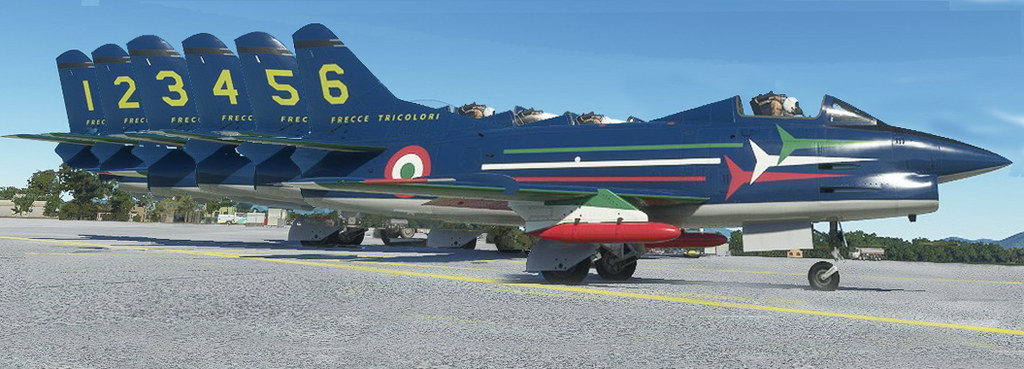 FT
FT
[/URL]
jk1775 jk1783[url=https://flic.kr/p/2kFFK33]
FT [/URL]
Last edited:


cortomalteseit
Charter Member
Well, 6 is already a big step forward, 10 will be heaven!and I've added tail numbers to the Frecce Tricolori paintjob, number 1 to 6 so far. Do you want all 10, or is 6 sufficient for now??


ak416
Members +
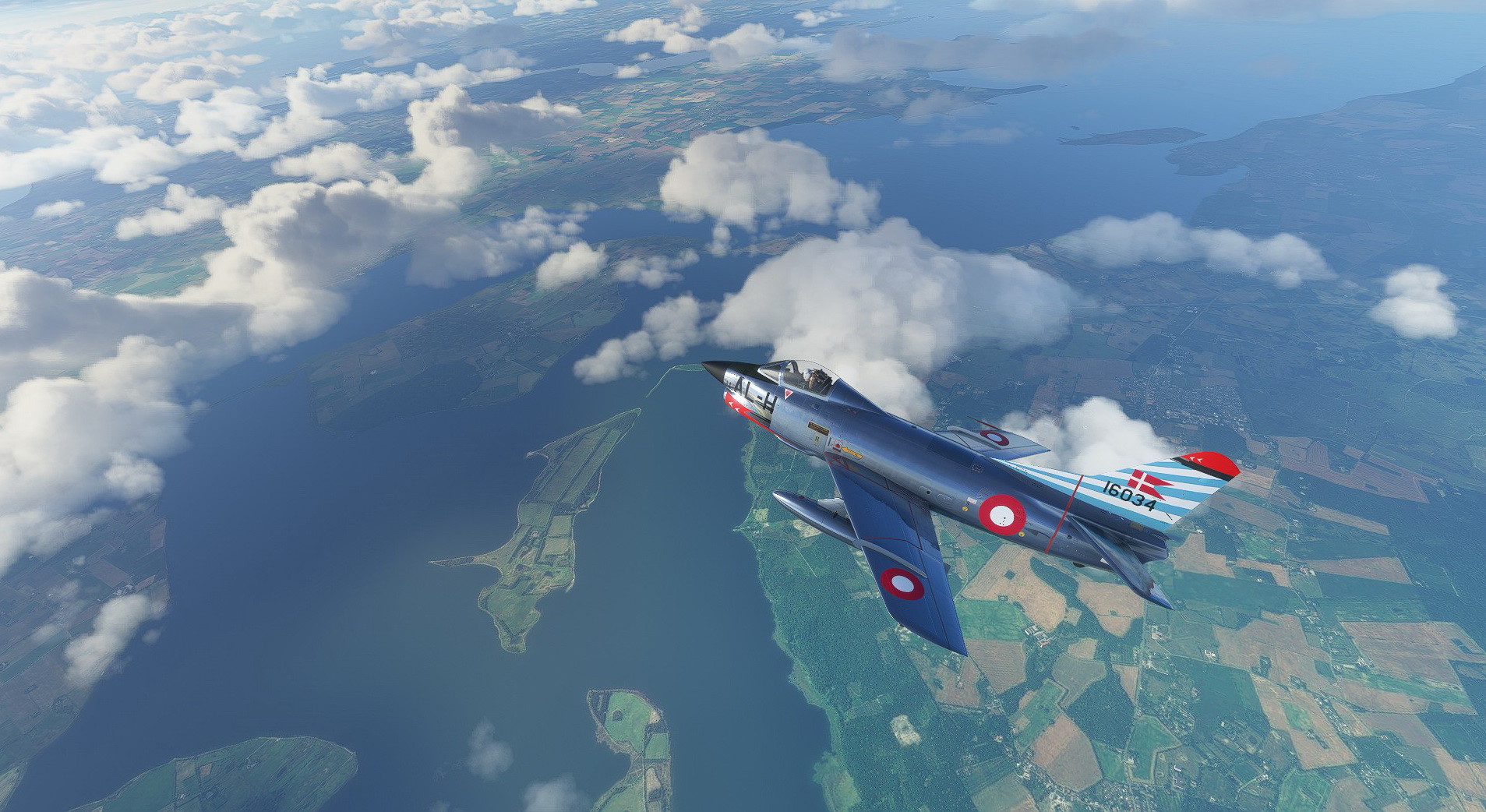
Oh, I am loving the Armée de l'air livery! I also like the colourful tail on the Danish paint, great job as always JanKees 
If you are open to suggestions, I would love to see a livery based on the old RCAF paint scheme that was commonly seen on our CF101's. Lots of reference pictures here: http://silverhawkauthor.com/canadian-warplanes-6-jets-mcdonnell-cf101-voodoo_679.html
I think it would suit the G91 quite well!
If you are open to suggestions, I would love to see a livery based on the old RCAF paint scheme that was commonly seen on our CF101's. Lots of reference pictures here: http://silverhawkauthor.com/canadian-warplanes-6-jets-mcdonnell-cf101-voodoo_679.html
I think it would suit the G91 quite well!

jankees
SOH-CM-2026
 jk1917 by JanKees Blom, on Flickr
 jk1914 by JanKees Blom, on Flickr
 jk1916 by JanKees Blom, on Flickr
noddy
SOH-CM-2026
Beautiful.
UnknownGuest12
New member
Got mail from JustFlight version 3.0 of G-91 out. Installed. Problems with throttle. If pushed forward (accelerate) dragchute opens, no engine change, still instruments needles. Brakes off plane seems to move backwards. Reverse throttle axis, power handle moves just a little bit forward stops on a kind of detent. Unable to make it move. Every other plane on sim OK. Don´t know how to contact their support, will try Justflight. Anyone got same problem? Thanks, best regards.
I don't have the G-91, but I ran into something similar with their MSFS F-104, and I ended up figuring out that the problem was caused by the mixture or propeller in MSFS being assigned to an axis on my throttle.
If you haven't, try assigning the throttle to "throttle 1 axis" instead of "throttle axis", since MSFS broke that assignment for a lot of 3rd party airplanes
If you haven't, try assigning the throttle to "throttle 1 axis" instead of "throttle axis", since MSFS broke that assignment for a lot of 3rd party airplanes
UnknownGuest12
New member
I don't have the G-91, but I ran into something similar with their MSFS F-104, and I ended up figuring out that the problem was caused by the mixture or propeller in MSFS being assigned to an axis on my throttle.
If you haven't, try assigning the throttle to "throttle 1 axis" instead of "throttle axis", since MSFS broke that assignment for a lot of 3rd party airplanes
Thanks. Own a Thrustmaster T16000M and in options, only shows Joystick r-axis Z, Slider x, x-, x+. Only axis Z works. Will have to wait for a fix if any. Meanwhile no more superb Italians....Mb 339 also affected...
Regards

Thanks. Own a Thrustmaster T16000M and in options, only shows Joystick r-axis Z, Slider x, x-, x+. Only axis Z works. Will have to wait for a fix if any. Meanwhile no more superb Italians....Mb 339 also affected...
Regards
You can check what's assigned to the throttle axis by going into the controls page in MSFS, and doing the "search by input" option (select the TM1600M on the tab along the top first), which will let you see what MSFS thinks is assigned to any given button or axis. By default, I believe MSFS assigns "throttle axis" to what it thinks is a throttle control, so it's possible you've got "throttle 1" and "throttle axis" both assigned to the same thing, since MSFS lets you do that.
UnknownGuest12
New member
Problem solved, azflighboy, thanks

