
• Please see the most recent updates in the "Where did the .com name go?" thread. Posts number 16 and 17.

    Post 16 Update

    Post 17 Warning old domain name stealing credentials

  • Special Server Maintenance

    Just when you think you have everything running some what better...

    You get a message from the Hosting company. Short story they need to move us to a new server. I have been working with them to plan a good date for all concerned. Here is what we have come up with as a schedule.

    1. November 4th 17:00 -5UTC shut off the forums and start backup proceedures. During this time there will be no access to the forums or the Resource Section.
    2. November 5th Continue with Backups and download same until complete.
    3. November 6th 7:00 turn over server to hosting company to move system to new server
    4. November 7th - 8th restore backups and upgrade forum software.

    If all goes well we should be back online on November 8th.

    To keep you updated we will post updates on AVSIM forums.

    Thank you for your support.

Strange autogen buildings beside Edmonton (CYEG) suddenly

vipgroup

SOH-CM-2024
I have used addons linker for many years, and often modified my parent folder structure. Today, I was doing the same as I have done countless times before, and when I launched FS2020 at CYEG (using both standard scenery and fsimstudios version), I found a change in the autogen to the west of the airfield, and just north as well.

These buildings do not match the photo scenery, and occurred right out the blue (unless I had simply not noticed them before!) I checked FS2024 and they are not present in that version.

I have tried de-selecting all addon scenery and still these things appear.

Can some kind soul check CYEG and see if you see these infernal monstrosities in FS2020? Failing that, I am open to suggestions as to what the heck I might have inadvertently done, and how I can solve it.

Thanks!
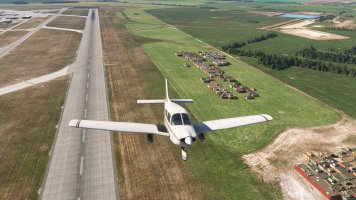
20260318020003_1.jpg
 
Most likely the last FS update popped in those. Had the same thing pop up on the south approach to B06 (Basin Harbor) Most likely an updated ground texture caused the AI to do something stupid. If you know how to set up and use the SDK, make a quick exclude polygon. If not, there are plenty of Tutorials on YT
 
Most likely the last FS update popped in those. Had the same thing pop up on the south approach to B06 (Basin Harbor) Most likely an updated ground texture caused the AI to do something stupid. If you know how to set up and use the SDK, make a quick exclude polygon. If not, there are plenty of Tutorials on YT
Thank you Brian.
 
I threw together a quick building exclude scenery for you. Just put the unzipped file in the community folder. That should kill the oddball buildings
 

Attachments

  • greenmtnflightsim-airport-cyeg-edmonton.zip
    15.3 KB · Views: 3
Buildings gone. Thank you Brian.
Glad I could help. Thinking back, I bet those "buildings" were interpreted by the AI system. In reality I'll lay odds considering the background texture, they were big round hay bales... Had the same issue at Basin Harbor in Vermont which had some random buildings in a field that were likely tents from a campout at the nearby VT Maritime Museum and several other "Buildings" at KPBG (Platsburgh NY) that in other aerial photographs were a storage lot for RV's.
 
Back
Top