

RingTingTing
Members +
How can I disable the default runway scenery ?
I have seen this question asked on many forums before. Some of the proposed methods were very cumbersome indeed.
there is a very easy solution :
In the default CFS2 folder, find the file called scenery.cfg
Open this file with notepad and find the entry for Runways , it should look like this :
[Area.009]
Title=Runways
Local=Scenedb\runways
Active=TRUE
Layer=11
Required=TRUE
Remote=
Change the entry Required=TRUE to Required=FALSE and save the file.
Now you can start the game and in the menu go : OPTIONS --> SETTINGS --> SCENERY LIBRARY
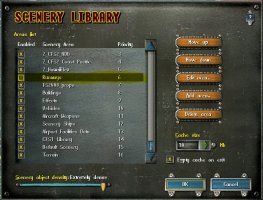
In the Scenery Libray window, find the entry for Runways, and simply Uncheck the box and press OK
and OK again on the next window. And as easy as that you can now switch of the default runways at will.
Regards ,
Ring Ting Ting
I have seen this question asked on many forums before. Some of the proposed methods were very cumbersome indeed.
there is a very easy solution :
In the default CFS2 folder, find the file called scenery.cfg
Open this file with notepad and find the entry for Runways , it should look like this :
[Area.009]
Title=Runways
Local=Scenedb\runways
Active=TRUE
Layer=11
Required=TRUE
Remote=
Change the entry Required=TRUE to Required=FALSE and save the file.
Now you can start the game and in the menu go : OPTIONS --> SETTINGS --> SCENERY LIBRARY
In the Scenery Libray window, find the entry for Runways, and simply Uncheck the box and press OK
and OK again on the next window. And as easy as that you can now switch of the default runways at will.
Regards ,
Ring Ting Ting
