• There seems to be an uptick in Political comments in recent months. Those of us who are long time members of the site know that Political and Religious content has been banned for years. Nothing has changed. Please leave all political and religious comments out of the forums.

    If you recently joined the forums you were not presented with this restriction in the terms of service. This was due to a conversion error when we went from vBulletin to Xenforo. We have updated our terms of service to reflect these corrections.

    Please note any post refering to a politician will be considered political even if it is intended to be humor. Our experience is these topics have a way of dividing the forums and causing deep resentment among members. It is a poison to the community. We appreciate compliance with the rules.

    The Staff of SOH

  • Please see the most recent updates in the "Where did the .com name go?" thread. Posts number 16 and 17.

    Post 16 Update

    Post 17 Warning

T-2 Buckeye Repainting Question

falcon409

SOH-CM-2025
I'm sure someone has run into this before so here's the question. I wanted to redo a few of the Razbam Buckeye repaints in hi-res textures, but when I load the exterior textures for painting they're distorted to 1024x1024. How do you repaint something that's squished up like that? I tried adjusting the textures to 1024x768 or 2048x768 but it's still not right. Any suggestions?
 
falcon409,
Rotate the file 90 deg left, then re-size it to 1024 high by (approx) 2222 wide. The stretch is trial and error, when the center of the national insignia looks round and not oval you're good. Do your work, then re-size it back to 1024x1024 and rotate it back 90 deg right and save it in your preferred format.
 
I'm sure someone has run into this before so here's the question. I wanted to redo a few of the Razbam Buckeye repaints in hi-res textures, but when I load the exterior textures for painting they're distorted to 1024x1024. How do you repaint something that's squished up like that? I tried adjusting the textures to 1024x768 or 2048x768 but it's still not right. Any suggestions?

You will get personalized support from us in our forums at http://www.razbam.org/forums/
 
falcon409,
Rotate the file 90 deg left, then re-size it to 1024 high by (approx) 2222 wide. The stretch is trial and error, when the center of the national insignia looks round and not oval you're good. Do your work, then re-size it back to 1024x1024 and rotate it back 90 deg right and save it in your preferred format.
Thanks, I'll give that a shot. I've already redone all the VC textures to a higher res, just thought I'd go the extra and get the exterior as well. My financial problems don't allow for splurging on new aircraft, so making FS9 versions better in FSX is my new hobby, lol.:salute:
 
Back when I first bought the Razbam Buckeye package, I was looking at doing some repaints and I swear I read the How To somewhere. If I recall correctly, you have to rotate the image 90 degrees counter clock wise, then resize it to 1024 (H) by 2048 (W). Do your work, resize to 1024 by 1024 and rotate 90 degrees clock wise.

OBIO
 
The buckeye isn't a bad model however I couldn't get the tail hook to drop so that's what put me off however if these textures are released I may have to reinstall this model!
 
The buckeye isn't a bad model however I couldn't get the tail hook to drop so that's what put me off however if these textures are released I may have to reinstall this model!
The tailhook problem was just resolved (again) a week or two ago in this forum. You might go back a few weeks and start looking. . . .it's there somewhere.:salute:
 
The buckeye isn't a bad model however I couldn't get the tail hook to drop so that's what put me off however if these textures are released I may have to reinstall this model!

Easy fixes

[hydraulic_system]
normal_pressure = 1000.000

[TailHook]
tailhook_length=5.32
tailhook_position= -12.66, 0.00, -2.57
cable_force_adjust=3.0

I lengthed the tail hook - was finding that on a flat approach, the hook would simply bounce up and off the deck with out engaging. That suggested to me that the virtual (functioning) hook was shorter than the visible/model hook. From my reference books on the T-2, and my own "eyeball" perspective, it also seems close. Main thing - it works.

[launch_assistance]
launch_bar_pivot = 6.433, 0.0, -3.822
launch_bar_lug = 11.423, 0.0, -7.0


as per

http://www.sim-outhouse.com/sohforu...2-Buckeye-FSX-Compatibility&highlight=buckeye

and

http://www.sim-outhouse.com/sohforu...71-Razbam-screenshots......&highlight=buckeye

dl
 
Another question: the card at the top of the main panel. . .I assume this is a course deviation chart. Does anyone have an example that I could use to fill in the card and make it look more realistic?
 
Ed, I should have mentioned earlier in the thread - how thrilled I am you're looking at "FSXing" the T-2. Huge thanks. If either a USMC or an Aggressor repaint materializes - I'll be thrilled!!

I'll definitely implement anythign you do with the panel - it's showing it's age, and I'm sure your magic will really show, as you've done with the FJ-1, T-33, etc.

:icon29::icon29:

dl
 
Looking forward to trying the new VC. Away until tomorrow ... :( ... but thanks in advance!

Anyway, few (possibly only a couple?) ever received the aggressor treatment - here's #33 from VF-43:

http://www.airliners.net/photo/USA---Navy/North-American-Rockwell/1827515/M/

and #32 from the same unit:

http://www.paulnann.com/Make.asp?Make=North American&Family= T-002&ImageRef=pn_w0233.jpg


Quite a lot more served in USMC, with CWT-6 and VT-9, among other units ...

http://www.airliners.net/photo/USA---Marines/North-American-Rockwell/1106584/M/
http://www.airliners.net/photo/USA---Marines/North-American-Rockwell/1020055/M/


Anyway - just ideas ... with your panel upgrade alone, Ron's bird is getting a good airworthiness extension these days ... :)

dl
 
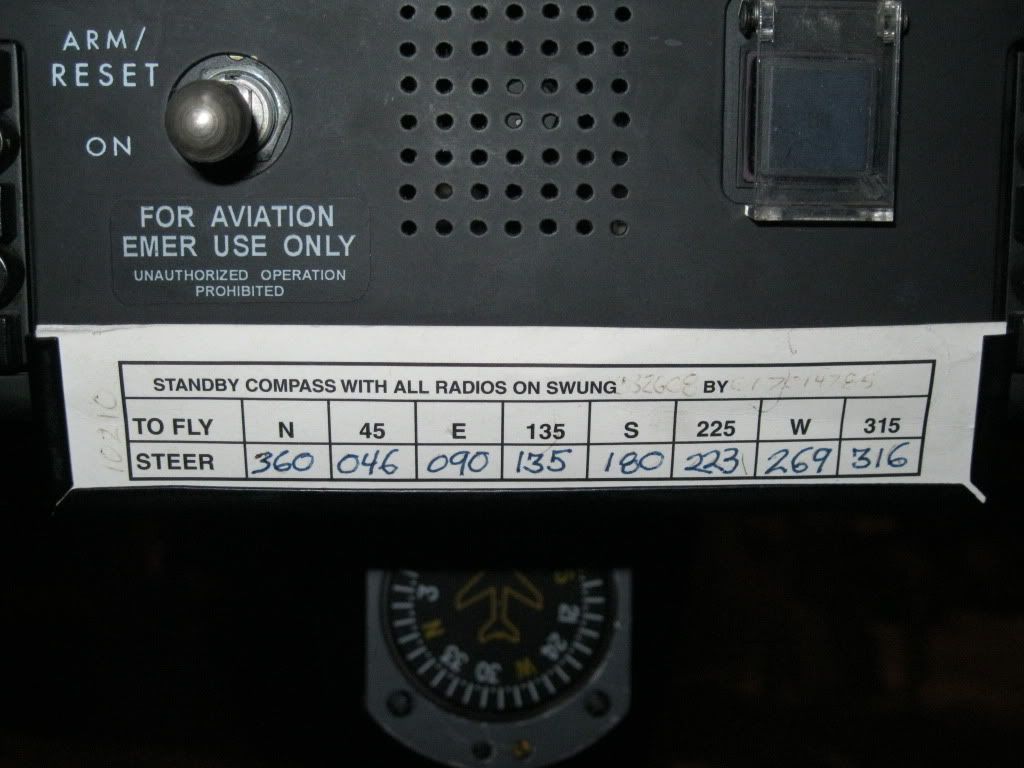
Another question: the card at the top of the main panel. . .I assume this is a course deviation chart. Does anyone have an example that I could use to fill in the card and make it look more realistic?

Compass deviation card? I have the T-2C, but it's not installed anymore, so I can't look at the panel and tell.

Anyway, here's a real compass deviation card.

Jan2011035.jpg
 
Thanks. . . .I thought that's what this was, but maybe not. The pic shows what the card looks like, I just went over the original to clean it up, but it had a lot of info as you can see.
 
A big thanks for the tailhook and the new textures I'll be installing this tomorrow night and having a few flights, yet another bird given new life!! Great going guys!
 
I added the A6 smoke but forgot about the fs9 aircraft into fx smoke fix? Sorry for the request but does anyone have the fix :kilroy:

Thank you for the help

and Thanks for gettin this thread started and the old trainer working everyone :wavey:

if you would like to add exhaust smoke

add to config

[smokesystem]
smoke.0 = -9.25, -2.20, -1.61, fx_(enter your smoke here)
smoke.1 = -9.25, 2.20, -1.61, fx_(enter your smoke here)

Falcon, Thanks for the VC clean up :wavey:
 
Back
Top