
• Please see the most recent updates in the "Where did the .com name go?" thread. Posts number 16 and 17.

    Post 16 Update

    Post 17 Warning old domain name stealing credentials

  • Special Server Maintenance

    Just when you think you have everything running some what better...

    You get a message from the Hosting company. Short story they need to move us to a new server. I have been working with them to plan a good date for all concerned. Here is what we have come up with as a schedule.

    1. November 4th 17:00 -5UTC shut off the forums and start backup proceedures. During this time there will be no access to the forums or the Resource Section.
    2. November 5th Continue with Backups and download same until complete.
    3. November 6th 7:00 turn over server to hosting company to move system to new server
    4. November 7th - 8th restore backups and upgrade forum software.

    If all goes well we should be back online on November 8th.

    To keep you updated we will post updates on AVSIM forums.

    Thank you for your support.

Texture format question (Jankees??)

Brian_Gladden

SOH-CM-2025
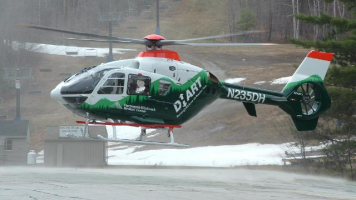
Here's what I have guys, Back in my P3d V3 days I was fairly proficient in any repaints I wanted. FS 2020 seems a dark art to me. I've been trying to slightly edit an existing texture to add in the area's for the radome and wire cutters on the HPG E135. I can turn on the model extras easily but repainting the sections of the existing texture sheet is a confusing mess. I know what parts of the sheet to edit but when saving, I run into issues. I try to save in DXT1 no Alpha and no joy. Yet that format works on another model. I'm just so confused. Also, I wonder why someone hasn't tried the paint job I really want for the 135 as it was a default for the Nemeth EC-135 for FSX. I'd love to have a Working DHART paint job to fly around my home patch.
 

Attachments

  • 1733923964769.png
    1733923964769.png
    470.2 KB · Views: 7
Under FS20, you can paint with many programs which can save in *.PNG format.
Then copy/paste from the SDK a livery project and copy in your PNG files.
Using a drag&drop of your XML which describe your project on a copy of fspackagetools (fs20 SDK) will compile the project and create the *.PNG.DDS that you need in FS20.

The same can be used on FS24.
 
Last edited:
I use Photoshop, with the nvidia dds plugin, and save files in the BC7 RGBA 8bpp format. I have no idea if dxtbmp does that as well, I haven't used it for a while.
 
Since Photoshop wants a small fortune and I'm unemployed, I'll stick with my almost 20 year old copy of PSP... And I have an ATI Card not NVIDIA
 
Last edited:
For what little I do (mostly changing baked-in reg's to my personal N721TC), I use Paint.net and Gimp. Gimp does a little more, but won't open some 3rd party dds files. For that, I open the file in Paint.net and then resave it. Once I do that, Gimp will open the file.
 
Back
Top