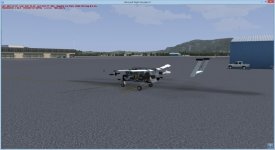
Texture Problem

padburgess

Charter Member
Hi

Can anyone please shed some light on what may be causing this effect. It only affects the Carenado Skymaster 337 and the Alabeo WACO_YMF5.
I have my config set up for 4096 textures (I'm running other hi-res aircraft no problem) and both these aircraft initially ran fine. Something changed and I can not find out what. I have even tried reinstalling both aircraft with no change.
Both display fine in preview.
attachment.php


Thanks.
 

Attachments

  • Carenado_c337.jpg
    Carenado_c337.jpg
    52.1 KB · Views: 0
Do you have the Highmemfix line in your FSX.cfg?

[GRAPHICS]
HIGHMEMFIX=1

Greetings
Tim
 
DX9 mode. The problem doesn't just seem to be missing textures though as parts of the model are invisible, so maybe something to do with alpha. Don't know enough to say.
 
Hi Roger

I had changed the reject threshold in bufferpools, but I have just tried 2 other values, and then commenting out the entry with no change in model appearance.
My Bufferpools entry is

[BUFFERPOOLS]
UsePools=1
PoolSize=50000000
RejectThreshold=262144 //512Kb = 524288, 256Kb = 262144, 124Kb = 126976, 96Kb = 98304 * use only one set (everything after // is not used)

Thanks for your help.
 
It's an odd one! I know on the 337 the rudder & tail fins are on the same texture sheet, but the rudder is showing, but the tail fin is not.
I'd try backing up the fsx.cfg, then deleting it and let FSX build a new one.

Or possibly an Ezdok problem, and you're only seeing the VC model. I don't use Ezdok, but I believe there is a config prog you have to run.

Edit: Just checked the VC model for the 337 & all the parts are there, so it's not that you're seeing.
 
Last edited:
Hi Roger

I had changed the reject threshold in bufferpools, but I have just tried 2 other values, and then commenting out the entry with no change in model appearance.
My Bufferpools entry is

[BUFFERPOOLS]
UsePools=1
PoolSize=50000000
RejectThreshold=262144 //512Kb = 524288, 256Kb = 262144, 124Kb = 126976, 96Kb = 98304 * use only one set (everything after // is not used)

Thanks for your help.

Have you tried UsePools=0 just as a check if you still have issues after doing as DaveWG suggested.
 
I had a similar problem and found that uninstalling the problem planes and re-installing them worked a treat.
 
Back
Top