So, enough of the holiday stuff. Its time to get back in the groove.

(PART ONE)
If you are doing the "Career Mode" route, you should be familiar enough with either the TA-4 or T-45 trainers.
Its time to "take it to the boat" and get Carrier Qualled.

If you're new to this kind of flying, its easy to dive into the vids and the forums and start learning about Marshal Stacks, glide slope intercepts, gross weight vs. approach speeds, where to start a Carrier Break, etc. Its all good info but DON'T get hung up on it, at least
not yet.
Keep your first Carrier traps
easy. This is all about getting your back-side/pants seat calibrated and getting used to flying between 1,500 feet to 600 feet AGL with the gear and flaps fully extended and your airspeed close to 150 KTS. Start paying more attention to your AOA Indexer. The lower segment (usually RED) should be lit and you'll need to "bump" the throttle slightly to avoid lighting the middle or upper segments. This was why I kept harping on practicing the pattern work and touch-and-go's at your training base. What you are doing
now is essentially the same thing. Keep that in mind, don't let the Carrier freak you out.
If you want the "full Monty" experience and you have Carriers 2006 installed, do a quick cross country flight from your training base to NAS Jacksonville (KNIP) and do some more pattern work to get familiar with the runways.
If you have
Flight Deck 3 from Abacus, fly to NAS Pensacola (KNPA). I also have some AFCADs and Traffic files for FD3 if you want them. Just drop me a message and I'll hook you up.

Otherwise, we'll figure that there's bad weather over the Gulf and your carrier did something its good at. It moved East to the other side of the state.
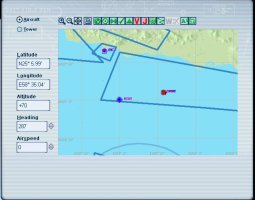
Once you land at KNIP or KNPA, take a moment to jot down some notes. Use the Map View to find the carrier and write down the ILS, VOR, and NDB freq's. The Glide Slope course setting is also important. You'll also want to get a ball-park idea of where the carrier is located but
notice that we really don't care about the Lat or Long. We also don't care about Elevation, the ship should be trucking along at sea level.
Now, try to get a good night's sleep. No pressure, but tomorrow (weather permitting) will make or break your career in Naval Aviation.

OK, its time for your first real day of CQ. Double check your radio freqs and course setting. Top off the fuel and get airborne. If you're using the Carriers 2006 scenery, head East and climb to 8-10,000 feet. Watch your NDB display, you are looking for the USS Kennedy and its NDB should be 367.0 while the VOR is 108.40 and the ILS is 110.30. Once you pick up the NDB, fly towards it. Once you can see the ship, steer a course so you wind up "about" 10 miles behind the ship. If you are running ARRCAB, now would be a good time to make sure its running. Drop the gear and (full) flaps and drift down to "about" 1,500 feet at 150 knots. DON'T be in a hurry, this is where things usually go sideways. Notice that your tailhook is still UP, your first couple of passes at the ship are for RECON and some touch-and-go's. Try to plan ahead, things are about to get busy.
DO NOT contact the tower yet, but hit the "~" key to dial in comms. If you have AI traffic set up, listen to what's going on. Someone's usually taking off or requesting a landing by this point. This is why I enable callsigns and flight numbers, its always good to know who else is in the pattern. FS ATC will ALWAYS hit you with a "go around" or "line up and wait" call if another plane is taking off or landing.
BTW, I should point out that this post IS FS9/FS2002 specific. This ain't FSX+, P3D, or DCS. Our carriers don't move
but the basic procedure's are mostly the same.
So, you're about 10 miles out and you have the radios set and the HSI course dialed-in. Maintain 1,500 feet/150 knots and aim for the boat (use your NDB pointer and HSI until you get a good view). The lower segment of your AOA Indexer should be lit. Notice that the auto-pilot is as cold as an ice cube.
WE DO NOT USE THE AUTO PILOT IN FS8 OR FS9 FOR CARRIER OPS. EVER. I tried to play around with A/P settings back when the real Navy started talking about "Magic Carpet" but the FS8/9 A/P just can
not handle it. Cruising at altitude is one thing (as long as you don't use the Auto Throttle) but USN Fast Jet FD's just do not play well with the A/P.
Anyway, you should be cruising up to the boat. As you get close, take a good look at the landing deck. You'll notice the "dirty" center section and if you look close enough you'll see the trap wires. You should also notice the "Meatball" landing light. In FS9, the Meatball is limited but its still handy. As you fly over the ship, set a steady 45 degree bank to the LEFT. Once you've changed course 180 degrees (downwind leg) call the tower and request a touch-and-go. Once the tower clears you, slowly begin to settle down to 600 feet while maintaining 150 knots. Keep an eye on your ILS Glideslope (HUD or HSI). Now is also a good time to hit <shift><z> and check the wind and its direction. You can set the wind direction on your HSI using your HEADING bug. If you are flying in the VC view (recommended), bump your view down slightly so you have a good outside view AND you can see your HSI and NDB pointer. Try to maintain 600 feet and slowly drop your power so the middle light on your Indexer turns ON. If both the middle and lower segments are lit, that's fine. Take a quick look at your airspeed, just for reference. From here on out, your airspeed is ONLY important if you can't stay on the glide slope. Check your VOR display (HSI or HUD). When you are 4-5 miles behind the boat, start another steady 45 degree turn to the LEFT. Watch your Indexer, HUD/HSI, and NDB pointer. Continue the turn while you maintain 600 feet. When your NDB pointer and HSI course are pointing in the same direction, you should be really close to being lined up on the glide slope. If the horizontal bar of your ILS shows the glide slope is ABOVE you, that's fine. Maintain level flight until you intercept it. The Meatball on the ship should turn green by this point. If the top segment of the AOA indexer lights up beyond this point, bail out of the approach, hit the throttle, and try it again. While the three segment lights of the Indexer are
really close in terms of AOA units, getting the top light usually means you're about to stall. This was why you filled the tanks prior to take off, you have plenty of gas to get this stuff right.



 I love doing day traps, I love doing foul weather day traps, I LOATHE doing night traps in any kind of weather. And, I've been doing these Ops for years. Night landings are just the worst. The only other observation I can offer is that its best to keep a tight landing pattern around the carrier. Starting from six miles out (600 feet) is almost automatic. Doing the 1,500 foot approach (day or night) is where the trouble starts. Its like you're spending too much time on the glide slope. Its just better to get it over with quick and dirty.