• There seems to be an uptick in Political comments in recent months. Those of us who are long time members of the site know that Political and Religious content has been banned for years. Nothing has changed. Please leave all political and religious comments out of the forums.

    If you recently joined the forums you were not presented with this restriction in the terms of service. This was due to a conversion error when we went from vBulletin to Xenforo. We have updated our terms of service to reflect these corrections.

    Please note any post refering to a politician will be considered political even if it is intended to be humor. Our experience is these topics have a way of dividing the forums and causing deep resentment among members. It is a poison to the community. We appreciate compliance with the rules.

    The Staff of SOH

  • Please see the most recent updates in the "Where did the .com name go?" thread. Posts number 16 and 17.

    Post 16 Update

    Post 17 Warning

The Thorp has been uploaded!

Yep, that's what I've done as well Bruce, but it's a no-show. Gonna give Roger's tip a try.:salute:

"No-Joy". . .renaming had no effect. I even went back and started over. New folder, move Oleboy's textures in. . .overwrite. . . .rename folder and made sure that everything in the aircraft cfg read correctly. Go to FSRepaint. . . .looks great when I choose the "Tiger" livery. Go into FSX and all I get is a duplicate of the default livery.
 
The only very remote possibility is that for some reason, I've reached a max on what I can display in-sim. The texture folder for the Tiger livery is twice what the default is. I have not had any problem before with high-def textures, as a lot of my repaints have been textures that were 4096x4096 and it never has any effect on my sim. These could be an exception. I also noticed, when loading the textures into PSP to view, that I am asked if I want to display the mip-maps. I didn't think anyone used mip-maps any more?

I have no other ideas as to why the livery won't display.
 
Just a thought as I'm at work and can't dig into this...I recall reading about a similar problem that ended up having to do with something in the aircraft.cfg file in the sections for each paint. It had something to do with an entry (not the paint folder) being unique to each section or this would happen.
 
This is all I had to do...

[fltsim.0]
title=Thorp T-18 paint 1
sim=T-18
model=
panel=
sound=
texture=
kb_checklists=
kb_reference=
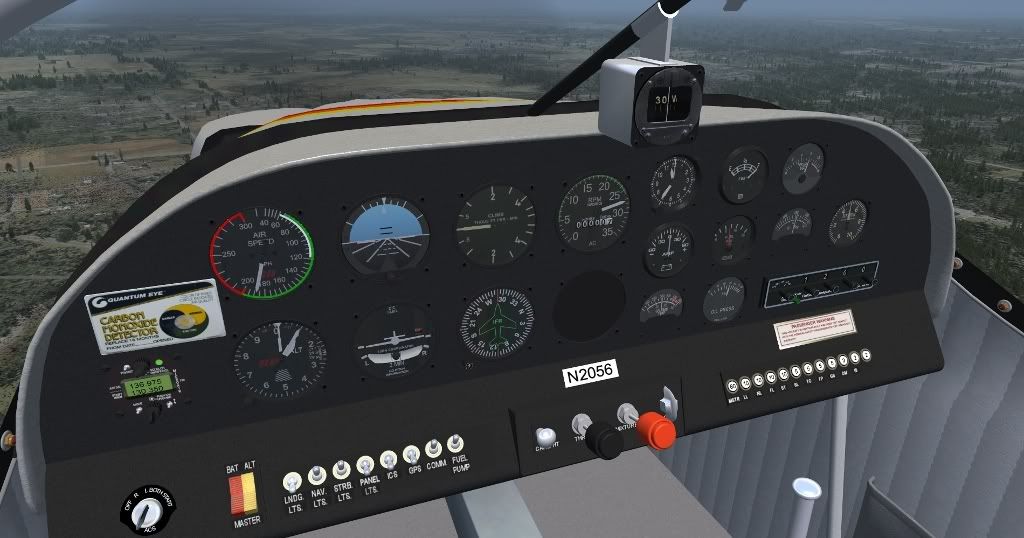
atc_id=N2056
ui_manufacturer="Thorp"
ui_type="T-18"
ui_variation="White & Red/Orange/Yellow"
ui_typerole="Single Engine Prop"
ui_createdby="Robert Kerr"
description="The Thorp T-18 was designed by John Thorp, and first flew in 1963."

[fltsim.1]
title=Thorp T-18 paint 2 //"Tiger"
sim=T-18
model=
panel=
sound=
texture=N9675Z
kb_checklists=
kb_reference=
atc_id=N9675Z
ui_manufacturer="Thorp"
ui_type="T-18"
ui_variation="Tiger"
ui_typerole="Single Engine Prop"
ui_createdby=Robert Kerr / Repaint by OleBoy
description="Thorp T-18..." "Repaint By OleBoy on 5-17-2011. #1"
 
Labors of love are always the most difficult projects to finish.... you never are quite happy with your own results. Really fine work and thank you very much!

Going to go download and fly this in honor of you and your father's work. :applause::wavey::applause:
 
Hopefully you get/got things sorted out, Ed. I thought I made the instructions clear. I have sneaking hunch you overlooked something.

This reg is almost completed. All that's left is the bottom fuse stripe, and rework the specular. I'm not sure if I go in to work soon, or not, so I had to stop for now.

Some progress shots for everyone. Pictures just do. When uploading, the compression used, spoils the details.

I know I've said this many times. To get the best peek, right-click "view image"
thorpt18n6cm2011may1700.jpg

thorpt18n6cm2011may1700.jpg

thorpt18n6cm2011may1700.jpg

thorpt18n6cm2011may1700.jpg

thorpt18n6cm2011may1700.jpg
 
Ok, here's what I found:
texture.cfg as found in the original download:

[fltsim]

fallback.1=..\texture
fallback.2=..\..\..\..\Scenery\Global\texture
fallback.3=..\..\..\..\..\..\Scenery\Global\texture

Went to "FSdevelopers site" to check the contents of the texture.cfg and found this:

[fltsim]

fallback.1=..\texture
fallback.2=..\..\..\..\Scenery\Global\texture
fallback.3=..\..\..\..\texture

Changed to match that and this is what I have in the sim now:
 
In the course of working on a repaint I have discovered an issue concerning smoothing on the leading edge of the left stabilator. It's fixed now. I also realized that I neglected to rig the N-number placard to automatically reflect the number for a given paint.

I'm sure I'll dredge up a few more things. Expect a service pack in the near future. :icon_lol:
 
Very odd, Ed. I never experienced anything like that? And this was the texture/ fallback config that was in my repaint? I just checked my files and all are ok.
 
Very odd, Ed. I never experienced anything like that? And this was the texture/ fallback config that was in my repaint? I just checked my files and all are ok.
At first I assumed I must have done something in all the confusion and swapped out "texture.cfg's" (not sure how, but it was a thought). After going back to your zipfile and checking though, it was correct. I don't understand why, but for some reason the cfg file that works for everyone else does not work for me. Go figure.
 
Ed, for some reason I'm getting strange things like that happening with a paint I'm trying to do. When I nail it down I'll share my findings. :salute:
 
Robert, I would like to thank you very, very much for this gift to the community. She is beautiful and flies like a dream. Awesome work and lot's of super detailed pieces of work!

Lucas
 
thorpt18n6cm2011may1700.jpg


That is absolutely beautiful, OleBoy. I hope you release it! :salute:


Do you think you could do this one? :wavey:

4838885269_c3100f24e4_o.jpg
 
On this plane I used a custom environment map. If you want to see it with the stock map go into the texture folder and rename "RKEnv". Make a copy of the GlobalEnv texture (it's in the texture folder - DON'T mess with the root FSX one) and rename it RKEnv. That should give the standard reflection. Note that you will need to restart FSX (if already running) for the change to take effect. I was not real happy with the look on the flat sided fuselage. What do you think?

This is being evaluated for the revised model.
 
I sure can Kiwikat. I had already saw that one, and the colors really grabbed my attention.

I kinda got a few too many irons in the fire currently, but I will do it if you don't mind waiting.
 
Can someone please give me a precise link to this package? I can't seem to find it under Warbird's library, what's new...

Nevermind... it's under FSX addons ->general aviation

http://www.sim-outhouse.com/sohforums/local_links.php?action=jump&catid=39&id=4051

Nice little plane! It goes fast (ok so I redlined it hehe). One question about the RPMs... The gauge is odd in that when I idle the throttle it only goes down to about 20... then very slowly goes down from there. Is that how yours works?

thorpvc.jpg
 
Back
Top