• Please see the most recent updates in the "Where did the .com name go?" thread. Posts number 16 and 17.

    Post 16 Update

    Post 17 Warning old domain name stealing credentials

  • Special Server Maintenance

    Just when you think you have everything running some what better...

    You get a message from the Hosting company. Short story they need to move us to a new server. I have been working with them to plan a good date for all concerned. Here is what we have come up with as a schedule.

    1. November 4th 17:00 -5UTC shut off the forums and start backup proceedures. During this time there will be no access to the forums or the Resource Section.
    2. November 5th Continue with Backups and download same until complete.
    3. November 6th 7:00 turn over server to hosting company to move system to new server
    4. November 7th - 8th restore backups and upgrade forum software.

    If all goes well we should be back online on November 8th.

    To keep you updated we will post updates on AVSIM forums.

    Thank you for your support.

There's Never Been a Tweak Like This

Thanks for posting - I did this just yesterday afternoon and it's incredible. I'm not sure how this can make a 2K monitor look like it's 4K, but the clarity of the sim now, in particular gauges is amazing.
 
Definitely a sharpening of scenery and instruments here, but not as radical an improvement as others are experiencing. Nevertheless, a tweak well worth trying out.
 
Definitely a sharpening of scenery and instruments here, but not as radical an improvement as others are experiencing. Nevertheless, a tweak well worth trying out.

I imagine a lot has to do with your overall system specs and other tweaks you've tried. I have a curved 32" Dell S3220DGF 1440P monitor, and was always underwhelmed by it's clarity running MSFS. This tweak has renewed my faith in it. However, I still plan on an upgrade to a larger 4K OLED sometime in 2024.
 
After some further flying, I believe the display screens are noticeably sharper than previously with DLSS. This alone sells the tweak to me.
 
To note this only seems to apply to those with 2 series or higher Nvidia cards - us 1070 boys will have to soldier on with our slide shows ...
 
I have an RTX2060 running on a 34" curved monitor, 2560x1080. Always had trouble with MSFS running poorly and ghost images following behind my aircraft. Tried this tweak partially last night and it worked a charm, I'll add in some of the stuff I missed later but I'm pleased with the result
 
I'd really like to try the DLSS Swapper, but it doesn't recognise MSFS. I gather this is because I'm using the MS Store version (even though I didn't install to the default location). Apparently I have to install from the Xbox app instead. Has anyone else found the same?

https://github.com/beeradmoore/dlss-swapper/issues/140

I have the same problem - MSFS doesn't show up in it for me either. I've decided to just run it with whatever DLSS version MSFS has as default, which seems to be working fine for me.
 
I imagine a lot has to do with your overall system specs and other tweaks you've tried.

The system specs and graphic settings were the same before and after applying this tweak. The sharpening happened as a result of this tweak alone - nothing else was changed.
 
I'd really like to try the DLSS Swapper, but it doesn't recognise MSFS. I gather this is because I'm using the MS Store version (even though I didn't install to the default location). Apparently I have to install from the Xbox app instead. Has anyone else found the same?

https://github.com/beeradmoore/dlss-swapper/issues/140
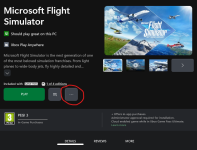
Here is the fix I found. I has to *move* my MSFS to a different folder, specifically my XboxGames folder. To do so I opened the Xbox app, selected MSFS and then hit the ... button, as illustrated here:

B6ynrzv.png

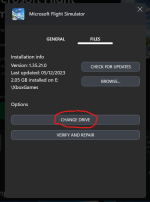
I then hit Change Drive:

6RGLZqV.png

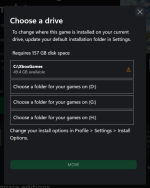
You then select the drive and folder to Move to:

CVr3pRE.png

I was then able to see MSFS listed in DLSS Swapper.

If you do not see the option to "Move" you need to first enable the the smart, dynamic or whatever (I can't recall the term) option for the location/folder at the stage of the second screenshot, above.
 
I'd really like to try the DLSS Swapper, but it doesn't recognise MSFS. I gather this is because I'm using the MS Store version (even though I didn't install to the default location). Apparently I have to install from the Xbox app instead. Has anyone else found the same?

https://github.com/beeradmoore/dlss-swapper/issues/140
DLSS Swapper works for me, with the MS Store version of MSFS. Though I did install from the Xbox app, my Flight Simulator folder with the Community and Official folders is in a custom location.

(Edit: whoops, didn't see spatialpro's new post!)
 
I followed the video, but I'm still getting pretty noticeable blurring on numbers on glass cockpits. Has anyone found a setup that doesn't do that using DLSS?
 
Yawn! I fell asleep listening to this guy, extremely bland! I use all AMD, RX 7900 XT. Everything set to ultra, real weather (for the sky maybe, but not the ground), all buttons pushed. I get better CPU and abouyt the same GPU performance and a constant 60 fps.

Cazzie

View attachment 92585
 
Back
Top