
-
Please see the most recent updates in the "Where did the .com name go?" thread. Posts number 16 and 17.
-
Special Server Maintenance
Just when you think you have everything running some what better...
You get a message from the Hosting company. Short story they need to move us to a new server. I have been working with them to plan a good date for all concerned. Here is what we have come up with as a schedule.
- November 4th 17:00 -5UTC shut off the forums and start backup proceedures. During this time there will be no access to the forums or the Resource Section.
- November 5th Continue with Backups and download same until complete.
- November 6th 7:00 turn over server to hosting company to move system to new server
- November 7th - 8th restore backups and upgrade forum software.
If all goes well we should be back online on November 8th.
To keep you updated we will post updates on AVSIM forums.
Thank you for your support.
You are using an out of date browser. It may not display this or other websites correctly.
You should upgrade or use an alternative browser.
You should upgrade or use an alternative browser.
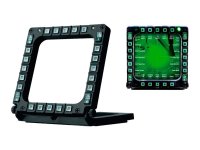
THRUSTMASTER MFD for MSFS
- Thread starter merida72
- Start date

Hi merida72!
I have two of them and have used them for years. I have one set up so that the buttons for the ATC responses (1 through 0) are programmed on the top and rightside buttons. The other buttons (Left side and bottom) are programmed for the instrument views (again one through 0). I don't have the rocker switches programmed but I I imagine that you can program them to increase or decrease (such as trim if you don't have a trim wheel). I programmed them through the MSFS control options not the TARGET software. I really like them and the way I have them programmed works very well for me.
I hope this helps and gives some ideas.
Best wishes, Joe
I have two of them and have used them for years. I have one set up so that the buttons for the ATC responses (1 through 0) are programmed on the top and rightside buttons. The other buttons (Left side and bottom) are programmed for the instrument views (again one through 0). I don't have the rocker switches programmed but I I imagine that you can program them to increase or decrease (such as trim if you don't have a trim wheel). I programmed them through the MSFS control options not the TARGET software. I really like them and the way I have them programmed works very well for me.
I hope this helps and gives some ideas.
Best wishes, Joe


merida72
Charter Member
I have two of them. I use FSUIPC to program them.
I have FSUIPC too,
I would like to program it like those of the T-45...
can you suggest me how to do it?

jmig
SOH-CM-2026
I have FSUIPC too,
I would like to program it like those of the T-45...
can you suggest me how to do it?
With the airplane loaded in MSFS, click on the upside-down V and select FSUIPC. Select Program Buttons. A dialog box will show. Activate the button you want. It will show in the center box with a letter and number, such as B12. Select the operation you want from the dropdown box on the right.
This is a very broad brush answer. The user manuals in FSUIPC documents go into the many details of button programning. You can use basic functions or LVar functions depending on the dropdown.
P.S You must have the paid version of FSUIPC for this to work.
merida72
Charter Member
With the airplane loaded in MSFS, click on the upside-down V and select FSUIPC. Select Program Buttons. A dialog box will show. Activate the button you want. It will show in the center box with a letter and number, such as B12. Select the operation you want from the dropdown box on the right.
This is a very broad brush answer. The user manuals in FSUIPC documents go into the many details of button programning. You can use basic functions or LVar functions depending on the dropdown.
P.S You must have the paid version of FSUIPC for this to work.
Yes yes I have the registered version the 7..3.16 ...
I meant peer-to-peer (identical) programming to the T-45 MFDs...
I've read something about using Lvar but I'm not very practical.
I thought there was a utility like in the old FSUIPC for FSX where you clicked with the mouse on the key you needed and the programmed code came out.
jmig
SOH-CM-2026
Yes yes I have the registered version the 7..3.16 ...
I meant peer-to-peer (identical) programming to the T-45 MFDs...
I've read something about using Lvar but I'm not very practical.
I thought there was a utility like in the old FSUIPC for FSX where you clicked with the mouse on the key you needed and the programmed code came out.
You might want to look into Lorby “Axis And Ohs”.

strykerpsg
SOH-CM-2026
Hi merida72!
I have two of them and have used them for years. I have one set up so that the buttons for the ATC responses (1 through 0) are programmed on the top and rightside buttons. The other buttons (Left side and bottom) are programmed for the instrument views (again one through 0). I don't have the rocker switches programmed but I I imagine that you can program them to increase or decrease (such as trim if you don't have a trim wheel). I programmed them through the MSFS control options not the TARGET software. I really like them and the way I have them programmed works very well for me.
I hope this helps and gives some ideas.
Best wishes, Joe
Thanks for bringing this topic up. I love this idea, thank you for sharing.