• There seems to be an uptick in Political comments in recent months. Those of us who are long time members of the site know that Political and Religious content has been banned for years. Nothing has changed. Please leave all political and religious comments out of the forums.

    If you recently joined the forums you were not presented with this restriction in the terms of service. This was due to a conversion error when we went from vBulletin to Xenforo. We have updated our terms of service to reflect these corrections.

    Please note any post refering to a politician will be considered political even if it is intended to be humor. Our experience is these topics have a way of dividing the forums and causing deep resentment among members. It is a poison to the community. We appreciate compliance with the rules.

    The Staff of SOH

  • Please see the most recent updates in the "Where did the .com name go?" thread. Posts number 16 and 17.

    Post 16 Update

    Post 17 Warning

"Visual Model Cannot Be Displayed"

Bone

Charter Member
The Alphasim C-141B gives me this message when I try to load it, but the C-141A model loads just fine. Also, I have tried to merge the default B-737 VC into one of the Rok Dolonec KC-135's that don't have a VC, and I get this message. The model normally displays just fine. I have succesfully merged VC's into other models before, so I don't think it's my technique.

Is there a cfg fix trick to make the darn things display when I get this message?
 
This a typical error when it is tried to load certain FS9 or CFS2 models (or cfs2 converted to FS9) into FSX. Sorry, I don't know a remedy.
I also :banghead: about that many times...

Cheers,
Mark
 
Might be a simple typo (or copy & paste error) in the cfg, e.g. referring to a wrong airfile or the wrong mdl.
I'ts similar with the mdl etc... folders
 
You are not the only one having this issue, for some reason the C-141B model cannot be opened in FSX while the C-141A model works fine...
 
A FS9 native model also cannot be made to display a seperate cockpit model; as fsx native can. A P.O, for sure-though I've long wondered if a coded gauge type of workaround couldn't be written to 'fool' FSX...just blue sky- I don't know enough about FSX code to make an informed guess...
 
No problems here, took it straight off the 2004 CD, bit of a problem with the panel as it made the screen letter box for some unknown reason?, dropped in the default B737 and screen issue resolved, suspect screen issue not present on the full set up but maybe on the free download.

Try these files attached and let me know, if not I'll FTP the complete B package minus panel, sounds and gauges.

Can't believe this is still going seven years after it was built!, time I pulled my digit out and attempted to make another more accurate one. Rip the Vc and some landing gear details, add a few LOD and this'll make a half decent AI I think, sadly built in Gmax, not my platform anymore.

Best

Michael
 
Hey Michael,

Thanks for the fix!

Any idea what is happening in the VC?

Do the new model files need to be renamed?

Best

mal
 
Yep, I have it too.

2011-7-2_13-52-4-851.jpg
 
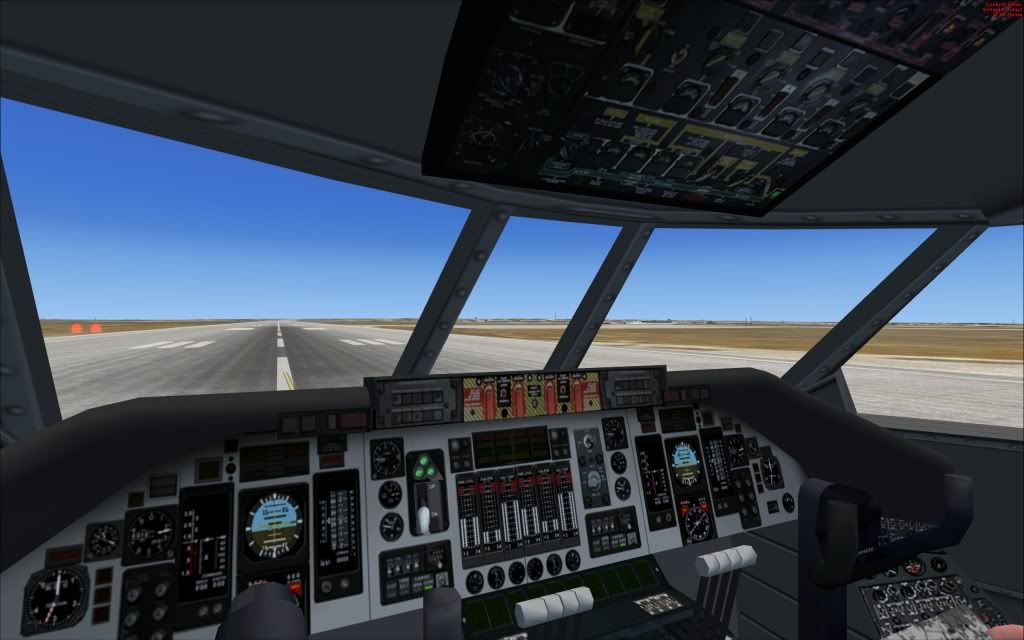
The black squares are the gauge placement polys, there should be a code in the panel cfg to make them transparent and show the gauges, there are four VC polys for you to place gauges on. Clearly when Alphasim sent this up as freeware they stripped out the VC polys. However this mdl does have the VC polys in place, so y'all can now add gauges at your leisure if you desire.

In the panel cfg you will need to add four new sections at the bottom, simply adding these sections will make the black squares invisible, adding gauges to each section will then make gauges appear in the aircraft VC. the four panels are:

Panel 1 directly ahead of the pilot
Panel 2 the center overhead
Panel 3 the upper dashboard (fire handles etc)
Panel 4 a thin strip where the center pedestal meets the main panel

Pictures can be supplied if the above is not clear enough.

The required panel cfg additional text is in the attached file, in fact this is the revised panel cfg I use after stripping out the 2D panel, which was causing the sim to go into letter box mode. It works for me but y'all have to source the required gauges from elsewhere or find replacements, but at least there are no black squares anymore.

Note, the VCockpit numbers must be sequential and follow on from what ever the last VCockpit value was/is in your current panel cfg if you choose to add these entries, or simply just use this panel cfg per se.

Hope that helps.

Best

Michael
 
Back
Top