
VTP1 Textured Poly - Ghostline

RingTingTing

Members +
Does anybody know what causes these 'Ghost' lines on the southern border of a VTP1 poly ?
It is visible at just the right angle.
I get it with VTP1 poly's place with Ground2K , and the same thing when I do it with SCASM code.
Tried every possible tweak , but nothing seems to work ????
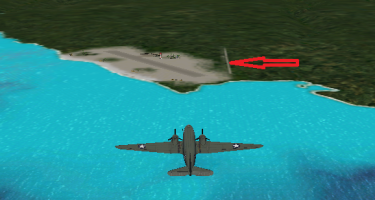
Capture.PNG
 
My guess is Rhumbas VTP1 fixer might work. Dick discovered a problem with the VTP1 code, his fixer changed all instances of "0" location points to "1", & it removed the artifacts with "handed" vtp1 lines (eg shorelines), maybe the fixer works similarly for VTP1 polys too?

As a habit I've always used Dick's VTP1 fixer on any VTP1 reef polys I've made with G2K, just in case.

Another cause might be just having 2 points created too close together. Again, my experience is mainly with VTP1 lines in G2K, & sometimes on compile you can get wierd sharp "spikes" appearing when 2 points are too close to each other (influenced by the width of the line). And these VTP1 lines are just narrow VTP1 polys after all ....
 
Dick's VTP1 fixer does not help.
I narrowed it down to MipMaps though.
If I disable MIP mapping in the display hardware options, then the ghost lines vamoose . . .
 
Glad you got it sorted.

Yes, mipmaps were really useful back in the day, but nowadays the PC hardware & Sim engine itself seems to do a better job than the image encoding used to...
 
Well . . . it's not sorted
I now know that Mips display the ghost line , but without MIP mapping enabled the scenery looks quite grainy,
so I would prefer to have MIP mapping on ( but then I get the ghost lines )
Have you ever come across these ghost lines ? I'm wondering if it is inherent to my hardware ?
 
Only the artifacts fixed with Rhumbas vtp1 fixer

OR

Dodgy alpha channel issue (had this with runway textures & flak effect textures when Itried to upsize them - the compiled image alpha never matched my input 24 bit images used when using DXTbmp, fixed by using original-style (lower rez) alphas.

IIRC Lindsay Watt mentioned the cloud bitmaps always had a single pixel in each corner of the image that was fully black(?) - maybe this is a similar issue?
Check your image alpha channel.
 
Back
Top