• There seems to be an uptick in Political comments in recent months. Those of us who are long time members of the site know that Political and Religious content has been banned for years. Nothing has changed. Please leave all political and religious comments out of the forums.

    If you recently joined the forums you were not presented with this restriction in the terms of service. This was due to a conversion error when we went from vBulletin to Xenforo. We have updated our terms of service to reflect these corrections.

    Please note any post refering to a politician will be considered political even if it is intended to be humor. Our experience is these topics have a way of dividing the forums and causing deep resentment among members. It is a poison to the community. We appreciate compliance with the rules.

    The Staff of SOH

  • Please see the most recent updates in the "Where did the .com name go?" thread. Posts number 16 and 17.

    Post 16 Update

    Post 17 Warning

Wanted:Early (MKI-MKII-MKIV) real air spitfire repaint

Hammer353, the FSX version uses different file names.

The fs9 version names are spit1.bmp, spit2.bmp, spit3.bmp and spit4.bmp. To use them in FSX you have to rename them into spit1_t.bmp, spit2_t.bmp, spit3_t.bmp and spit4_t.bmp.
Almost all repaints are done for the FS9 version, therefore in most cases you will have to rename the textures.

When you want to use them in DTX5 dds format you need to flip them as well.

Hope this helps,

Cheers,
Huub
 
And one more thing - make sure you copy the texture.cfg file from the original texture folder (texture.rdc) to any new texture folders you make, otherwise bits of the Spit will be blank. Each new repaint folder just needs the 4 texture files that Huub lists, plus the texture.cfg.
 
Ok, i did what huub said with the renameing the texture files & adding the texture.cfg. but it still shows up as an all black aircraft. I am doing something wrong?
 
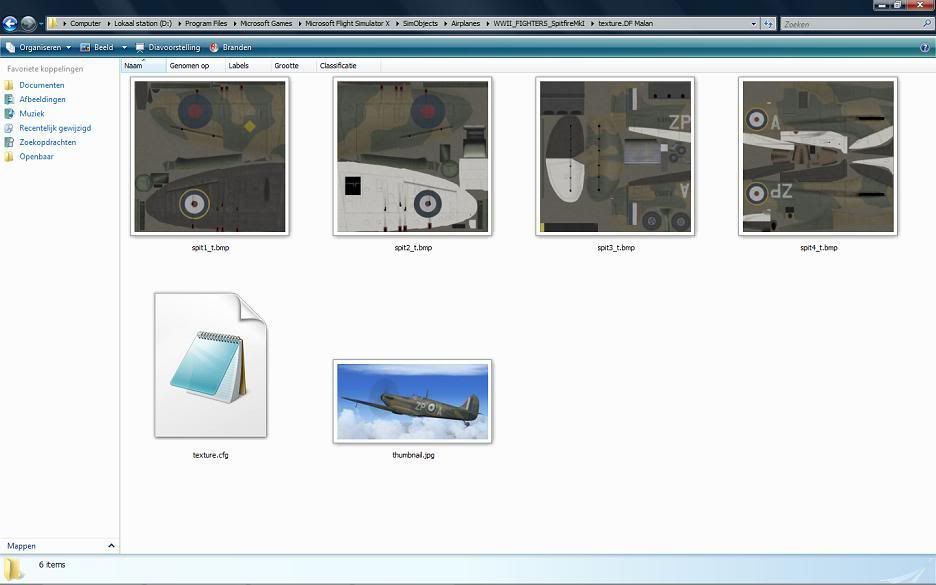
Hammer353, can you post your aircraft.cfg file and a screenshot of one of the texture folders which doesn't show up?

Below an example of how it should look like with textures in bmp format.

Huub

Example_Spit_texturefolder.jpg
 
Personally I love both the Real Air and A2A Spitfire but If I had to pick one it would be the A2A one, luckily I was able to get Bob Rivera's addon prop textures too which look just amazing and really make a differance to the look of this aircraft!
Pete:salute:


Re Rail Air - i think it was Bob who also created a better texture for the pilot who looks a bit pale otherwise.
 
I cant post a pic of my folder, but my folder looks just like yours. What should my aircraft.cfg look like?
Hammer353
 
The relevant bit of mine looks like this...
[fltsim.1]
title=Supermarine Spitfire MK1a DWK N3029
sim=spit
model=
panel=
sound=
texture=dwk
kb_checklists=Spitfire_check
kb_reference=Spitfire_ref
atc_id=N5150
atc_airline=
atc_flight_number=
atc_heavy=0
ui_manufacturer=WWII FIGHTERS
ui_type=Spitfire Mk IA
ui_variation=610 Sq 1940

Does the thumbnail image show up in the aircraft selection screen? If it does you know the cfg is calling the right texture folder and the problem may be the texture file name/format. If the thumbnail DOESN'T show in the selection screen then the cfg may be pointing to the wrong texture folder, or the folder may be mis-named. In my example, the cfg points to a folder called texture.dwk. Hope this helps a bit.
 
I was finally able to them to work i just had to convert them from .bmp to .dds. I also had to flip each of the repaint textures.
Michael
 
Back
Top