• Please see the most recent updates in the "Where did the .com name go?" thread. Posts number 16 and 17.

    Post 16 Update

    Post 17 Warning old domain name stealing credentials

  • Special Server Maintenance

    Just when you think you have everything running some what better...

    You get a message from the Hosting company. Short story they need to move us to a new server. I have been working with them to plan a good date for all concerned. Here is what we have come up with as a schedule.

    1. November 4th 17:00 -5UTC shut off the forums and start backup proceedures. During this time there will be no access to the forums or the Resource Section.
    2. November 5th Continue with Backups and download same until complete.
    3. November 6th 7:00 turn over server to hosting company to move system to new server
    4. November 7th - 8th restore backups and upgrade forum software.

    If all goes well we should be back online on November 8th.

    To keep you updated we will post updates on AVSIM forums.

    Thank you for your support.

Weird controller situation with Razbam F-102

Navy Chief

Senior Member
I had not flown the Razbam F-102 in years, literally. I just reinstalled it and loaded it. As soon as the aircraft leaves the runway, the elevators cease to function. I can go left or right, but not up or down, period. Worse yet, when I select a different aircraft, then the same applies to them as well.

If I select, say, the default Cessna from the beginning, or any other aircraft besides the Razbam F-102, everything works fine. I am going to shut off and reboot system to see if that fixes it, but I have never encountered this problem before.

Is there something about the F-102 switchology that I am missing? Thanks, NC
 
Chief -

Are you using FSX, FSX-SE, P3D or which?

other than AFCS switches on lower panel between your knees, I see no switchology that might isolate hydraulics.

Go to an external view and move the stick forward/aft -do BOTH elevons move in the SAME direction on the ground? Do the move OPPOSITE with left/right stick motion? If the do, go to map view, set 20,000 ft, 300 kias in map view (left column - leave lat/long and heading alone), then back to the plane in external view. Plane should be at 20,000, 300 KIAS but gear down. Retract gear right away, see if you can pitch, watch elevon movement. You may have a trim or cg problem vice elevon control
 
Last edited:
Chief, make sure you are not taking off with the autopilot on. You may have accidentally hit the z key without knowing it.
 
Chief -

Are you using FSX, FSX-SE, P3D or which?

other than AFCS switches on lower panel between your knees, I see no switchology that might isolate hydraulics.

Go to an external view and move the stick forward/aft -do BOTH elevens move in the same direction on the ground? If the do, go to map view, set 20,000 ft, 300 kias in map view (left column - leave lat/long and heading alone), then back to the plane in external view. Plane should be at 20,000, 300 KIAS but gear down. Retract gear right away, see if you can pitch, watch elevon movement. You may have a trim or cg problem vice elevon control

Thanks Mike. Am using Steam edition. Getting closer to working correctly, but another problem has me perplexed. The flaps go to full down, no matter what I do. If I put them in full up position, they immediately go back to full down. Weird. NC.

attachment.php
 

Attachments

  • f102flaps2.jpg
    f102flaps2.jpg
    33.3 KB · Views: 2
What are these pictures -not an F-102, for sure--

An F-102 did not have flaps

Anyway, look under [FLAPS.x] in your aircraft.cfg file. All values should be "0" -there are none
 
What the Kestrel .cfg file settings are currently.


[Flaps.0] //Trailing Edge Flaps
type = 1
span-outboard = 0.500000
extending-time = 4.000000
system_type = 0
flaps-position.0 = 0.00, 0.00
flaps-position.1 = 15.00, 0.00
damaging-speed = 250 // KIAS
blowout-speed = 300 // KIAS
lift_scalar = 1.5
drag_scalar = 1.0
pitch_scalar = 0.75
 
I'm afraid I'm with Zippy on this one. Sounds like the AP is on.
Have you tried resetting your default flight to the FSX original? The trike over Friday Harbour? Easiest way is in the FSX.cfg file.
Could you have saved the F-102 with the AP on? At least the Alt Hold? Try pressing Z as soon as the plane loads in and see what happens.
Do you "wipe" the controls before take off, and do the elevators move normally when you do?

Just throwing possibilities out. Maybe something will ring a bell...
Pat☺
 
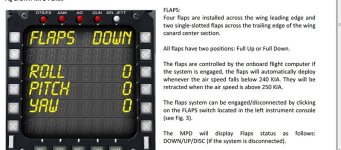
Always helps to read manual. Automatically controlled flaps. :rolleyes-new: Thanks for putting up with my inability to read beforehand! NC
attachment.php
 

Attachments

  • flaps.jpg
    flaps.jpg
    71.7 KB · Views: 2
Quick video


[video]https://drive.google.com/file/d/1O6LoDtpbrH1zXYhr4e6DXqv3NotojJgO/view?usp=sharing[/video]
 
I was about to say - [flap.x] should have at least 2 sections because it has both LE and TE flaps at a minimum. Glad you found the problem. Not surprised about auto-flap system for a modern tactical airplane, especially with canards -great for maneuvering in a dogfight.
 
Back
Top