
-
Please see the most recent updates in the "Where did the .com name go?" thread. Posts number 16 and 17.
-
IMPORTANT DOWNLOADING INFORMATION - ALL MEMBERS PLEASE READ
Please see this thread for updates. Update Thread
SOH ADMINISTRATION
You are using an out of date browser. It may not display this or other websites correctly.
You should upgrade or use an alternative browser.
You should upgrade or use an alternative browser.
What's a good screenshot program for P3Dv4.5?
- Thread starter Willy
- Start date

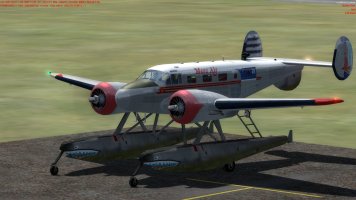

I just use 'V' Willy and save them as a PNG file then I can crop, edit, tweak exposure and sharpening etc. in Photoshop and have them ready for posting in no time.
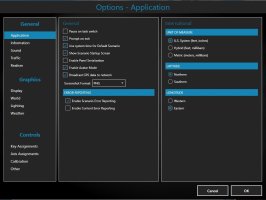
Under 'Options/Application' there is a drop-down menu for 'Screenshot Format' where you can save the image type you want to use. I always use PNG as they look better than BMP or JPG.
BTW since the forum software change the method of attaching images to posts has changed too. If you click on the small 'picture' icon at the top of the reply screen (it says 'Insert image (Ctrl+P) when you hover over it) it will pop open a small window. You can then either drag and drop an image into that box or left-click in that box and navigate to the image location. It will then insert the image into your post at the location of your cursor automatically. You don't have to click the 'Insert....' flag on the mini image that appears at the bottom of the screen, if you do that you get the original image plus the image as an attachment to the post which is why on some of your posts you have been getting both. It took me a while to figure it out on the new software too!
HTH.
Under 'Options/Application' there is a drop-down menu for 'Screenshot Format' where you can save the image type you want to use. I always use PNG as they look better than BMP or JPG.
BTW since the forum software change the method of attaching images to posts has changed too. If you click on the small 'picture' icon at the top of the reply screen (it says 'Insert image (Ctrl+P) when you hover over it) it will pop open a small window. You can then either drag and drop an image into that box or left-click in that box and navigate to the image location. It will then insert the image into your post at the location of your cursor automatically. You don't have to click the 'Insert....' flag on the mini image that appears at the bottom of the screen, if you do that you get the original image plus the image as an attachment to the post which is why on some of your posts you have been getting both. It took me a while to figure it out on the new software too!
HTH.
It is better to use the button PRTSCR than to use "V" button for screenshots because the former results into average size of 300 KB per screenshot while the latter averaged 3 or 4 MB per screenshot because the former always use JPEG format while the latter always use PNG format.
Regards,
Aharon
Regards,
Aharon
I have my save option set to PNG as shown in the screenshot above and I use the 'V' key and my full screen shots are 1920x1027 and 2.2MB in size. What you say might have been the case in FSX but it is not what I am seeing in P3D v4.5.
Yes that might be true. Somebody needs to test P3D v4.5 by using PRTSCR button and pasting on Microsoft default Paint software saving it under automatic JPEG format setting to get 300kb file size while avoiding average of 2 to 4 MB file size per screenshot in PNG format.What you say might have been the case in FSX but it is not what I am seeing in P3D v4.5.
Regards,
Aharon

tgycgijoes
Members +
I use left WIN and PRT SCRN always successfully. Then owning Photoshop I massage them into what I want and save as jpg. GIMP works great for that and it's FREE.


tgycgijoes
Members +
WIN key plus PrtScr. They are deposited in the Pictures/Screenshots. Just used it again a few moments ago
WIN key plus PrtScr. They are deposited in the Pictures/Screenshots. Just used it again a few moments ago
That is BEST solution except anyone does not need WIN button. Anyone just can use PrtScr button to take screenshot. That is all. IMPORTANT TIP: set your default setting to save after pressing PrtScr your screenshots under JPEG format instead of hard drive disk space hogging PNG format.
Regards,
Aharon
I just use the 'V' key in P3D v4.5 with no issues. Save as a PNG file to the 'Pictures' folder and job done. There is no need for external apps at all.