• There seems to be an uptick in Political comments in recent months. Those of us who are long time members of the site know that Political and Religious content has been banned for years. Nothing has changed. Please leave all political and religious comments out of the forums.

    If you recently joined the forums you were not presented with this restriction in the terms of service. This was due to a conversion error when we went from vBulletin to Xenforo. We have updated our terms of service to reflect these corrections.

    Please note any post refering to a politician will be considered political even if it is intended to be humor. Our experience is these topics have a way of dividing the forums and causing deep resentment among members. It is a poison to the community. We appreciate compliance with the rules.

    The Staff of SOH

  • Please see the most recent updates in the "Where did the .com name go?" thread. Posts number 16 and 17.

    Post 16 Update

    Post 17 Warning

It's an AI thing

Willy

Administrator
Staff member
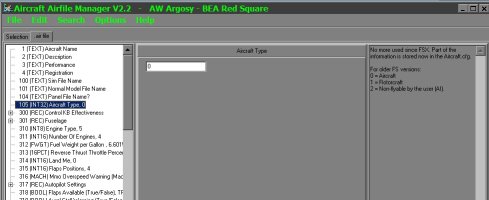
I'm working on some custom AI traffic for FSX SE and wanting to throw some of Milton's Howard 500s in there for the AI to have fun flying about. It's been a good while since I've last done AI conversions to aircraft and I used to use XML Notepad to change the little 1 to a 2 so the aircraft selection menu would ignore it. Problem is that XML Notepad is not gee-hawing on my fancy new Win 11 rig. So what other programs/apps are good for minor tweaks to a .air file?

Thanks in advance,

Willy
 
Another option is "Aircraft Typer", though it may be difficult to find now (dated Jan 2004); runs well in Win7, no idea about newer OS.

"FS Aircraft Typer - FSAT
====================
version 1.0

What it is
----------
As AI Traffic was implemented in MSFS the number of aircrafts installed in MSFS increased enormously. To enjoy a lot of AI Traffic also means to have an oversupply of non-flyable aircrafts in the MSFS aircraft menu. Also the process of opening the MSFS aircraft menu takesmuch more time with hundreds of aircrafts that have to be loaded. To get rid of them when choosing an aircraft in MSFS but still let the aircrafts fly as AI Traffic is not possible with MSFS. This simple tool lets you make this job very quickly.

Compatibility
-------------
This little software was tested on Windows XP with a PIV 2400 but should work as well with other 32 Bit Windows OS and slower computers. Only for FS 2002&2004, for AI Traffic was not yet implemented in former versions of MSFS.

To do it
---------
1. Select an aircraft directory (FSAT automatically detects the aircraft folders of FS2002 and FS2004)
2. FSAT reads in all airfiles in the subfolders
3. Select the aircrafts whose type you wish to change or select <Find AI Traffic Aircrafts> to automatically detect AI Aircrafts
4. Select the aircraft type (<non flyable> means that the aircraft is not shown in the MSFS aircraft menu)
4. Write the changes to the airfile
5. FSAT makes a backup of all airfiles being changed (.FSAT_bak)

THATS ALL"
 
Back
Top